
Your Browsing History


DAVID W.
Joined on 09/15/03
0
0
product reviews
- 8
Zalman 9700 - worth it!
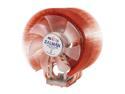
ZALMAN CNPS9700 LED 110mm 2 Ball CPU Cooler
Pros: 1st time system builder. Using Zalman 9700 in Antec 900 case with Intel E8400 CPU on Asus Maximus Formula mobo. 9700 not as large physically as some reviews suggested. Install easier than expected. Very effective cooler for this setup - max CPU temp UNDER LOAD of 37 celsius on hotter Core 0 and 32 celsius on Core 1 (no overclocking yet). Picked 9700LED with blue LED to match blue LEDs in Antec 900 case - neat effect!
Cons: 1) Zalman install instruction pamphlet in package is good, but print is smallest font I have ever seen. Pull out your electron microscope to read, or download manual from Zalman website for a readable version prior to install. 2) Almost forgot how dark red human blood really is. SERIOUSLY - you WILL have scars on BOTH HANDS to admire from install into almost any motherboard. Just incredible how much damage those thin copper fins can do to human flesh with slightest contact.
Overall Review: 1) NOTE - 9700LED has a 3 pin connection for the motherboard. I connected it to the ChassisFan3 on Maximus Formula. And -- DISABLE CPU fan detection in BIOS to avoid needing to "F1" around the error message since the 9700LED does not connect to the 4 pin CPUFan. 2) Currently have the fanmate controller routed out of rear of case and stored (temporarily) in tray on top. Fanmate switch turned full clockwise for maximum RPM capability, but ASUS Probe and SpeedFan indicate it's just turning 1050 RPM. 3) Looks and works great in Antec900 with Maximus Formula mobo, Intel E8400 Wolfdale 3.0GHz Core Duo, 4GB Corsair DDR2 800MHz RAM, EVGA 8800GTS 512MB overclocked 12%, WD RaptorX 150GB boot drive, WD SATA 500GB storage drive, twin ASUS 2014L1T SATA optical drives, all powered by PC Power&Cooling 750Quad Silencer and running WindowsXP SP2 O/S.
3/9/2008See more detail
HAF932 = dynamite full tower!
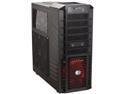
Cooler Master HAF 932 Advanced - High Air Flow Full Tower Computer Case with USB 3.0 and All-Black Interior
Pros: 1) Posting initial impressions now as I am holding off on a build - next generation video coming Q3 / Q4, etc. 2) Think BIG about the 932 - interior is 5 full inches taller and 2.5 inches longer than Antec 900 3) 932 is total 22 inches tall from bottom to top exterior - you'll need a healthy space to park this full tower 4) Cool flexibility to mount PSU at either bottom of case = default, or at top of case by removing top 230mm fan and the cutout plate at top rear of case 5) Full complement of front access ports = 4 USB, 1 Firewire, 1 eSATA and sound jacks 6) Also great flexibility to retain the provided 230mm fans at front, side and top of case or swap in multiples of your favorite 120mm fans - I'll be doing Blue LED 120mm fans for side and top 7) No doubt I'll be able to fit everything conceivable into this interior with room to spare 8) Great built-in cable management features!
Cons: 1) I'm a Blue color guy and the 230mm Red LED fan at the front of the case has already been swapped for a genuine CoolerMaster 230mm Blue LED fan 2) Interior of the case and back of motherboard / that side panel are drab gray - would have happily paid another $20 for full black paint on all surfaces like Antec 902 and 1200 3) So, I'll be modding this case to provide the desired gloss black on everything currently the drab gray - cut my teeth on case modding with my Antec 900 version 2 4) Be advised this case weighs 29 pounds WITHOUT mobo, CPU, CPU cooler, PSU, PCI-E cards, cold cathodes, etc; makes for an oversized curl bar to build those biceps hauling it around
Overall Review: FOR NEWEGG STAFF: I've seen notes in other reviews about you possibly having approached UPS on shipping damage. I was REALLY worried about this case, but the box arrived via UPS to Midwest with maybe 1 light scratch. BASICALLY FLAWLESS! Thank goodness. My current system: Intel E8400 CoreDuo 3.0GHz stock OC to 3.15, ASUS Maximus Formula X38 mobo 1207 bios at 1400MHZ front bus speed, Zalman 9700LED CPU cooler, 4GB Corsair Dominator 1066 RAM OC to 1120MHz, EVGA 8800GTS 512MB video, X-Fi Titanium PCI-E soundcard, PC Power & Cooling Silencer 750W PSU, WD RaptorX 150GB primary drive backed by WD 640GB secondary drive, all in modded/painted Antec900 version 2 case. Original build date = March 2008 with the X-Fi Titanium and Corsair Dominator 1066 RAM recent upgrades. Waiting for right price on new EVGA GTX275 for video upgrade. Will be doing an I7 920 / ASUS P6T Deluxe or Rampage II Extreme / EVGA 3XX build eventually in the HAF.
5/12/2009See more detail
Solid 1066MHz DDR2 RAM!
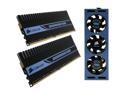
CORSAIR DOMINATOR 4GB (2 x 2GB) DDR2 1066 (PC2 8500) Dual Channel Kit Desktop Memory Model TWIN2X4096-8500C5DF
Pros: 1) Usual high quality from Corsair - great visual appearance, good construction for the supplied Dominator fan 2) Nice to see the black wrapped tail on the Dominator fan! Makes for a stealthy wrap-around edge of the mobo to reach a 3-pin fan header 3) Great fit in my system - both RAM and the Dominator fan; no problems with combined height of the RAM + Fan stack 4) Good to see the Zalman 9700LED CPU cooler is still keeping my E8400 Wolfdale cozy cool with the inlet airflow reduced a tad by the Dominator fan 5) I have this RAM actually running at 1120MHZ using the BIOS settings for Maximus Formula mobo; ROCK SOLID with no issues at this 5% OC over the quoted speed 6) You do have the option of running at a stock 800MHz if system / stability problems are encountered
Cons: 1) Was concerned about the feedback reports of bad RAM sets for this model - fortunately NO problems with the sticks I received 2) I understood fully the Intel X38 chipset officially supports 800MHz DDR2 RAM; so, praise goes to ASUS for building in OC options for the Maximus Formula mobo and Corsair for making the Dominators capable of the OC 3) DON'T FORGET - you'll likely need to enter the BIOS and update settings for RAM MHZ speed and DRAM voltage; I needed to do both on the Maximus Formula - 1120 MHZ speed OC'd and DRAM voltage = 2.1 per Corsair note on the blister pack
Overall Review: My system: Intel E8400 CoreDuo 3.0GHz stock OC to 3.15, ASUS Maximus Formula X38 mobo 1207 bios at 1400MHZ front bus speed, Zalman 9700LED CPU cooler, 4GB Corsair Dominator 1066 RAM OC to 1120MHz, EVGA 8800GTS 512MB video, X-Fi Titanium PCI-E soundcard, PC Power & Cooling Silencer 750W PSU, WD RaptorX 150GB primary drive backed by WD 640GB secondary drive, all in modded/painted Antec900 version 2 case. Original build date = March 2008 with the X-Fi Titanium and Corsair Dominator 1066 RAM recent upgrades. Waiting for right price on new EVGA GTX275 for video upgrade. Next build is in buy phase = CoolerMaster HAF932 w black interior mod, Intel I7 920 CPU, etc = more business for NewEgg!
5/7/2009See more detail
X-Fi Titanium = audio upgrade!
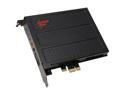
Creative Sound Blaster X-Fi Titanium Fatal1ty Professional 70SB088600002 7.1 Channels 24-bit 96KHz PCI Express x1 Interface Sound Card
Pros: 1) Usual excellent hardware from SoundBlaster - nice powder paint finish, high quality parts visible within a stout full shield covering the PCB. 2) Installation - easy as pie: open case, remove slot tab for a PCI-E 1.1 slot, insert X-Fi card, close case and load drivers from the supplied CD. 3) Simply unbeatable results - X-Fi audio is a clearly audible step up from the otherwise good SupremeFX on-board sound by SoundMAX which ASUS includes as a ROG treat with Maximus Formula X38 mobo. 3) And, I mean audio in every game is soooo much better - superior sound quality, accurate placement of sounds across the soundstage, distinct movement of sound as the developer intended, etc. 4) I'm an avid flight simmer and the X-Fi answered the question of weird dropouts of ATC communications in Microsoft FSX to loud static - must have been the SupremeFX on-board sound because all ATC sound is crystal clear with the X-Fi. THANKS!! 5) Usual top notch experience dealing with NewEgg.
Cons: 1) Be prepared for a simple unboxing experience - the X-Fi Titanium comes in a glossy white box with the X-Fi logo in black, the X-Fi card and a CD with drivers and full suite of Creative sound / multimedia applications. That's everything in the package.
Overall Review: 1) Wish I had upgraded from the SupremeFX to the X-Fi Titanium SOONER - it's that big a difference in PC audio! 2) I noticed some reviews critical of the Creative sound software on the CD due to conflicts with the OS, other software, etc. NONE of these software issues noted yet - see my system config. My system: Intel E8400 CoreDuo 3.0GHz stock OC to 3.15, ASUS Maximus Formula X38 mobo 1207 bios, Zalman 9700LED CPU cooler, 4GB Corsair Dominator 1066 RAM OC to 1120MHz, EVGA 8800GTS 512MB video, X-Fi Titanium PCI-E soundcard, PC Power & Cooling Silencer 750W PSU, WD RaptorX 150GB primary drive backed by WD 640GB secondary drive, all in modded/painted Antec900 case. Original build date = March 2008 with the X-Fi Titanium and Corsair Dominator 1066 RAM recent upgrades. Waiting for right price on new EVGA GTX275 for video upgrade. Next build is in buy phase = CoolerMaster HAF932 w black interior mod, Intel I7 920 CPU, etc = more business for NewEgg!
5/2/2009See more detail
The Missing Manual for 2243BWX
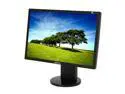
SAMSUNG 2243BWX High Gloss Piano Black 22" 5ms DVI Widescreen LCD Monitor with Height/Pivot Adjustments and 2-port USB Hub 300 cd/m2 DC 8000:1
Pros: Purchased this black beauty to mate up with my new Antec900-Intel E8400 CoreDuo-EVGA 8800GTS gaming focused build. PROS: 1) awesome black monolith look with the slim gloss black frame and stand - puts most competitors to shame; 2) NO DEAD PIXELS!; 3) great color and other options within the built-in monitor menus; 4) Supreme Commander, Company of Heroes, HalfLife2, Quake4, FlightSim2004 and FlightSimX all look AMAZING at the default 1680X1050 resolution; 5) complete selection of monitor and USB cables included in box.
Cons: CONS - ABOUT THOSE CONTROL BUTTONS at lower right frame of monitor: 1) Yes, the text color is a dark slate gray which makes it almost impossible to read when the monitor is off; the ambient light from the monitor when switched ON makes the button text virtually UNREADABLE!; #1 dumbest design in recent memory; 2) Samsung forgot completely to mention the buttons are TOUCH SENSITIVE - just touch the On button and confirm the blue LED is lit to turn on, and just touch to activate the menu buttons to the left; 3) tilt/pivot/height adjust stand uses a flimsy oversized 'hairpin' as a stop device; #2 dumbest design in recent memory; 4) NO printed manual in package. Mandatory -2 EGGS for dumb designs and excluding a good users manual!!
Overall Review: I'll generously award back +1 full rating Egg for the sleek gloss black physical presence and absolute top-notch display quality. This is the first widescreen LCD for me, and has set the standard very high. My setup does benefit from a separate, ultra high quality - high resolution Belkin PureAV DVI cable, which I highly recommend. If you're interested in the 2243BWX, my suggestion is to WAIT about 60 days - Samsung will need to address the color issue for the touch sensitive menu buttons in a 'version 2' update.
3/17/2008See more detail
Antec900 = awesome air cooling
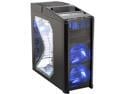
Antec Nine Hundred Black Steel ATX Mid Tower Computer Case with Upgraded USB 3.0
Pros: 1st time system builder. Snared the Antec 900 on a NewEgg newsletter special in late 2007. Mine is clearly the 'version 2' case with the two large vertical oval openings in motherboard tray near drive cages. Pros include: 1) incredible airflow standard through case with 2 blue LED fans in front, the 200MM top fan, and 1 blue LED exhaust fan; 2) option to add two more 120MM fans - one in plastic housing at rear of cage which does not hold hard drives, and one in mount in the side mesh / plexiglass window; 3) tons of flexibility with the front panel configuration, including 3.5" drive mounting for floppy / memory reader / etc; 4) very complete set of mounting hardware - mobo standoffs, endless selection of screws, long video card T support; 5) bottom mounted power supply caused no issues; 6) very popular case for modders with several long-term threads on websites showing what can be done.
Cons: There is room for improvement: 1) Antec NEEDS to release a version 3 case with THREE additional large openings - 1 at top rear of case for 8 pin power cable, 1 at top front for SATA/case connector cables, and 1 at bottom for cables from the power supply; 2) there's no LED or backlighting on the case power switch located to the right of the USB/1394 ports ahead of the top tray - you'll memorize the switch location, but better for Antec to correct the issue; 3) case needs to be 2 inches or more LONGER from front to back as there's not much room to spare between video card and the plastic housing for optional internal 120MM fan mount; AND, 4) build in an OFFSET of 3/8 inch on side with mobo tray to provide sufficient room for cables routed back behind the tray through the additional openings - it's a tight fit with current design.
Overall Review: My build includes Antec 900 with PC Power&Cooling Quad750 Silencer power supply, ASUS Maximus Formula X38 mobo, Intel E8400 3GHz CoreDuo processor, EVGA 8800 GTS 512MB video card, 150GB RaptorX boot drive, 500GB WD storage drive, twin ASUS 2014L1T SATA optical drives, 4GB Corsair 800MHz RAM. I added the 2 optional 120MM fans - both are Scythe S-Flex with fluid dynamic bearing. Absolutely awesome physical presence - you WILL impress the right people with this case. I did mod my 900 with 7 additional mobo / hard drive rail openings - 3 in mobo as described above and 4 in vertical drive rail for the famous 'reverse hard drive to hide SATA & power cable' mod. FrozenCPU.com is a great resource for cable mgmt including 8 pin and case connector extension cables. Check the thread 'A Positive Look at the Antec900 Case' at www.xtremesystems/org forums - take your time and read every single full page of the mods; made my build a snap after studying what modders are doing with the 900.
3/16/2008See more detail