
Your Browsing History


robert f.
Joined on 08/10/06
0
0
product reviews
- 15
Buying a mobo is always a dice roll.
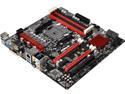
ASRock A88M-G/3.1 FM2+ / FM2 A88X (Bolton D4) Micro ATX Motherboard
Pros: Sometimes the dice come up in your favor... Fired right up and worked with Athlon X4 845. Win10 worked on second try (see other).
Cons: None so far. It's still working after 2 months of use.
Overall Review: To Swawn E.: I had problems also the first time with Win10. Well, assuming your upgrading from win 7+(and not fresh install), I discovered turning off anti-virus- plus just shutting all non needed programs in task manager off worked just fine. Never mind the fact I rolled back to win7 because I feel win10 isn't ready for prime time... lots to like but still a few things not to my liking. But, that's another story.
6/27/2016See more detail
Gave it a 3 because... The cons
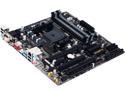
GIGABYTE GA-F2A88XM-D3HP (rev. 1.0) FM2+ AMD A88X (Bolton D4) USB 3.1 USB 3.0 HDMI Micro ATX AMD Motherboard
Pros: Plenty of SATA ports. Worked as advertised.
Cons: If you plan on using a pci wireless network card with this board, be prepared to be very displeased. The pci slot is too close to the pci-e slot. The network card blocked 1/2 of the fan on my old 9800 gt. I mean it literally touched the video card. Anything wider than a 9800 gt will block the slot.
Overall Review: Returned it as I needed a wireless option.
4/25/2016See more detail
My first upgrade since my i5 750 (in February 2010)... and- WOW!
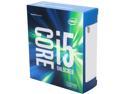
Intel Core i5 6th Gen - Core i5-6600K 6M Skylake Quad-Core 3.5 GHz LGA 1151 91W BX80662I56600K Desktop Processor Intel HD Graphics 530
Pros: Overclocked right out of the box to 4.4ghz. I could have used auto voltage but I went with a manual 1.250v setting right away (as to not let the voltage run out of control during prime 95)- it only reached 1.236v in a 12 hour prime95(no crashes) session (so says HWMonitor). So, I'm going to leave it there- auto voltage will probably work as well but I'm happy. Temps? Well with Arctic Silver 5 and a Noctua NH-D15S... Never got above 52c (during extended prime 95)... (To me) Simply amazing! Idles at 27c. Boot up time (with SSD). About twice as fast as i5 750. 10 seconds(ish) with 6600k...
Cons: A little expensive...? Yeah? no? I don't know.... worth it to me. Actually not a con with the 6600k- Had some problems with the memory working in XMP (certainly mobo or memory- I dunno) but set timings manually with XMP off and all is great!
Overall Review: My old i5 750 was actually still working well(after 6 years O.C. to 3.2) but with a few problems starting to pop up. I actually assume it was motherboard problems- if not for that, i would have kept the 750 'til the planet exploded (or tech advances forced me into it). It was that good for my needs. R.I.P. i5 750, i will miss you (but not that much!). my new computer: http://www.newegg.com/Product/Product.aspx?Item=N82E16819117561 http://www.newegg.com/Product/Product.aspx?Item=9SIA24G3KG3691&cm_re=z170-_-13-128-841-_-Product http://www.newegg.com/Product/Product.aspx?item=N82E16820233831 http://www.newegg.com/Product/Product.aspx?Item=9SIA9PV3Y62116&cm_re=Noctua_NH-D15-_-35-608-072-_-Product http://www.newegg.com/Product/Product.aspx?Item=N82E16835100007&ignorebbr=1 My old GTX 650 Ti Boost (trying to save some cash)- works awesomely! Loving it!
7/11/2016See more detail
Blown Away!
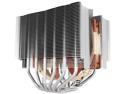
Noctua NH-D15S, Premium Dual-Tower CPU Cooler with NF-A15 PWM 140mm Fan (Brown)
Pros: With my new i5 6600k(stock 3.5ghz), running prime 95 for over an hour now... Haven't seen temps over 37c! My old i5 750 @3.0ghz (with a very good thermal right cooler) ran at 35c idle.!?!.. Very easy install. The fan clips are the best I've seen. Great mounting bracket- my old thermal right- as good as it was- I could twist and turn it after mounting... This is rock solid.
Cons: zero.
Overall Review: Oh, and- memory stick clearance? Looks to me that I could have 3 inch tall memory and be clear of the cooler( CORSAIR Vengeance LPX 16GB (2 x 8GB) here)(it's nowhere close to heat sink). But it and enjoy!
6/29/2016See more detail
Best I've owned
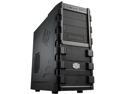
Cooler Master HAF 912 - Mid Tower Computer Case with High Airflow, Supporting up to Six 120mm Fans and USB 3.0
Pros: 1- Lot's of room. 2- Cable management like I've never had. Nothing in the way of air-flow now. 3- It looks great. 4- Great air-flow. Love how the entire front of case allows air in. I could probably figure out a way to add 1 more fan in the unused cd bays for even better cooling. 5- screw-less removable hard drive mounts. Never had 'em before- great feature. All this and temps are great (see other thoughts) with just the front fan and the 2 (installed inside on the back) that came with the Thermaltake WATER2.0 Performer. I wonder what my temps would be with a fan added to the side and top?...
Cons: None.
Overall Review: I also bought a Thermaltake WATER2.0 Performer http://www.newegg.com/Product/Product.aspx?Item=35-106-188&SortField=0&SummaryType=0&Pagesize=100&PurchaseMark=&SelectedRating=-1&VideoOnlyMark=False&VendorMark=&IsFeedbackTab=true&Keywords=%28keywords%29&Page=1#scrollFullInfo at the same time. I couldn't be happier. Max temp (during prime 95- max heat test- 5 hours) dropped from 68c to 61c degrees. i5 750 OC'd to 3.68ghz @ 2.16v.
3/19/2013See more detail
Can't Complain
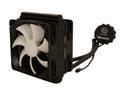
Thermaltake WATER2.0 Performer Closed-Loop All In One Liquid CPU Cooler Dual 120mm PWM Fans 120x25mm CLW0215
Pros: Dropped the temp of my i5 750 from 68c to 61c degrees while running prime 95 (in-place large FFTs. 5 hour test). I must note that I also put my computer in a new case at the same time: COOLER MASTER HAF 912 RC-912-KKN1 http://www.newegg.com/Product/Product.aspx?Item=N82E16811119233 . Awesome case! I don't find the fans noisy at all. My GTX 460 is the only noise I hear from my case now. Though I'm coming from a case that had 6 fans in it. With the Thermaltake WATER2.0 and the new case, I only have 3 fans- front case and the 2 that go on the radiator (inside case - rear). Like others have said- finger tighten the bolts. I had no problems. I wiped off the included thermal paste and applied Arctic Silver.
Cons: None really. The included instructions aren't the best but easy enough to figure out. After you gigure out the retaining clip inserts... install the top clip from the bottom- aligning grooves- then give it a slight turn before adding bottom clip- instructions make it look like top clip installs from top...
Overall Review: i5 750 OC'd to 3.68ghz @ 1.232v. - Thanks to Thermaltake WATER2.0, I think I will try a few more mhz with no worries. I was going to buy a new cpu and mobo but decided on cooling solutions for my current rig. I'm very happy I did.
3/19/2013See more detail
seller reviews
- 1
wheres my keyboard?
over 15 days and tracking still shows order processing...
On-time
Delivery
Product
Accuracy
Customer Service
Satisfactory
6/20/2013See more detail