
Your Browsing History


John M.
Joined on 12/01/03
0
0
product reviews
- 20
Response to some bad Reviews
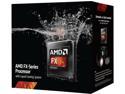
AMD FX-9370 Vishera 4.4GHz Socket AM3+ 220W 8-Core Desktop Processor - Black Edition FD9370FHHKWOX with Liquid Cooling Kit
Pros: This is a solid CPU, with a proper set up temps never go above 50c. If you are doing an OC setup you probably will need to tune things a bit more and will probably see higher temps even with the stock water cool (i'd recommend getting the longer radiator water cool if you stick with closed loop as this water cooler is nice and looks neat with the lit FX symbol it doesn't really keep up with OC settings).
Cons: For the reports of loud fans, yes these fans are loud when you first install, that is because the fan control software (which is plugged into your onboard USB headers) does not kick in until you install the software. So on new builds its loud as all get out until you install the AMD chill software. After you do this you can set the liquid temperature that controls how much the fans spin up. I have mine set to spin up to full once the liquid temp gets to 45c which typically keeps my cpu under 50 on full load at stock speeds with turbo enabled. For those not getting boot ups or not getting full clock speeds it is probably because the MOBO does not support the 220watt power draw these pocessors use and most likely underclock the CPU to something it does support which is probably the equivalent of an 8150. I bought this CPU with a verfied to work with motherboard (the Asrock 990FX Extreme9). If you are just wanting to upgrade a CPU and not both CPU and MOBO then you might want to get the 8350 unless you have a motherboard that can actually support a CPU that has a 220watt power draw or can be verified to work with a bios update.
Overall Review: I personally ran into some Overclocking issues. Research suggests that the parts that are stock 4.7/5.0 turbo are top bin parts able to work at those frequencies and the 9370 are going to be the procesors that didn't quite cut it at those speeds. My computer is plenty fast without the added bump in speed so it doesn't break my heart any.
11/19/2013See more detail
great while it worked.
Linksys AE2500-RM High Performance Wireless-N Adapter IEEE 802.11a/b/g/n USB 2.0 Up to 300Mbps Wireless Data Rates
Pros: Worked great while it worked. Connected at 300mbps no problems. Easy setup, great price if it had just kept working.
Cons: Sadly it is always a gamble to buy refurbished. I knew there was risk but have never really had issues with older tech or refurbished tech before. After about 2 weeks the device started randomly disconnecting and then finally just failed to connect. Linksys tech support while friendly was wholly unhelpful, this product was outside of their warranty system and therefore needed addtional advanced technical support fees to troubleshoot and replace this product. As of now i'm waiting to see if newegg takes this back to be replaced but i'm wondering if they will just keep giving me what other people return as nonfunctional unless I buy some sort of warranty protection.
Overall Review: The new retail boxed version worked great and still works great, but new in box is still some 40 dollars compared to the 20 refurb I paid and now it is even lower.
9/13/2012See more detail
Good memory, not sure i'd say great
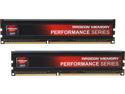
AMD Radeon Performance Series 8GB (2 x 4GB) DDR3 1866 (PC3 14900) Desktop Memory Model AP38G1869U1K
Pros: Fast memory, ram drive software is easy to use with very detailed walkthroughs on setup via you tube videos.
Cons: Price. The memory seems to be a bit unstable at the 9-10-9-2T timings its rated at. My motherboard kept wanting to set the clock to 1T which made it really sluggish and unstable. Frankly it seems to run smoother at the 11-11-11-1T @1600 fail safe setting, I tend to run mine at 10-10-10-2T @ 1866 just to keep it at the speed I paid for, if I wanted 1600 speed i'd buy a 1600 chip. I find the timing settings curious on how they worked at least in my particular computer (Asrock 990FX extreme9 with a 9370 CPU). Normally I prefer Gskill memory but my motherboard had issues with my RAM until I flashed the bios, so I ended up just getting verified to work with the MOBO AMD memory and it looked good with my MOBO since I have a windowed case. The RAM drive software is pretty nice but can bog down the start up times. A side note on RAM DRIVE, I dont' think this is new technology as I'm pretty sure I remember this concept back in the earlier days. AMD tries to sell you the 32 and 64GB RAM drive upgrades which isn't priced bad at 20 bucks I think. To those not familiar RAM drive software makes virtual drives using your available RAM, so if you have 8GB of ram you CANNOT use 64GB RAM drive. In fact if you have 8GB of ram you probably don't want more than 1 - 2 GB RAM drive size, otherwise your system will bog down and or start running out of memory. So basically if you buy AMD memory you get a free 6GB use of RAM drive which is MORE than sufficient for most people. If you don't buy AMD you still can get free access to the software at 4GB of RAM drive space which again for most people is probably more than they want to use with the amount of RAM in their system, unless of course your pockets are so deep that you actually have 128GB of RAM in your PC which I bet is more of a server than a PC lol.
11/19/2013See more detail
Solid Motherboard
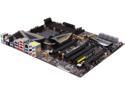
ASRock 990FX Extreme9 AM3+ AMD 990FX + SB950 USB 3.0 ATX AMD Motherboard with UEFI BIOS
Pros: I love the color scheme, so the aesthetics are great. Overall it seems to have a solid build but i'm questioning the use of the solid gold capacitors it promotes, see cons below. The bios does have a neat feature, it has QR codes so that you can use your phone to look up what something does, which is great, except for the fact the webpage never pulls up on my phone (QR is a pro, page not coming up as it should is a con). Lots of options in the mother board to change settings, and it comes with loads of USB 3.0 ports which is awesome. It was one of 3 boards that supported the AMD 9370 out of the box according to Newegg so I went with this one due to color scheme. Seems to work great with my 9370 after I figured out how to make all the components like each other.
Cons: I'm not sure if its my case, my water cooler or my motherboard's capacitors but when I use my Razer USB headphones I get the loudest coil whine I've ever heard, which is very disappointing due to the fact I really like those headphones and now i'm having to use my older less comfortable headphones with simple audio and mic jacks (no usb). I dislike graphical interfaces in the bios. I wish they had a feature to turn it off as I do not need to say a space background when tuning my computer, in fact I personally find it distracting in a fashion making it not so easy to quickly see where you are or what option you are changing or looking for. Not really a con but he case I bought didn't have power and reset switch header cables long enough to reach the connection on this motherboard, the header connectors are on the bottom centerish portion of the board which might prove a problem in some cases (like mine). I had to flash the bios to get the board to like the RAM I had, which prompted me to also order memory that is actually on the certified memory list for this board, something i've never done before but this board seems to be rather picky. I use GSkill memory which I love and this is the first board that I have owned ever that had issues with GSkill ram chips. After the bios flash the ram worked as it should but I had already ordered replacements. For some reason I cannot get the power saving options for the CPU to turn off. I can turn off turbo core and it seems to stay off, but whatever feature that causes the CPU to over volt the CPU on load does not seem to go away. My 9370 even with all power features turned off, turbo core off, CPU multiplier set manually and voltage set manually, when I stress test full load on all cores the voltage will jump from whatever I have it set at to or near 1.60v!!!!! I am used to some over volting to occur but not a fully .2 or more. For all its overclocking features I cannot seem to get this to OC a 9370 CPU successfully due to this dramatic voltage increase that occurs despite manual settings. When power features and turbo core are turned on the CPU will run smooth under 1.4 volts sometimes less and most of the time rarely goes over 1.5 or the default 1.53. Not sure what is going on there but a bios update is not fixing that issue and I cannot find any other setting that is affecting this. I have set the processor to lock in at 4400 @ 1.45v and the default 1.53 and it does not seem to like it on a stress test. But since default settings with turbo core on, c6 on and cool and quiet on it runs fast smooth and at low temps and not so scary voltages.
Overall Review: This is not a bad board, but customer service still has not returned my emails with questions and its been 3 days, their phone support is worthless as no one answers it seems and has the usual pain to navigate automation to boot. When using a 9370 default settings seems to be the best option as it works wonderfully, but when you have a BE or unlocked cpu or a fan of overclocking to see what your cpu's potential is, it seems this board comes up short at least with the 9370.
11/14/2013See more detail
Sorta Worked Awesome
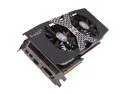
HIS Radeon HD 7970 GHz Edition 3GB GDDR5 PCI Express 3.0 x16 CrossFireX Support Graphics Card H797QMC3G2M
Pros: Scored over 10k on 3Dmark11 for graphics, pushes a solid 60 FPS with all settings on high or ultra and vsync turn on with most of my games (Borderlands 1 & 2, Metro 2033 & Last Light). The heat sink appeared to keep the cards temps at 60 or less, I believe it was around 30 idle? The fans were quiet from what I could tell but I also have some 6 case fans 120mm and bigger. I have to say the card worked great, while it worked, see cons below. This is a nice looking card, this is my first windowed case and its nice to look and see sexy black with silver and red accents on components.
Cons: This card is huge, it looks like a video card that has more than one GPU on it. The heatsink is massive with double fans cooling it. Since the card never got above 60 degrees i'd hardly say it is a con except you NEED a case with LOTS of space to use this card. Defective, periodically I would get a blank screen or gray screen with bars running down it which would prevent me from doing anything else unless I hard reset the computer. Had that problem on another card some years back so hopefully getting a new card will solve that problem, but having to send out and wait to receive a new card is just annoying, luckily I did not sell the 6870 I had so at least I can still use the beast of a computer. Kudos to newegg on giving prepaid shipping to return the card so i'm not even out of money to replace it. I will note that this card seems to run at the "boost" speed constantly which was 1050mhz and i'm inclined to think that had something to do with the occasional gray screens, my assumption is that clock rate is really just too high to sustain and that the card really should either run at 1000 or maybe a hair less, especially since while it was working it worked wonderfully and much to my surprise pretty cool. Perhaps it was just a flawed capacitor.
Overall Review: After I bought this card I have to say I didn't realize the R9's were out, after some reading it seems this card really is the same as the R9 280x maybe with exception of power consumption. Initially I thought I needed to return and exchange for the R9 series but since they are the same (excluding the R9 290 & 290x) i'm not too broken up about it. I did NOT get the 11 games selection in the AMD rewards, it was more like 7 games so titles have been removed, it was a much more narrow choice for my 3 games. I'll also note taht these games are NOT FREE, if you look at the price of a similar card without the games you can see they inflate the price of the card to account for the games. Also if you go online you will see that the games if bought seperately are valued at about 65 dollars and the certificate (and newegg) say the value is 99.99 which means if you return for refund you don't get refunded the 99.99 so in this case if I refunded this card to buy the R9 I would have only been refunded 280 dollars out of the 379 that I paid meaning that the R9 equivalent would have had me out of pocket 40 dollars. If your deciding factor is the free games, skip that notion and buy the R9 290 or 290x as you will only pay 20 bucks more and get way more card for your money, the stream processors in the 7970 and R280 is the same at 2048 however in the R9 its 2500+ and that is a pretty solid difference, if I had it to do over I would have bought the R9 290 and skipped the so called "free" games.
11/14/2013See more detail
Changing my Review
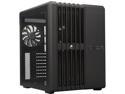
Corsair Carbide Series Air 540 (CC-9011030-WW) Black Steel High Airflow ATX Cube Case Support ATX Power Supply
Pros: Large case, very boxy, light weight. Lots of room and well placed components that make since for heat dissipation and air flow. Easily accommodates a water cooling set up or large heat sinks. Easy to install components into without too much head ache. Over all I really do like the case. I'd like to update on the customer service. The phone support is totally lacking, however the email ticket (you have to create an account for that much like a forum account) works great. They are pretty speedy and they sorted out my short cable issue. I'm still waiting on the replacement as of this writing but i'm told they are sending me a new header piece with longer cables which means i'll have to swap out the power button part but at least they did do what they can to work around my short cable issue. This the first case that I have owned that has a hot swap hard drive bay and I have to say it was awesome sliding in a test hard drive or a second hard drive without shutting the computer down. Not sure if SATA is hot swap regardless but i've always played it safer and never unplugged a drive with teh computer still on. The hot swap bays are nice but again be mindful some force is needed to lock it in place and not only are the drive bay trays plastic but so are the connections on a hard drive, so again I strees handle with care. I love the cable management but I agree the hot swap drive bay cables that connect to the mobo are rather longer than necessary, really wish they shortened those and lengthened the header cables for the power and reset switch, I suspect the latter would have been cheaper than the former.
Cons: Size, its a big case although that is usually what some are looking for but I have to say I was a bit surprised at how big and square this was. It is light weight but that is because its mostly made of plastic so be careful. Since this is a plastic case the drive caddy's can be broken rather easily and I think the primary hard drive caddy's for the hot swap bays should a different set up for holding the hard drive in place, its hard to explain but you have to basically bend the plastic caddy to slide the hard drive in where the screw holes are. The metal snaps that go in those holes are fixed making it a risk of breaking every time you put a drive in the caddy.
Overall Review: I really do recommend this case, but if your mobo header connection for the power and reset switch are on the bottom part of the board and towards the center or far left the header cables will not reach, however if your header connection on the mobo is on the bottom right or anywhere on the right side of the mobo you will NOT have any trouble at all.
11/14/2013See more detail