
Your Browsing History


Mike A.
Joined on 04/29/05
0
0
product reviews
- 14
Sweet PS
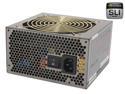
COOLMAX CUG-700B 700W ATX12V v2.3 SLI Certified / CrossFire Ready Modular Active PFC and Compatible with Core i3/i5/i7 Power Supply
Pros: My first modular power supply, and now I don't think I can ever go back. Seriously, a genius idea finally becoming more popular. Tons of power. Fits in the Antec 900 case perfectly and the cables reach all necessary plug ins on the mobo. Great quiet fan. Haven't finished building my system yet but as of right now it's a gem. Perfectly labeled ports on the PS, very user friendly.
Cons: None that I can see so far!
Overall Review: I'm building a new rig with the 900 case and this PS, and I only have the mobo and RAM so far, so I can't attest to how this performs on a full fledged system, but at this current stage it's going to rock my system.
6/24/2007See more detail
A beautiful looking board with tons of functionality hampered by terrible customer service.
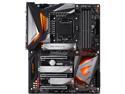
GIGABYTE Z390 AORUS ULTRA LGA 1151 (300 Series) Intel Z390 ATX Intel Motherboard
Pros: - Great aesthetics. It looks very slick. - Tons of connections and slots. 3 M2's, plenty of SATA connections, great placement of all connectors as well. - BIOS is easily navigable. - Built in WiFi is a godsend. Antenna is magnetized and sticks to the top of my case. Connects to my 5ghz signal like a charm. - Great packaging and included accessories like Velcro strips, stickers, manual is informative.
Cons: - I could fill this whole box up with the mess I've endured since ordering parts to build my new PC back in January. - To summarize, total system instability from the very beginning. This will have been my 4th custom built machine, so I like to at least think I know what I'm doing. I replaced the RAM and the CPU. I tested all other components in another machine to verify their functionality. I even took it to a local PC shop which I've never done in my life, they diagnosed the first CPU (9900k) as the problem, so that's when I RMA'ed that. Reinstalled windows a few times, unplugged every unnecessary peripheral and connector and the issue persisted. Total hard locks in windows and sometimes would not boot to it at all. Windows SFC would come back clean, all arrows pointed to it being hardware somewhere. - After exhausting all options over many months I finally decided to RMA this motherboard. Even FINDING the RMA section on Gigabyte's website was a chore. Once I got signed up on there and submitted my RMA with my issues I of course had to pay to send it in. - Almost a week after it was received I got word from Gigabyte that they looked at the board and discovered CPU Socket Damage. I couldn't even tell what was damaged in the pictures they sent me. Then the real kicker. I needed to pay $100 to have it repaired. Now, again, I've done this personally 4 times already and I do it at my job as well. Putting the CPU in and closing the bracket is so easy a 5 year old could do it. Not to mention I did it with 2 CPU's. I explained all of this to them in email (the english in the responses was almost nonexistent mind you) and they said either I pay $100 or they're gonna send the board back with nothing done to it. Fact: I did not cause any damage to it, it was shoddily put together to begin with. - I paid the $100 because I was going on 4 months of not even being able to use my almost $2k rig, then they sent it back with the slowest delivery method possible. I am now finally enjoying my machine and after about a week of use I've not experienced a single lockup. The whole process was ridiculous and I will not be puchasing another Gigabyte piece of hardware.
Overall Review: - I've been sticking with ASUS boards in my rigs for years and I would advise that. - Now that this is working, I am basically scared to death to even attempt to overlock. - Looking at some of the other comments and reviews of this board online appear to be a ton of similar problems, mostly POST related and board connector related. Purchase at your own risk.
6/11/2019See more detail
Tons of power. Incredible cooling & OC potential.
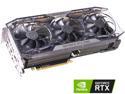
EVGA GeForce RTX 2080 FTW3 ULTRA GAMING, 08G-P4-2287-KR, 8GB GDDR6, iCX2 & RGB LED
Pros: System: i7-3820 OC'ed to 4.7ghz 16 gig corsair dominator ram 128 gig samsung 830 SSD Asus P9X79 mobo Win7 64 Bit Case: Corsair Graphite 600T - Installed the card into my 6 year old, overclocked i7-3820 (4.7ghz) system. - Absolutely crushes anything thrown at it at 1920x1200 resolution. WoW, Battlefield V, BLOPS 4, Grim Dawn, etc on max settings. I realize the card is likely overkill for that resolution, but as mentioned, this was my 6 year old machine. I have to turn vertical sync on in everything to prevent tearing as my monitor is even older and only 60hz. I was upgrading from a Radeon HD 3GB 7970 card and the results give my machine new life. - Incredibly quiet, even when fans are cranked to 70%. WAY more quiet than the Radeon. - RGB is slick and purdy. Precision X1 software lets you customize the LED's, as well as the fans. - Overclock potential is there. Using Precision X1 you can easily OC the hell out of this thing. I have not done so as it's not necessary until I upgrade my monitor and build a new system. - Used the included DVI->HDMI adapter since my monitor has no HDMI/DP connections, and it recognized it and functioned properly instantly. - Fantastic packaging. - This apparently has some RGB headers on it if you want to plug in additional RGB fans and such to be controlled by Precision X1, but my machine has 0 RGB stuff in it. - Historic EVGA support & step up program & community.
Cons: - First con for most people would likely be the price. 9 bills is a lot to fork over for a video card, and the most I've ever spent on one. But I got 6 years out of my last card and I expect this one to last the same. You also get the great EVGA support with it. I am in the process of building a new system so buying one big part at a time. I look at video cards like monitors and even vehicles. Buy something that'll last. - This is an *enormous* card. I had to use my 2nd PCI-E slot because it would cover both of my smaller PCI-E slots that I use for my wireless card if I put it in the 1st PCI-E 16x slot. I was worried this wouldn't operate at the 3.0 spec for whatever reason, but it does and all is well. It is brushing up against some mobo connections at the bottom of my board but disasters were averted. It takes up 3 brackets on the rear of your case. Length wise, it is a few inches away from the HD bays. Check the sizes of everything if you're putting this into a regular mid-tower case. - Precision X1. This software is still in beta, so I don't expect perfection. The capability of it is definitely there to be exceptional, but in it's current state it is not great, Bob. It is not user friendly whatsoever. the program gives you no feedback as to what it's doing, or did, or anything regarding OC'ing. There's supposedly a one click OC function (the scan button) but I have no idea if the settings after it scans gets saved even using GPU-Z. The fans & LED are easy to figure out, but if it gave you more information on the overclock ability, that would be very helpful. Additionally, this program would simply not open at all in 64 bit Win7, and I had to spend a few hours scavenging the internet until I found a forum post by a guy that shared some 'Aero 2.0 net framework' plug-in that once installed, fixed the issue immediately.
Overall Review: It's been awhile since I did a major upgrade to my system and I was very pleased at how smooth it all went. I was concerned about it being in the 2nd PCI-E slot, about using a DVI-HDMI adapter, about poor old Win7 and new technology. The list was big, but I uninstalled the Radeon completely, took it out, put the 2080 in, display came up right away and ran the Nvidia driver package I downloaded earlier and I was all set within minutes.
12/20/2018See more detail
It's a fan. It works. Nuff said.

Rosewill RFA120L-B Blue LED Case Fan
Pros: A little hard to review a fan, but I put this on the side panel of my Antec 900 case. Blows enough air, is quiet, looks good. Not much else to say. And an awesome price for a 2000 rpm fan.
Cons: None?
Overall Review: Can't beat the price. Any of the rosewill colored fans will do just fine.
6/24/2007See more detail
Hell of a case.
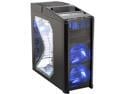
Antec Nine Hundred Black Steel ATX Mid Tower Computer Case with Upgraded USB 3.0
Pros: An ultimate gamer case. Tons of room, power supply on the bottom. Easily removable drive trays, 4 fans including the monstrosity on the top. I have them all set to high and they don't make NEAR as much noise as people are saying they do. Thumbscrews galore. (Yay) Sturdy and light. Includes 2 built in ties that you can run cables through. Can't recommend more!
Cons: No HD LED light lead... and your USB/Firewire/Front Panel audio wires aren't long enough to go along the side of the mobo then up, you'll have to go straight across everything. No included side fan, but you can get one of those for 3 bucks anyways.
Overall Review: Coolmax 700W modular PS, Evga 680i SE SLI mobo, Corsair PC-8500 (1066mhz) dominator ram. Get a side fan, and you can also put another one inside the case for additional HD cooling if you want.
6/24/2007See more detail
Fantastic Game

Grand Theft Auto: Vice City Stories PSP Game Rockstar
Pros: It's a GTA game, what else ist here to say? Tons of gameplay, feels like a PS2 version of Vice City. Great price, good shipping.
Cons: None.
Overall Review: Both GTA's for the PSP are quality games and worth a purchase.
6/24/2007See more detail
seller reviews
- 1
Ordered a webcam via Newegg from this seller, waited 2 weeks with no updates on delivery and item never came. Messaged them and they offered to refund immediately, so that's good I guess.
On-time
Delivery
Product
Accuracy
Customer Service
Satisfactory
8/7/2020See more detail