
Your Browsing History


Shawn M.
Joined on 12/20/07
0
0
product reviews
- 18
Great case but plan ahead first
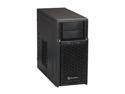
SilverStone PS08B Black High-strength plastic and meshed front panel Micro ATX Mid Tower Computer Case
Pros: Compact size, great looks. Everything I put in fit, once I planned it all out. It's definitely smaller than a full-sized case so the luxuries of quick-connect brackets and room for wire-routing aren't there. Once both panels on each side are opened, there is enough room to do anything you may need. My 11in video card fit in perfectly and doesn't come close to hitting the HDD bays. Also, the (2) USB 3.0 ports are very nice.
Cons: The front LED shines blue and very bright. The rear expansion slots must be punched out so DO THAT FIRST before the motherboard goes in. Otherwise you'll scrape it. Also, long HDDs extend out, barely over the motherboard. Make sure you plan ahead where the HDDs sit in relation to the CPU cooler/ram/motherboard ports. In my case, I had the wiring for the CPU cooler, MB power, HDD SATA, HDD power, USB 3.0 all squeezed between the CPU cooler and (3) HDDs! In short, Adjust where your drives sit, accordingly. If mating a large CPU cooler, it may be best to mount it last. There isn't much room to swivel the board in and plug wires in once it's mounted.
Overall Review: This case paired with these components snuggly: - ASrock H77M http://www.newegg.com/Product/Product.aspx?Item=N82E16813157303 - 92mm Rosewill CPU Cooler http://www.newegg.com/Product/Product.aspx?Item=N82E16835200056 - Corsair CX600 PSU http://www.newegg.com/Product/Product.aspx?Item=N82E16817139028 - EVGA GTX 260 http://www.newegg.com/Product/Product.aspx?Item=N82E16814130443 - (3) HHDs - ASUS Wireless PCI Card http://www.newegg.com/Product/Product.aspx?Item=N82E16833320113 - Hauppauge TV Tuner http://www.newegg.com/Product/Product.aspx?Item=9SIA0AJ0UM5646 - 80mm Case Fans in rear and front http://www.newegg.com/Product/Product.aspx?Item=N82E16835426010
10/30/2013See more detail
Queit fan but reading wrong RPMs
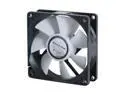
GELID Solutions FN-PX08-20 80mm Case cooler
Pros: The fan fits and is mostly quiet. The wire loom is straight, right from the box. I find it annoying when you have to unbend all the wires first.
Cons: The system is reading the wrong fan speed RPM. I've tried on multiple boards and it's all the same. It's reading anywhere between 25,000 and 50,000 RPM very sporadically. However, the PWM still adjusts properly based on CPU/MB temps.
2/3/2014See more detail
Nice mechanical keyboard
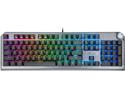
Rosewill NEON K91 RGB BR Wired Mechanical Gaming Keyboard, Kailh Brown Switches, Underglow and 17 Backlit Modes, NKRO, Anti-Ghosting, Multimedia Control Keys, PBT Keycaps, Macro Keys
Pros: This is a nice, heavy mechanical keyboard. It doesn’t feel cheap at all. The Kailh browns are nice and smooth. The lighting is even and consistent and easy to change between modes. Very comfortable palm rest. Nice looking key caps.
Cons: The twist knob feels a little cheap. Palm rest magnet could be stronger. Noticeable ping in key-press.
Overall Review: I’d recommend this keyboard. The main reason to dock an egg is the audible ping in the keys. Other than that, great keyboard.
1/12/2021See more detail
These are made for very large heads.
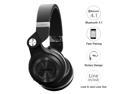
Bluedio T2S (Turbine 2 Shooting Brake) Wireless Bluetooth 4.1 Stereo On Ear Headphones - Black
Pros: I'm sure they'd feel comfortable for someone with a large head. The padding is soft and rest on my ears well.
Cons: The build quality seems chintzy and the smallest adjustment is still too large for my head, and I don't have a small head by any means.
Overall Review: I'd like to see these made smaller. I'm returning these for another brand.
1/8/2016See more detail
Good quality board
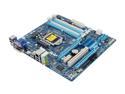
GIGABYTE GA-Z77M-D3H LGA 1155 Intel Z77 HDMI USB 3.0 Micro ATX Intel Motherboard
Pros: The best thing about this board is the placement of the USB 3.0 plug. Unlike other boards, this plug does not sit directly butted up against the 24-pin plug. This makes wire routing and management a lot cleaner.
Cons: This board does not come with as many fan plugs as most other boards. The max amount of fans you can run off the board are 3 (1 CPU and only 2 case fans)
2/13/2014See more detail
Nice little mic with swivel
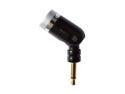
OLYMPUS ME-52W 3.5mm Connector Noise-Cancellation Microphone
Pros: It comes with everything you need like the clip and wiring. I like the small size. I have it directly plugged into my desktop tower and it can hear me or anyone else in the room just fine.
Cons: Maybe it's only noise-cancelling with Olympus products because it picks up quite a bit of fan noise from my tower. This was to be expected, but I had my hopes high for some reason.
2/3/2014See more detail