
Your Browsing History


Richard C.
Joined on 04/30/04
0
0
product reviews
- 20
Nice little Android 12 tablet - not usable with Verizon though
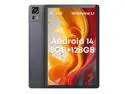
CHUWI Android 14 Tablet, 10.95 Inch Aupad Tablet PC, 8GB LPDDR4 RAM 128GB ROM, Snapdragon 685 CPU, 2K(1920X1200) Display,1TB Expand, Triple Cameras, 7000mAh, 4G LTE/5G WiFi/Bluetooth 5.0/GPS
Pros: Google Play Store came on the tablet and I'm able to install apps from Google Play Store. It has a SIM card slot. While my cell provider, Verizon, does not support this tablet (T Mobile does when I checked), I am able to pair this tablet with my Samsung Galaxy phone from Verizon and use the Google Map app for driving directions. I can use a Bluetooth keyboard with the tablet.
Cons: Netflix does not seem to work with this tablet and Google Play Store does not show Netflix as a downloadable app. However YouTube and YouTube TV do. There is some kind of a security thing that Netflix wants to be available that is either not on this tablet or I do not know how to turn on. When using the tablet paired with my cell phone for driving directions, my car hands-free no longer is available so I can't do hands-free calls while using it this way.
Overall Review: I purchased this as an inexpensive though usable Android tablet. I like the size of it and that it has a SIM card slot as well as WiFi. Unfortunately my cell provider, Verizon, doesn't support this tablet though T Mobile does. The sound is good from the speakers as is the picture and I'm able to watch YouTube videos using it. I've used it for both YouTube videos and YouTube TV. It's nice to have a portable device with a reasonable size for videos. Browsing pictures and watching videos from Google Photo works great. I tried a pair of headphones and the sound was good with a YouTube video so I think this tablet will work fine for watching video in bed using headphones. I was able to pair my Verizon supplied Samsung Galaxy phone with this tablet using Bluetooth which allows me to use it for driving directions using Google Map. It is fantastic to be able to see the map for a change! The downside of using the table paired with my phone is that I can't use the hands-free in my car with my phone. I use standard Verizon apps for texting which is available in the Google Play Store so I downloaded that app and now I can do texting with either my phone or the tablet. It came with a set of standard Google apps: gmail, photo, map, chrome, play store. I've installed a couple of additional apps from the Google Play Store as well as tested installing an app, WINE for Android, by downloading the APK installer file. WINE for Android did not work but that was a problem with WINE and not the tablet. I've also tried using the Kindle app from Google Play Store which worked fine and several books I tried in portrait mode by rotating the tablet displayed nicely. Battery life seems to be good thus far. Video, pictures, and text seem to display fine though screen brightness may be a problem in bright light. However using it in my car for driving directions, the displayed map was easily visible.
3/23/2023See more detail
Drive may not work with PIII onboard IDE
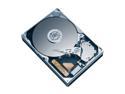
Hitachi GST Deskstar 7K160 HDS721680PLAT80 (0A32721) 80GB 7200 RPM 8MB Cache IDE Ultra ATA133 / ATA-7 3.5" Hard Drive Bare Drive
Pros: Drive did work in Dell P4 but not Gateway 933M PIII. Tried using an older Promise Ultra100 TX2 HDD controller PCI card in PIII and was able to install Windows XP. Was unable to boot using the Promise controller however probably due to BIOS limitations.
Cons: When drive was installed in on-board IDE controller of Gateway 933M PIII, unable to install Windows XP to the drive. Failed NTFS format step. Tried with two similar Gateway 933M PIII PCs with same results.
Overall Review: A comparable Western Digital hard disk (7200 RPM, 80GB) was tried with the on-board controller of PIII and worked fine. I had help from IT Services so expertise was not an issue. BIOS upgrade did not fix problem.
1/11/2007See more detail
works with Ubuntu 20 Linux and MSI PRO Z390-A PRO motherboard
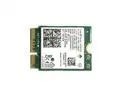
intel wirelessac 9560, m.2 2230, 2x2 ac+bt, gigabit, no vpro
Pros: it works with Ubuntu 20 Linux and the MSI PRO Z390-A motherboard with an M.2 E key CNVi slot out of the box. I just turned off the computer, opened up the case and put this in without the antennas which are still on the way, and after restarting, went into Setup and on the WiFi settings entered the password for my router. I didn't have to install any software or drivers. Just install the card in the empty M.1 E key slot and Ubuntu 20 came up using it.
Cons: none yet.
Overall Review: I wanted to provide some feedback for others who are looking for a WiFi addition for a motherboard that didn't come with WiFi. I have a build using the MSI PRO Z390-A PRO LGA 1151 (300 Series) Intel Z390 motherboard with Intel Core i3-9100F Coffee Lake CPU that has an M.2 E key slot CNVi WiFi card which in the documentation is described as "Intel CNVi Wi-Fi module, IEEE 802.11 AC". This card came in today without an antenna which I've also ordered however I was intensely interested in knowing if this card would work with Ubuntu 20 Linux so I've installed it without an antenna in a case on a desk within 10 feet of my cable internet provider to test it. Using this card without an antenna I was able to see both speeds provided by my older cable router, 5Ghz and 2.4Ghz. I was able to connect at the 5Ghz speed to my cable router and surf the net using FireFox. From my reading on the MSI forums, the Z390 motherboards with CNVi require this card, the AC 9560, and can't use the newer AX 201 which is CNVi2. Also the motherboard needs to implement the Intel CNVi technology in order to use the AC 9560 because the CNVi architecture splits up the WiFi functionality into a piece that is built into the chipset of the motherboard and a piece that is on the M.2 E key card rather than all of the WiFi functionality built into the M.2 card.
10/4/2020See more detail
Working great with Ubuntu 19.1 and i3 9100F
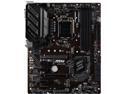
MSI PRO Z390-A PRO LGA 1151 (300 Series) Intel Z390 ATX Intel Motherboard
Pros: Assembly of the board and installing into my case was quite straightforward. The only issue I had was that I had not bent back a tab on the I/O plate so when I set the motherboard into the case, the tab bent forward obscuring the RJ-45 Ethernet connector on the motherboard. It was simple to remove the motherboard, bend the tab properly, and reinsert the motherboard. There are four memory slots and I've started with two 8GB 2666 sticks intending to add another two 8GB sticks later. There is an M.2 2280 slot that I plan to use with a WD Black NVMe 500 GB drive at a later time. I'm using an i3 9100F with an RTX 2070 GPU and it all fit in nicely and the GPU slot seems to be sturdy. All the leads from the case front panel (audio, disk activity LEDs, USB 2.x, USB 3.x, power switch, reset switch) all had places to go on the motherboard. Once I made a change in the default Ubuntu audio settings, headphones jacked into the front panel worked fine as did reset switch and power switch. The instructions on the paper documentation that shipped with the board are skimpy however the manufacturer's website has a PDF manual that is very helpful. Once I had the manual PDF, I relaxed and enjoyed the assembly. The BIOS user interface has an Advanced version and a Simple version. I changed to Simple version to change Boot sequence and turn on XMP settings to automatically set up my RAM.
Cons: I have no cons to report other than the included paper documentation is pretty skimpy however that was fixed by going to the manufacturer's website and looking at the manual PDF there.
Overall Review: My build consists of: - MSI Pro Z390-A ATX motherboard - Intel i3 9100F with the stock fan - CORSAIR Vengeance LPX 16GB (2 x 8GB) 288-Pin DDR4 SDRAM 2666 (PC4 21300) CMK16GX4M2A2666C16 - WD Blue 500GB SSD - Gigabyte GeForce RTX 2070 GPU - Thermaltake Toughpower TPD-0750M Gold Semi-Modular 750 watt power supply in a DIYPC DIY-BG01 Black USB 3.0 ATX Mid Tower Gaming Computer Case. This case doesn't have an external bay but then I didn't need it. I'm running Ubuntu Linux 19.1 which I installed using a USB thumbdrive. Using the manual PDF found on the manufacture's web site, installation of power connectors and the case front panel and the fan connectors was straightforward. The leads from the case front panel were labeled similar to the motherboard documentation and connecting everything was easy once I had the manual PDF. Before I reviewed the manual I was concerned about getting everything hooked up properly as there are about six different leads on this case front panel (audio, USB 2.0, USB 3.0, activity LEDs). I took a look at several YouTube videos showing how to install CPU, memory, and fan onto the motherboard, test powerup of the motherboard and CPU then inserting the motherboard into the case, The BIOS user interface has an Advanced version and a Simple version. When the board first booted, it came up in the Advanced version of the BIOS interface. I found the Advanced version overly complex and confusing. I changed to Simple version, I was then able to set up Boot sequence to boot from the USB drive to install Ubuntu and turn on XMP settings to automatically set up my RAM. I seemed to have trouble with a PS2 keyboard not working with the BIOS interface. I changed to a USB keyboard and it worked fine. It may have been a keyboard problem and not a motherboard or BIOS problem. For me having a USB keyboard and a USB mouse with the Simple version of the BIOS user interface gave me access to everything I needed.
3/18/2020See more detail
Fairly easy build and a nice price though poor documentation. Power Supply area cramped.
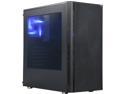
DIYPC DIY-BG01 Black USB 3.0 ATX Mid Tower Gaming Computer Case with Pre-installed 3 x 120mm Fans
Pros: There are three 3 wire case fans, two in the front and one with blue LEDs in the rear exhausting air out of the box. The fan noise seems to be quite low to me but they were not running at high speed either. Both side panels come off so it is easy to do the wiring. The case came with what looked to be a micro-ATX positioning of six standoffs however the bag of screws contained three additional standoffs that I need for my ATX motherboard. The screw collection had several different types of screws and I'm not sure what they are all for. I used some of the screws for holding down the motherboard as they seemed to fit into the standoffs properly. I also used a couple of the screws to secure the faceplate of the RTX 2070 GPU after inserting it into the motherboard. There were a number of openings available to guide cables from the wiring side of the case over into the cavity where the motherboard is mounted. There was a single sheet of paper containing information about using the storage drive mounting hardware located in the bottom of the case. No other documentation nor could I find anything on line. However I was able to make do with the documentation from the motherboard manufacturer when it came to connecting the front panel to the motherboard. The wires from the front panel were clearly marked so once I had the motherboard documentation, connecting up the front panel was straightforward.
Cons: The power supply is located in the bottom of the case and the space there is a bit cramped. I'm using a Thermaltake Toughpower TPD-0750M semi-modular power supply and only need a single GPU card power cable along with a SATA power cable in addition to the 24 pin board power and the CPU power. I would not want to try to shoehorn a non-modular power supply into the area. For some people the lack of an external accessible bay may be a con. For me it is not. The length of the power cables from the power supply mounting position at the bottom of the case to the top of the motherboard, which is where the CPU power connector was located on my MSI Z390-A Pro motherboard, may be a problem. The original position of the power supply was to have the
Overall Review: I wanted a low cost case for a simple PC for learning about and applying TensorFlow. The components I put into the case are an MSI Z390-A Pro ATX motherboard with an Intel i3-9100F using the stock Intel cooler and two sticks of 8 GB 2666 DDR4 and an NVIDIA GeForce RTX 2070 GPU. Currently I have a 280 GB SSD but once I have done my initial testing, I plan to replace the SSD with a WD Black NVMe 500 GB drive. I'm running Ubuntu 19.1 Linux. The case does not have an external bay which is not a concern for me. I put a Ubuntu 19.1 installer on a USB thumb drive. I had to go into the BIOS to change the boot order to USB Hard Drive and the assembled PC booted into Ubuntu from the USB Thumb drive. The front cover is plastic and just pulls off. It looks like the two USB 2.x connectors are on an internal hub as there is only a single USB 2.0 cable to connect to the motherboard. In addition there is a HD Audio cable and a USB 3.x cable to connect to the motherboard. There are wires for the power switch, the reset switch, the HDD access LED and the power on LED. The three fans are all three wire fans and not four wire fans. The rear fan has blue LEDs/ There appears to be an LED string around the front cover. They look to be 120mm fans. The expansion slots are a bit strange in that the covers are not held in place by screws (making them easy to remove and put back) but are part of the case and to remove them you must break them off. So when I inserted the RTX 2070 which takes two slots, I had to break out two of the expansion slot covers to create the openings for the faceplate of the RTX 2070 GPU to be available for plugging the display cables into. So should I remove the GPU, I will have openings without any covers. All in all I would say the case was well worth the cost. The sheet metal is a touch thin however that is to be expected with such an inexpensive case.
3/4/2020See more detail
Impressive for the price
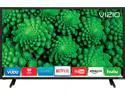
VIZIO D-Series D32x-D1 32" Class Full Array LED Smart TV
Pros: I like the Smart capabilities. It automatically pulled a firmware update down after I plugged it in and set it up! I have tried out watching Netflix over my house WiFi network and it worked great. I unplugged the TV and moved it to another room then plugged it back in and my NetFlix and WiFi network settings seemed to stick and I did not need to re-enter anything which is definitely a bonus. For cable TV, I am using this with a cable box from my cable provider through an HDMI cable. The TV is light weight at 11 pounds and easy to move about. There are several options for the displayed image: Normal, Wide, and a couple others. I did have to change the setting from Normal to Wide. The controller is small and it has a set of special purpose buttons for XUMO, NetFlix, and I-Heart Radio. Not sure if those are programmable or not. Setup was pretty easy though I am still working on the picture settings. A number of different options and I am not knowledgeable about what some of the settings mean. On screen keyboard appears at various points to allow data entry of user names and passwords by moving a selector around the keyboard image with the controller to pick a key.
Cons: The video imagery needs some fine tuning from the menu. I had a bit of a problem figuring out how to get the back off the controller in order to install the batteries. Finally hooked the edge near the IR sensor with my fingernail and then was able to get it pulled down and off.
Overall Review: Along with the TV I purchased a Tripp Lite P316-06N 6" 3.5mm Mini Stereo to Two RCA Audio Y Splitter Adapter Cable (3.5mm F to 2x RCA M) Female to Male to use with the TV in order to hook up a set of 2.1 computer speakers (two satellites and subwoofer) as I figured the sound quality of the TV speakers would be fair. I tried this out, plugging the RCA side of the adapter into the RCA connectors on the back of the TV and then plugging the computer speakers into the female 3.5 mm jack. Huge difference!
10/20/2017See more detail
seller reviews
- 4
Oscilloscope arrived quickly
I was surprised at how quickly my oscilloscope arrived, about a week ahead of when it was expected. It was shipped requiring a signature for delivery so I had to be home for that which was fine with me. I had looked at several YouTube videos about reviews of this device so installing the PC software and hooking things up was straightforward. This is my first time using an oscilloscope so I've been learning. What I've found is that tutorials about how to use a standalone oscilloscope with its own display and physical knobs applies to the digital oscilloscope as well.
On-time
Delivery
Product
Accuracy
Customer Service
Satisfactory
9/8/2023See more detail
on time, card working great
The compatibility information on the purchase page helped me to feel sufficient confidence that this WiFi card would work with my MSI Z390-A motherboard. I did have to do a bit of research to determine the difference between the Ac 9560 and the newer AX 201 and the difference between CNVi and CNVi2. I also was not sure that this WiFi card would work with Ubuntu 20 Linux so some information about operating system compatibility on the purchase page would be nice. I purchased a pair of IPEX MHF4 antenna to go with this WiFi card. After first installation with my Ubuntu PC within about 5 feet of my WiFi router, the card picked up my 5G band and despite not having an antenna, I was able to use FireFox to browse the internet. The next day the separately purchased antenna came in. I attached them to the card and after installation of the card, took the PC downstairs and attached to my large screen TV and streamed YouTube TV with no problems.
On-time
Delivery
Product
Accuracy
Customer Service
Satisfactory
10/5/2020See more detail
on time delivery, good information on purchase page, simple to install on AC 9560 WiFi card, no problems
I bought this pair of antenna to go with an AC 9560 M.2 E key CNVi WiFi card purchased separately. First thing I liked was the illustrations and card compatibility information provided on the purchase page for this item. They gave me the confidence to purchase both the card and these antenna Both items came in on time. After installing the antenna on the card and the card into my Ubuntu PC with MSI Z390-A motherboard, I moved the PC from upstairs near my WiFi router to downstairs. Was able to stream YouTube TV just fine.
On-time
Delivery
Product
Accuracy
Customer Service
Satisfactory
10/5/2020See more detail