
Your Browsing History


Ken K.
Joined on 12/16/02
0
0
product reviews
- 2
E4300 Overclocking Experience

ASUS P5B Deluxe LGA 775 Intel P965 Express ATX Intel Motherboard
Pros: I run at 2.85Ghz on the e4300. Idle temps at 30c and load no higher than 58c with a passive Thermalright Ultra-120 cooler. No fans on my cpu cooler, only on the case (Antec P180b) EXCELLENT case. Complying with the FSB:memory ratio, I run at 1:1 8x356 with vcore @ auto, vmem @ 2.25v (.5 higher due to asus not having a 2.2 that matched my ram rating). Memory runs at 4-4-4-4-11. Final thoughts: GREAT BOARD
Cons: Took a lot of understanding to figure out why the board was overclocking sometimes. Disabling the Asus overclocking software and using motherboard settings worked better. Board configured my patriot memory incorrectly for 5-5-5-5-16 out of the box. 5:4 ratio I believe.
Overall Review: Out of the box, the p5b overclocked my e4300 to 2.4Ghz (from 1.8Ghz oem). That was thanks to the 9x266Mhz fsb. Ran stable and cool, but still a suprise to me.
3/26/2007See more detail
Ubuntu Linux with raid
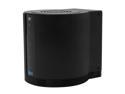
VANTEC NexStar HX4 NST-640SU3-BK Aluminum / Plastic 3.5" Black SATA I/II/III USB 3.0 & eSATA Quad Bay HDD Enclosure
Pros: - Cools great once you up the fan speed. 52-55 degrees C. on all drives - USB3 and Esata both work - Units continue to work under high IO stress - Each unit has a 4-disk aidz pool and I get 140 MB/sec write speed.
Cons: - USB3 JMicron controller on unit does not work well with linux. It spins drives down as soon as there's no USB connection and unfortunately, the computer can't wake them up on its own since it doesn't see past the USB hub/bridge. I had to unplug and plug them back in to turn them on. ie, drives didn't persist through a reboot. Lots of research showed the problem was in the JMicro controller and would probably get a firmware update soon to fix it. I switched to esata instead and everything works beautifully. (really, USB3 shouldn't be used anyway if you want rock-solid production-quality stability)
Overall Review: - I wish the bottom of the cylinder was open so I could stack the units. I own multiples and they take up a lot of surface area because you can't stack them.
3/2/2014See more detail