
Your Browsing History


Jeff M.
Joined on 12/21/06
0
0
product reviews
- 7
Loving it so far.
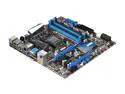
MSI Z68MA-ED55 (B3) LGA 1155 Intel Z68 HDMI USB 3.0 Micro ATX Intel Motherboard
Pros: Price, features, great overclocking on an m-atx form factor, 4 internal usb headers, stable so far.
Cons: Only 6 rear USB ports and no rear slot plate was included to add more USBs using the internal headers. SPDIF is optical only. There is a SPDIF header on the board but again, no cable provided to give you a rear RCA SPDIF. Overclock profiles are not saving memory configuration. -1 egg for lack of accessories.
Overall Review: I got away from the "extreem machine" look and decided on something more practical, like a micro ATX, but wanted overclocking features for a 2600k. This board has loads of features including great overclocking and a nice BIOS. BIOS even has a LAN driver to get it's own update. I clocked my 2600k to 4.5ghz right off the bat using the multiplier adjustment with no other tweaks. I had no problems fitting a Silenx Extreme 120mm cooler on it but I have to use standard height memory. I chose this board specifically over the ASUS and Gigabyte z68 offerings and I'm very happy with it.
7/31/2011See more detail
STAY AWAY!!
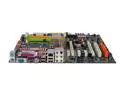
MSI 975X Platinum V.2 LGA 775 Intel 975X ATX Intel Motherboard
Pros: Cost? Crossfire?
Cons: Where do I begin? Bios isn't enabling Intel's SATA controller when set to raid. Hard drives not detected. Beat it into sumbission by selecting, unselesting, reselecting. Eventually it just works. =/ ? Overclocking is next to useless on this board. I can't change the multiplier for the memory. When I save changes and reboot it power cycles and defaults back to previous setting. My Abit board overclocked this cpu just fine and rock solid. I can't even get 5mhz more out of the front side bus let alone 30mhz my abit did. As far as software. The manual shows the wrong CD folder for the floppy files needed for RAID F-6 XP setup. You'll have to figure that out.
Overall Review: VERY DISAPOINTED in MSI. Some reviews are giving the JMicron controller a bad name. That actually works fine on my board. It's the BIOS not enabling the INTEL controller that's screwing up. What a nightmare. It's never taken me 6 HOURS!! to get a system running. Usually it's only 1 including the XP install. STAY AWAY!!
12/26/2006See more detail
Not worth the deal.
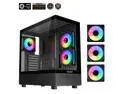
Sama Neview 4361 Black Dual USB3.0 and Type C Tempered Glass ATX Mid Tower Gaming Computer Case w/ 3 x 120mm ARGB Fans (2 x MB Side, 1 x Rear) Pre-Installed
Pros: Cheap. Looks nice.
Cons: Fans are loud and lack PWM control. They are only 3-pin. Included fan hub was shorted and caught the wiring on fire. Don't use it! No vibration isolation for 3.5" HDD. No dedicated 2.5" SSD bracket. The case has the mount location behind the motherboard but no bracket was included.
Overall Review: Would not recommend. Will not purchase again.
4/2/2024See more detail
One thing I forgot to mention
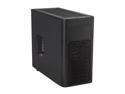
Fractal Design Arc Mini Black High Performance PC Computer Case w/ USB 3.0 and 3 Fractal Design Silent Fans
Pros: See review.
Cons: See review.
Overall Review: Fractal's website states 165mm tall coolers will fit. This is only true IF you don't use the side case fan or use a 12mm thick fan. My cooler is 153mm and it hits a standard fan. This was somewhat disapointing because I chose the cooler I did based on Fractals quoted space.
8/4/2011See more detail
Stay away from this brand
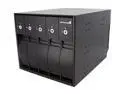
StarTech.com SBAY5BK 5 Drive 3.5in Removable SAS SATA Mobile Rack Backplane
Pros: Great for raid arrays
Cons: It doesn't work. Neither does the replacement when I RMA'd it. Drives will drop out of the array. ALWAYS use RE series drives when running a SATA raid. WD green, blue, and black ARE NOT RAID COMPATABLE. That could be why others are complaining about drives falling from the array. I use RAID compatable drives and they still fall out of the array when using this enclusure. I had to use cardboard spacers between the doors and the drive to shove the drive back to make connection. Totally inadequate cooling. Expect your drives to run VERY hot in this enclosure.
Overall Review: Don't bother with this company.
8/26/2010See more detail
Great LCD for the price.
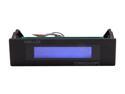
nMEDIAPC Black Aluminum Panel PRO-LCD-B Media Center Programmable LCD
Pros: Cheap, Easy to install, Bright enough to read from across the room. Software is pretty straight forward. Take the time to familiarize yourself with the software.
Cons: Spectrum analyzer didn't work correctly with my system. Could be a Windows7 issue or a driver issue with the audio mixer. I could see the LCD's software responding to the audio but nothing on the display. -1 egg.
Overall Review: If you want a low-cost basic display this is it. It comes with many pre-configured display options that are each customizable. The LCD itself can be removed and used remotely for projects like a car-pc or something like that. The display uses a Molex 5v supply not the usb's 5v supply so you'll need to power it seperatly if used remotely.
11/12/2009See more detail