
Your Browsing History


Joel B.
Joined on 07/06/02
0
0
product reviews
- 12
Works great with Linux and ZFS!
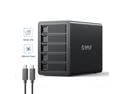
ORICO 5 Bay Hard Drive Enclosure Full Aluminum Type-C USB 3.1 Gen2 (10Gbp/s) 2.5/3.5 inch HDD SSD for Enterprise Class Data Storage, Support Daisy Chain 3559C3
Pros: - Works great with Linux - Keeps the drives cool - Extremely fast transfer rates (beats SATA 2!)
Cons: - The front door latches could be better designed and perhaps made of aluminum
Overall Review: The Orico 5 Bay external USB 3.2 enclosure works very well with Linux and ZFS once you work out the configuration. I loaded this enclosure with 16TB WD Red Pro Nas drives. The mounting trays are well-designed and provide direct metal-to-metal contact to hold the drives firmly in place and dissipate heat. Combine the metal trays with the aluminum shell with the large Fan in the back and good airflow and the Orico keeps the internal drives at a reasonable 47C under use. The key to USB 1.2 enclosures and Linux is to use a good controller card. I ended up buying the Inateck 20 Gbps Bandwidth with the Asmedia ASM3142 controller. Though, there are a number of cards which use this same controller. The drivers native to Debian 11 Bullseye work great with the ASM3142. One critical step to get this enclosure to stay on-line is to add the kernel parameter "usbcore.autosuspend=-1", which disables usb suspend putting the disks to sleep. This parameter is requires since ZFS will throw errors if the disks do not respond in a short amount of time. The second key to success is the "IOMMU" (I/O Memory Mapping Unit), which provides a direct memory map for IO virtualization. There are a number of articles out there on how you can perhaps wrestle with the IOMMU to get it to work. In my case, I don't need disk virtualization, so I just turned it off in my UEFI Bios. With those few challenges in Linux figured out, the enclosure is stable, runs cool, and provides a great way to add external storage. Excellent product and I highly recommend!
5/14/2022See more detail
Does not live up to specs
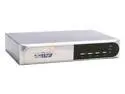
GWC KD054D 4-Port PS/2 DVI KVM Switch
Pros: Great price
Cons: Don’t waste your money. I have a laptop, a desktop with a NVIDIA graphics card, and another desktop with a ATI graphics card. All 3 computers work great when connected to a Samsung flat panel with the DVI connection. When I hooked up the three computers with this KVM, the results were very disappointing. The laptop looks great through the KVM at 1600 x 1200. Though, both desktops look terrible. One of the desktops at 1600x1200 is plagued with a tremendous level of dancing pixels, like snow drifting across the screen. I am not sure what is causing this snow, but I would guess that the KVM DVI bus cannot keep up with the bandwidth. The second desktop at a mere 1024 x 768 also has snow, but not as badly as the first desktop. In summary, this KVM does not live up to the specifications published.
12/14/2005See more detail
Great with Linux
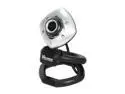
Agama V-1325R Night Vision Infrared 1.3M Pixel Webcam
Pros: Fabulous price, excellent low light capability with IR Leds. Best of all, it works great in Linux (tested with Ubuntu and OpenSuse) as it is fully UVC compatible.
Cons: Does not auto-adjust color/hue/contrast for light level changes. Also, IR leds are not automatic. You must use software to activate the lights.
Overall Review: This camera is a specialty item in that it works in zero light. As such, it comes with balance and color optimized for low light. NOTE:You must adjust contrast, color, and hue manually when used in bright light. Overall, great value for the price point. If you want fully adjustment in an IR camera, then you will have to pay $100 more.
1/15/2010See more detail
Cuts out and unreliable in Linux
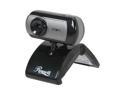
Rosewill RCM-8163 True 1.3 M Effective Pixels USB WebCam
Pros: This camera looks and sounds fantastic in Ubuntu Karmic, that is until it cuts out and freezes after a few minutes of use.
Cons: I don't know if the reliability issue in Linux is a driver issue or a hardware issue. Either way, another <$20 camera that replaced this works flawlessly.
Overall Review: Seems to work well for some and certainly is a great price point. However, beware if you are a Linux user.
12/27/2009See more detail
Great for a green file server or router
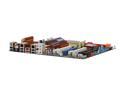
ASUS P5Q-E LGA 775 Intel P45 ATX Intel Motherboard
Pros: Green main board, heat pipes instead of fans, two Ethernet ports, plenty of SATA ports, 100% linux supported, DDR2 1200
Cons: Space around the LGA 775 socket is too tight for many main-stream coolers.
Overall Review: I use this board as home server running OpenSuse 11. I did my homework and realized ahead of time that the LGA 775 socket area was too tight for many coolers due to the heat pipes on the board. Still, the Zerotherm CF900 92mm CPU cooler snugly fits in place and does a great job of keeping the board cool in a side-vented case. I run a quad core processor, 8gigs of GSKill 1066 ram, 6 hard disks. OpenSuse 11 installed flawlessly and has run rock stable at blazing speeds. I could not be happier with my purchase.
8/28/2008See more detail
Fantastic green drive!

Western Digital Caviar Green WD10EACS 1TB 16MB Cache SATA 3.0Gb/s 3.5" Hard Drive Bare Drive
Pros: Very very low power consumption, low heat, reasonable speed, nearly silent
Cons: None..completely satisfied
Overall Review: I am elated that Western Digital realizes that not all hard disk applications call for heat spewing dragons sitting around melting plastic. This very quiet, cool, low-power drive is perfect for a file server or desktop application where files are not accessed continually. Alternative, these drives are perfect for media pcs. I would not use these as an OS drive where performance is critical. However, I write backups and store my multimedia to a pair of these raided.
8/28/2008See more detail
seller reviews
- 1
Responsive customer service
I had a small defective plastic part and Orico replaced it with no hassle. Great customer service and very happy with the product.
On-time
Delivery
Product
Accuracy
Customer Service
Satisfactory
5/14/2022See more detail