
Your Browsing History


Gregory C.
Joined on 07/14/06
0
0
product reviews
- 35
Good board, pathetic BIOS
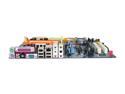
GIGABYTE GA-M55SLI-S4 AM2 NVIDIA nForce4 SLI ATX AMD Motherboard
Pros: Stable, good layout, features, fast, but not as fast as Biostar. Hopefully durable that's one of the reasons I buy Gigabyte - long lasting performer. Online BIOS updates are a plus, but only Taiwan server has latest versions, watch out. My older Gigabyte machine is still alive after 10+ years, Asus, others burned in 3 years. I am not a gamer, a math designer, I handle huge data files with lots of visuals and real time updates and AMD/Gigabyte combination seems do best for what I need. This stuff flyes in comparison with Intel. I dumped Intel a year ago.
Cons: Bios tweaks are very limited. I wasn't able to fully configure RAM to manufacturer's specs 4-4-4-12-22. Bios allows to configure it from 5-5-5-18-23 to 4-5-5-18-23 and that's it. I have to use RightMark Memory Analyser software to tweak memory to manufacturer specs. If you can't get this with the existing BIOS, forget overclocking with this board, at least at pro level.
Overall Review: BIOS is bad for manual tweaking - options are very few. Easy Tune 5 - a windows tweaker is nearly useless as well, besides tempretures and voltages - useless. It even doesn't save settings, you have to set it every windows session and does only as much as BIOS. I care less about overclocking, I just want to set components to manufacturer specs. May be slightly overvoltage memory +0.5-1V. The word is it performs much better at slight overvoltage without any danger of burn or reducing a lifespan. I am definetely not into extreme overclocking, just need few basic tweaks and this board's BIOS doesn't do even that, althogh board itself supports it.
4/25/2007See more detail
Works, just be careful
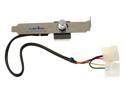
APEVIA FC-01 Multi Fan Speed Controller
Pros: Works running 3 (80mm) fans. Good for case fans connected to PSU.
Cons: Heat sink on this thing is too wide and can short circuit neighboring card. Yes it has an aluminum heat sink and it gets hot. This is poor design. Quarter inch smaller would do fine. Manufacturer should update the design, it's not safe. And Why can't you make it cool?. amps aren't that high. This isn't a 300W halogen lamp control, which by the way is cooler then your few Watt fan control
Overall Review: Anyway I discovered that back of PC is the last place I want fan controls. I detached it from a back plate and attached to the front of PC to empty CD slot, drilled a hole in the plastic panel. Looks good that way and very handy. Much better then having it in the back.
3/11/2008See more detail
Good overall, minor issues
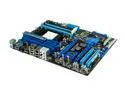
ASUS M4A89TD PRO AM3 AMD 890FX ATX AMD Motherboard
Pros: fast, lots of features. works. i like A s u s despite minor glitches
Cons: 1. back panel insert has misaligned holes for keyboard and mouse. i had to take out entire motherboard to fix back panel with the drill. Very annoying. 2. At shut down audio makes a weird noise (on all latest boards) Audio should be fixed by manufacturer. At start up it makes windows flicker. Looks like a driver glitch on load/unload, may be other issues. same audio glitch on previous model board.
Overall Review: Has room for improvement. these are all bugs so far
5/31/2010See more detail
Power on botton is next to USB?
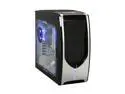
RAIDMAX Skyline ATX-948WS Black / Silver SECC ATX Mid Tower Computer Case
Pros: Roomy, cool, quiet, has decent looks
Cons: 1. Power and reset buttons are next to USB ports and can be accidentally hit. All input ports should be on front vertical panel instead, they will be less exposed to dust as well. 2. All inflow fans and openings must have dust filters. Computer case must keep dust out. Why most of pc cases designed like vacuum cleaners to accumulate all the dust inside? Filters has to be easily removable for cleaning (snap on), made out of inexpensive plastic mesh. Filters has to be easily removable for cleaning (snap on), made out of inexpensive plastic mesh.
Overall Review: I wonder if case manufacturers employ good designers or any at all? Entire industry has Ergonomics mistakes, basic functionality mistakes, no dust protection, mediocre looks. Most cases look so last century.
3/18/2010See more detail
how to improve this thing
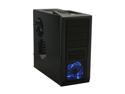
Rosewill Wind Knight Gaming ATX Mid Tower Computer Case with pre-installed 2x 120mm Fan, Support up to 1x 140mm top fan, 2x 140mm side fan, 1x 140mm front fan, 1x 120mm rear fan
Pros: Functional, ventilation options, HD positioning, quiet fans
Cons: Huge ventilation holes, exposing hardware. No 140mm filters provided to cover them. Someone said it's too much to ask for the price. This is wrong, this isn't too much. Filters can be cheaply made from same material they use for front filters and bottom. It is very cheap black plastic but it does the job. manufacturer should cover all 5 exposed areas and make them snap on, easily removable for cleaning.
Overall Review: This case is a prime candidate for a paint job. I painted side panels and top metal portion red and installed black color filters- looks much better. manufacturershould think color, add some color to their line - red, silver, blue, green. Adding filters are the must. This is a $50 case, no PSU. These filters will cost 5c to make and will add a ton of value. To buy separately - they are hard to find and will cost $30, this is too much and makes me want to buy a different case.
3/18/2010See more detail
Gret looks
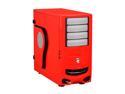
IN WIN IW-F430.RL Red 0.8mm SECC/ Japanese Steel ATX Mid Tower Computer Case
Pros: Superb looks, conversation piece, very happy about that. Everybody love it.
Cons: 1.No side fan or even an option for side fan mount over video cards. I had to improvise to put another 120mm fan there. 2. Filters are on inside the panel, I have to open it to clean them. Filters should be accessible from outside (slide on) 3. Screwless rails didn't fit, I had to either remove face panel or use screws. I used screws. It's a Minor problem, but manufacturers should improve functionality
Overall Review: Manufacturers should always have side fan options to cool video cards, essp for gaming cases. Air filtration should be taken seriously. Filters should be easily accessible for cleaning. Dust is another hardware enemy, not just heat.
3/15/2010See more detail