
Your Browsing History


Patrick P.
Joined on 11/09/10
0
0
product reviews
- 4
Great Unit
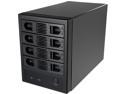
SYBA SY-ENC50104 4 Bay 3.5" SATA III HDD NON-RAID Enclosure -Supports USB 3.0 & eSATA Interface
Pros: Running a Pro Tools 12 DAW with Win 10 Pro and using 3 x 1TB SSDs and a 4TB HD for synth samples and soft synth content. Using USB 3.0 and it runs flawlessly. No external power supply which I LOVE!
Cons: To mount SSDs you need to "nip off" one of the plastic nibs that hold HDs in place. Also, drive caddies a bit difficult to remove once drives are installed. No big deal as I have no intention of Hot Swapping drives.
Overall Review: Wade on in...the water ain't deep.
5/25/2018See more detail
Weird Card
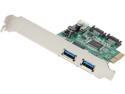
SYBA Combo USB 3.0 + SATA III 6Gbps, v2.0 PCI Express, x4 Slot Controller Card Model SD-PEX50055
Pros: Works
Cons: Weird because Bios sees device as storage controller. BUT upon booting the card is initialized yet states there are no drives attached (when there are). Win 7 Pro SP1 comes up and the drives are there. Go Figya'
Overall Review: Only 4 stars cuz it is weird. :)
4/2/2016See more detail
Great Drive...So Far :)
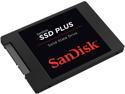
SanDisk SSD PLUS 2.5" 480GB SATA III Internal Solid State Drive (SSD) SDSSDA-480G-G25
Pros: Installed this as a Win 7 Pro Boot Drive in a ProTools 12 Digital Audio Workstation (DAW)...Dell Precision T5500 with Dual Processors (12 Cores) and 72GB RAM. System also has 2 @ 2 TB Hard Drives installed. OS loads in 5 seconds after POST and ProTools 12 is installed on the SanDisk as well and loads in 8 seconds!
Cons: None so far....fast!
Overall Review: Not a knock on SanDisk....T5500 onboard SATA is 3GB. Tried THREE different 6GB SATA cards to boot the SanDisk off of and the Dell BIOS only saw each as a "Mass Storage Device" but NOT attached drives so NO Bootable Device. You could see thecards in the POST but would never see the attached SanDisk drive. Even tried it with a HD Drive and got the same results. Looks like Dell hamstrung the BIOS...BLOODY WEASELS...Go Figya'. SO...the SanDisk is only running at 3GB off the System Board but is it still blows the doors off a HD drive. If anyone has successfully found a 6GB SATA Controller that works in a T5500 NON-RAID environment let me know. Looking at whether I can still get the 6GB performance via a Bootable external eSata enclosure. UPDATE 2/17/2016: Found a FANTASTIC INTERNAL SATA III card that works with the Dell T5500.... See that review here: http://www.newegg.com/Product/Product.aspx?Item=N82E16815461002
2/17/2016See more detail
The ONLY Card I've Found That WORKS In A Dell T5500!
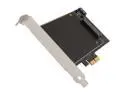
APRICORN VEL-SOLO-X2 Extreme Performance SSD Upgrade Kit for Desktop PCs and MacPro
Pros: Easy as can be to install. WINDOWS 7 Pro TIPS: Install the card with NO DRIVE inserted and boot. Card will be seen by the BIOS and boot into Windows. MS Device Driver automatically installed. Shutdown the PC. Pull the card, install your SSD with the 4 screws provided, reinsert the card into same slot and boot the PC INTO YOUR BIOS SETUP. IF using the SSD as a Boot Drive with OS already installed, select the SSD in the Boot Sequence as the FIRST DEVICE, save the settings and reboot. Otherwise, Boot the PC, verify the BIOS see the SSD, reboot and go thru the cloning/fresh OS install process
Cons: Nothing. Works right out of the box. Follow the instructions and you won't be ripping your hair out. Yeah...that's right...READ!
Overall Review: Definitely would recommend this product. The Dell T5500 has 3GB/sec SATA II on board so the SSD I installed was running only at 50%. I tried THREE OTHER CARDS before getting to this one and there is an apparent conflict with the Dell BIOS and the others. This card went into a PC SPECIFICALLY BUILT as a ProTools 12 DAW (Digital Audio Workstation) for my home recording studio. It has 2 x 6 Core Xeon Processors (12 Cores), 72GB RAM, SanDisk 480GB SSD Boot Drive and 2 @ 2TB SATA Hard Drives. Connected this to a Vizio 39" TV via HDMI and using it as a standard monitor. I can swap the input via the TV remote over to cable if I want WHILE THE PC IS RUNNING. :) After installing the card, the existing SanDisk 480GB SSD is running at a full 6GB/sec. It takes 5 seconds after POST to boot Windows 7 Pro SP1 and 7 seconds loading ProTools off the SSD. Ran a stress test with a ProTools track I call "Insane"...200 tracks of the AIR Music Tech Soft Synth Plugin "Hybrid"...30 second MIDI clip...ProTools loaded it in 42 seconds. Opened the PT Resources window and hit "Play"...less than 36GB RAM used and CPU/Cores utilization never went over 35%! An additional upside to this card, as if it needed it but at additional expense over the base card, is that it has a SECOND SATA III connector on it for ANOTHER drive. I can see myself picking up a 1TB SSD in 6 months when prices drop further and running it at 6GB/sec off that. I figure the ProTools Plugin "Content" files load time will be cut by 50% MINIMUM. Greased Lightning is a PIG compared to this machine. BTW, NASA called....they want to rent this PC to launch their next mission to Pluto. :)
2/17/2016See more detail