shipping Holiday Shipping Details & Extended Holiday Returns
Wavlink Universal USB C Laptop Docking Station Dual Monitor 5K/4K@60Hz with 65W Host Charging for Thunderbolt 4/3, USB-C Windows, Mac, Chrome, Ubuntu 20.04,22.04(2HDMI, 2DP, 6 USB 3.0, 1Gbps Ethernet
  •  
  • $129.99 
  • Save: 23%
  • $138.00
  • Free 30-day Returns
  • Price alert

    Best Sellers

    Top Rated
    4.5 (252 total ratings)
    • $139.00
    • + FREE SHIPPING
    Shop it at NeweggBusiness.

    Meet Your Seller

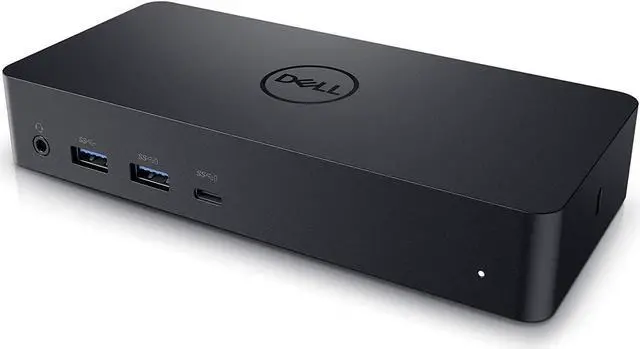
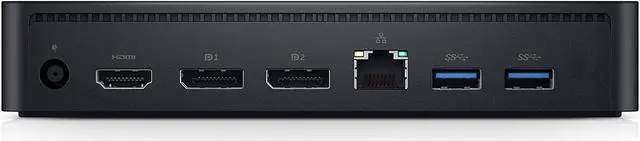
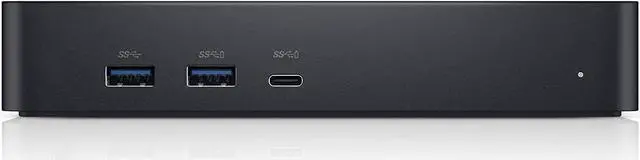
    Dell Universal Dock D6000 with Choice of USB 3.0 (Type-A) or USB Type-C Host Connection and up to 3 displays supported

    REFURBISHED Product Type
    • Enjoy Ultra HD 5K on a single screen or up to three 4K displays via USB C
    • Supports up to three 4K displays or a single 5K Display
    • Four USB 3.0 Ports. One USB C port. System Requirement (Recommended): PC’s equipped with USB 3.0 or USB C port, Display Link Driver installation. Power adapter 130 Watt. Power Delivery (PD) Profile Up to 65W Dell/Non-Dell laptop (5V/9V/15V@3A and [email protected])
    • Os required Windows 7, 8, 8.1, 10 32/64bit or later. Charges up to 65W laptop via USB C
    • Troubleshoot incompatible display driver this message will appear if the primary graphics card drivers installed are not wddm compatible. Windows 7 onwards is not designed to operate without wddm drivers. Download and install the latest graphics drivers for your primary graphics card.Third 4K display at 30 Hertz
    +
    +
    Overview
    Specs
    Reviews
    avatar

    Any questions? Our AI beta will help you find out quickly.

    Universal Docking Solution
    Conveniently connect any laptop equipped with USB-C or USB3.0 with the Dell Universal Dock - D6000. Enjoy universal compatibility with a wide range of PC brands and operating systems supported by DisplayLink technology. Whether youre at your desk or in a shared workspace, you can easily connect to displays, a mouse, keyboard and audio devices from your compatible system of choice.

    • Enjoy Ultra HD 5K on a single screen or up to three 4K displays via USB-C
    • Supports up to three 4K displays or a single 5K Display
    • Four USB 3.0 Ports. One USB-C port. System Requirement (Recommended): PCs equipped with USB3.0 or USB-C port,DisplayLink Driver installation
    • Os required-Windows 7, 8, 8.1, 10 32/64bit or later
    • Charges up to 65W laptop via USB-C

    Connect with three 4K displays simultaneously
    Youll be able to connect with 3 displays simultaneously. Enjoy Ultra HD 5K on a single screen or three 4K displays via USB-C. Thanks to DisplayLink technology.

    Fast and convenient docking solution
    With plug and play, connecting to the dock is fast and convenient. Plug in a single USB-C cable and transfer audio, video, data and power. Plus, the single cable eliminates the need for an additional power adapter -- keeping your workspace clean and clutter free.


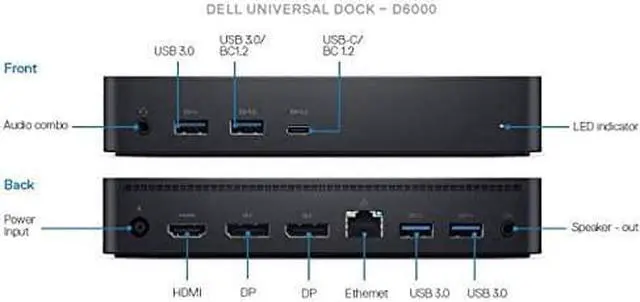
    Connections and features

    • Supports three 4K displays or a single 5K display.
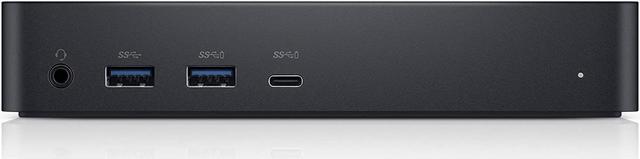
    • Four USB 3.0 ports.
    • One USB-C port.
    • Speaker output.
    • Combo audio.
    • Gigabit Ethernet.
    • Kensington Lock Slot.
    • Charges up to 65W laptop via USB-C.

    Whats in the box

    • Dell Universal Dock - D6000 (with USB-C cable and USB-A adapter attached).
    • 130W AC Adapter.

    Compatibility:

    • Latitude 5285.
    • Latitude 5289.
    • Latitude 7285.
    • Latitude 7280.
    • Latitude 7480.
    • Latitude 5280.
    • Latitude 5480.
    • Latitude 5580.
    • Latitude 3480.
    • Latitude 3580.
    • Latitude 3379.
    • Latitude 3189.
    • Latitude 3380.
    • XPS 13 2in1 9365.
    • Inspiron 7467 Gaming.
    • Inspiron 7567 Gaming.
    • Inspiron 5000 Gaming.
    • Inspiron 13/15 7000 2in1.
    • Inspiron 13/15 7000.
    • Inspiron 7460.
    • Inspiron 7560.
    • Inspiron 5000 Gaming.
    • Inspiron 13/13 5000 2in1.
    • Inspiron 15/17 5000.
    • Inspiron 14/15 5000.
    • Inspiron 14/15 3000.
    • Inspiron 14/15 3000 AMD.
    • Vostro 5468/5568.
    • Vostro 14/15 5000.
    • Vostro 3468/3568.
    • Vostro 14/15 3000.

    Warranty & Returns

    Warranty, Returns, And Additional Information

    Warranty

    • Please contact the Seller directly for warranty information. Warranty information may also be found on the Manufacturer's website.
    • CONTACT

    Return Policies

    Manufacturer Contact Info

    LOADING...
    LOADING...