

Your Browsing History








Any questions? Our AI beta will help you find out quickly.
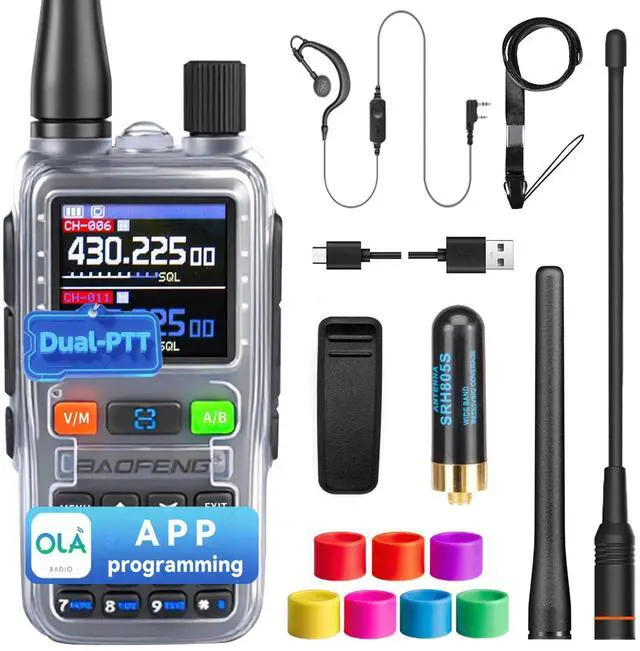
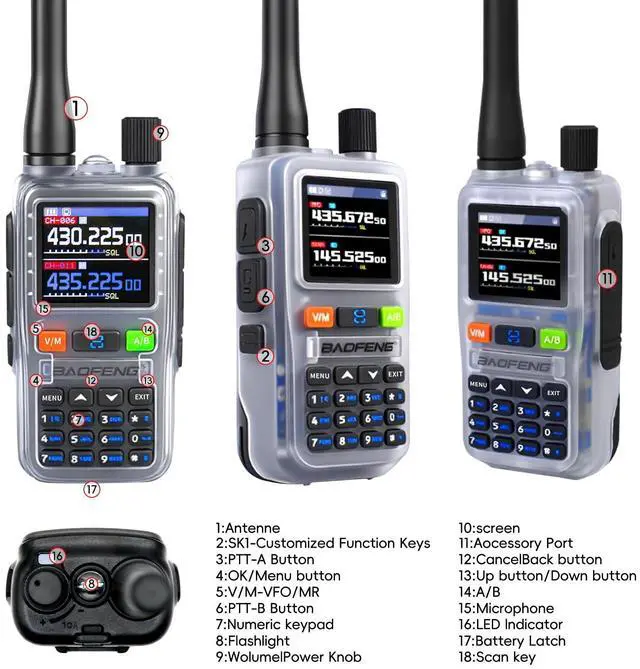
Call communication: devices in the same group need to set the same channel and subcode to communicate; Press the [PTT-A/B] key for the transmission time (A corresponds to the upper screen, B corresponds to the lower screen, and the red light is always on), and the microphone is 2.5-5cm away from the mouth to speak; Release the [PTT] key to enter the receiving state (the green light is always on to indicate receiving the call); Dual Watch: press [MENU][2] select ""15 dual watch "" set to"" On "",and the"" D ""icon will be displayed on the screen, which can receive the frequency of A/B channels at the same time, which is suitable for scenes that need to monitor multiple channels; On/off and volume adjustment: through the operation of [volume/power knob], turn clockwise to turn on or increase the volume, and turn counterclockwise to turn off or decrease the volume; It is forbidden to adjust the volume of the equipment near the ear to avoid hearing damage caused by high volume; Keyboard lock and unlock: press and hold the [] key until the keyboard lock icon is displayed on the screen. After locking, only the basic functions such as power on/off, volume adjustment, receiving/transmitting are kept, and other functions are disabled; To unlock, press and hold the [] key again until the icon disappears; Channel management: Channel selection: press the [V/M] key to switch to the channel mode, and you can select the target channel through the [ /] key, rotary encoder or numeric keyboard (input 3 digits, such as ""064"" corresponding to 64 channels); Channel storage: in frequency/standby mode, press [MENU][3][MENU][1][5] (""MEMCH"" is displayed), and press [MENU] to store after selecting a channel, and a prompt will be given successfully; Channel deletion: press [MENU][3][MENU][1][6] (""DELCH"" is displayed), press [MENU] to delete after selecting a channel, and channel 1 cannot be deleted; Frequency band switching: press the [A/B] key to switch between A/B frequency bands, highlighting as the main frequency band and dark color as the sub-band; Press the [V/M] key to switch between VFO mode (displaying VFO icon) and channel mode (displaying channel serial number).