here!
I’m your shopping assistant for PC builds, upgrades, and everything tech.
Got questions? Ask away!
Start a conversation
here!
I’m your shopping assistant for PC builds, upgrades, and everything tech.
Got questions? Ask away!
Start a conversation


Any questions? Ask CelesteSM will help you find out quickly.
We want to ensure your holiday shopping this year is hassle-free. That’s why we’re automatically extending our return policies on almost every product! For purchases placed between November 1st, 2026 and December 31, 2026 you will have until January 31, 2027 to return your product.
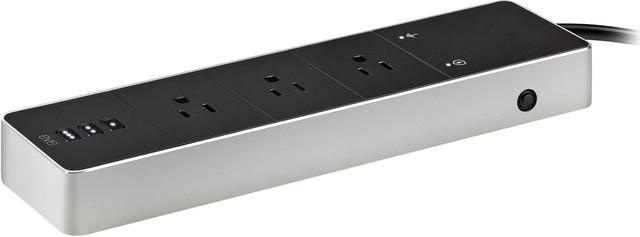
Eve Energy Strip is a HomeKit-enabled Wi-Fi power strip with three individually controlled outlets, energy monitoring, and surge protection, suited to Apple households that want to manage and track multiple devices from an iPhone or Siri.
| Attribute | Value |
|---|---|
| Best For | Smart-home users who want to control three outlets individually, schedule devices, and track power consumption |
| Outlet Control And HomeKit | Three individually controlled outlets with app, Siri, or onboard-button operation; supports schedules and automations. Connects directly over Wi-Fi without a bridge. Remote control while away requires an Apple TV or HomePod home hub |
| Power Monitoring And Protection | Tracks total power consumption and projected cost; includes overcurrent, overvoltage, and surge protection rated at 1,700 joules |
| Electrical Ratings | 120 V AC, 60 Hz, maximum 15 A and 1,800 W |
| Device Compatibility | Requires an iPhone, iPad, or iPod touch running iOS 12.1 or later; works with an Apple TV or HomePod home hub for control while away |
| Build And Controls | Aluminum and plastic enclosure with onboard on/off buttons and LED power-status indicators; 90-degree outlet orientation |
| Cable And Dimensions | 6.3-foot cable; product dimensions are 10.8 × 2.5 inches |
| Package And Weight | Item weight: 1.74 lb; package dimensions: 5.5 × 16.7 × 33.79 cm; package weight: 1.13 kg; one item |
| Plug And Compatibility Details | Plug attributes list North American Type A (2-pin) and Type B; compatible-device information lists Type A and B appliances |
| Model Identifiers | EVE; model 10027833; model number 10EBA4101; FCC ID SNE-POS-001 |
| Package Contents | Eve Energy Strip and quick start guide |