




 here!
here!
I’m your shopping assistant for PC builds, upgrades, and everything tech.
Got questions? Ask away!
Start a conversation
here!
I’m your shopping assistant for PC builds, upgrades, and everything tech.
Got questions? Ask away!
Start a conversationShipped by Newegg
 Top Rated Top Rated Top Rated





Any questions? Ask CelesteSM will help you find out quickly.
/20-231-887/clogo.png)
/20-231-887/ch1.jpg)
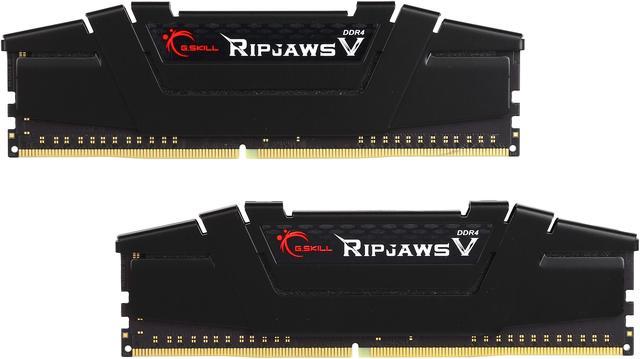
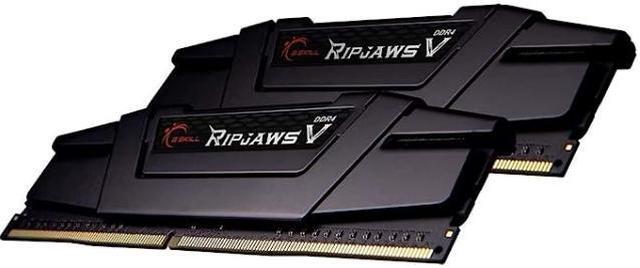
As the latest addition to the classic RipJaws family, RipJaws V series DDR4 memory is designed for sleek aesthetics and performance. Ripjaws V is the ideal choice for building a new performance system or for DRAM memory upgrade.
/20-231-887/1.jpg)
Available in a wide range of frequency options, Ripjaws V lets you enjoy a faster computing experience for gaming, video & image editing, rendering, and data processing.
/20-231-887/2.jpg)
Each and every Ripjaws V DDR4 memory kit is tested with G.SKILL’s rigorous validation process on all major performance motherboard brands to ensure the best-in-class reliability and compatibility across the widest selection of motherboards.
/20-231-887/3.jpg)
Continuing the tradition of aftermarket CPU cooler compatibility, Ripjaws V is designed with a 42mm module height suitable for most oversized CPU heatsinks.
/20-231-887/4.jpg)
Ripjaws V offers variety DRAM capacity configurations, ranging from 4GB module capacity up to ultra-high 32GB module capacity, for up to total of 256GB (32GBx8). The possibilities are endless!
/20-231-887/6.jpg)
Just set and go. Program med with the latest Intel XM P 2.0 profiles, the only thing between you and overclocked performance is simple BIOS setting.
* The memory kit will boot at the SPD speed when BIOS settings are at default.
* For XMP enabled memory kits, enable XMP/DOCP/A-XMP in the BIOS to reach up to the rated XMP overclock speed, and system stability with overclocked memory kits may depend on the capability of the motherboard & CPU.
/20-231-887/5.jpg)
All G.SKILL memo products come with limited lifetime warranty and the G.SKILL technical team is always ready to provide consumers with complete technical support via online forum, telephone, and email.
G.SKILL Ripjaws V F4-3200C16D-16GVKB is a 16GB (2 x 8GB) dual-channel DDR4-3200 desktop memory kit with CL16 timing, suited to compatible desktop builds or upgrades seeking a matched memory pair with Intel XMP 2.0 support.
| Attribute | Value |
|---|---|
| Best For | Desktop builds needing a 16GB (2 × 8GB) DDR4-3200 dual-channel memory kit, with compatibility dependent on the motherboard and CPU |
| Memory Capacity And Configuration | 16GB total as a matched 2 × 8GB dual-channel kit |
| Memory Speed And Timings | DDR4-3200 (PC4-25600; 3200 MT/s), CL16, with 16-18-18-38 timings |
| Module Type And Error Handling | 288-pin DIMM/UDIMM, unbuffered and non-ECC |
| Voltage And Performance Profile | 1.35V with Intel XMP 2.0 support |
| Platform Compatibility | Recommended for AMD X570, X470, B550, and B450 platforms, and Intel Z790 DDR4, Z690 DDR4, Z590, Z490, Z390, Z370, Z270, and Z170 platforms |
| Physical Design And Dimensions | Black modules with heat spreaders; listed dimensions are 13.3 × 0.7 × 4.4 cm and item weight is 100 g |
| Model Identifiers | G.SKILL Ripjaws V Series, model F4-3200C16D-16GVKB |
Q: Should I choose this 16GB DDR4-3200 kit or a 32GB kit?
A: Choose this Ripjaws V kit if 16GB is enough for your current workload and you want a matched 2×8GB dual-channel kit. Choose 32GB instead if your games, creative apps, or multitasking regularly need more memory; capacity is the main difference, not the DDR4-3200 rating alone. Check your motherboard’s slot count and compatibility before upgrading.
Q: Is this DDR4-3200 CL16 kit worth choosing over DDR4-3600?
A: Choose this kit if your system supports DDR4-3200 and you prefer a 16GB kit with a 3200 MT/s XMP profile. A compatible DDR4-3600 kit may provide higher memory bandwidth and can benefit some Ryzen systems, but the real-world difference depends on the CPU, memory timings, workload, and stability. Confirm your platform supports the faster kit before paying extra for it.
Q: How does this compare with a DDR4-2666 16GB kit?
A: Choose the Ripjaws V if your CPU and motherboard support DDR4-3200 and you want the higher rated memory speed with a dual-channel 2×8GB configuration. A DDR4-2666 kit may suit a system limited to that speed or a lower-cost upgrade. This kit’s DDR4-3200 rating requires enabling its XMP profile on compatible hardware; otherwise, it may run at a lower default speed.
Q: Should I buy this or Corsair Vengeance LPX 16GB DDR4-3200 CL16?
A: On rated capacity and speed, these are closely matched 16GB (2×8GB) DDR4-3200 CL16 kits. Choose the Ripjaws V if its price, appearance, or motherboard compatibility better fits your build; choose Vengeance LPX if those factors favor Corsair. The listed specifications alone do not establish a meaningful performance advantage for either kit, so check the exact model’s compatibility and current price.
Q: Will this RAM work with my desktop?
A: It is a 16GB kit of two 288-pin DDR4 desktop memory modules. Your motherboard and CPU must support DDR4, the module capacity, and the desired speed; check your system specifications or the motherboard’s memory compatibility list before buying.
Q: Will it run at 3200 MHz automatically?
A: Not necessarily. The kit may start at a lower default SPD speed. Enable XMP in BIOS to attempt its rated DDR4-3200 speed; the motherboard, CPU, and system stability determine whether that speed is supported.
Q: Can I use this RAM in a laptop?
A: No. This kit uses full-size 288-pin desktop DIMMs, while laptops generally require smaller SO-DIMM memory. Check your laptop’s memory type and specifications before purchasing.
Q: Can I add this kit to the RAM already in my PC?
A: It may work if the existing memory and system are compatible, but mixing separate kits is not guaranteed and can cause instability or prevent the rated XMP speed. For the most predictable results, use one matched kit rather than combining kits.
Q: Will this kit run at 3200 MHz automatically?
A: Not necessarily. The kit may start at a lower default SPD speed; enable XMP in BIOS to use its rated DDR4-3200 speed. Whether that setting is stable depends on the motherboard and CPU.
Q: Is this RAM compatible with an older Ryzen system?
A: It may work, but reaching 3200 MHz is not guaranteed on every older Ryzen CPU and motherboard. Check the motherboard’s memory compatibility list; if XMP is unstable, the system may need to run the kit at a lower speed.
Q: Can I add another identical kit later to reach 32GB?
A: It is possible, but two separate kits are not guaranteed to run together at their rated speed. G.SKILL advises against mixing kits; for a 32GB target, a single matched 2 × 16GB kit avoids combining separate kits.
Q: Is this a reasonable replacement for an 8GB RAM setup?
A: This kit replaces or expands an 8GB setup with 16GB total as two matched 8GB DDR4 modules. Confirm that the desktop motherboard supports DDR4 memory and has two available DIMM slots.


