




 here!
here!
I’m your shopping assistant for PC builds, upgrades, and everything tech.
Got questions? Ask away!
Start a conversation
here!
I’m your shopping assistant for PC builds, upgrades, and everything tech.
Got questions? Ask away!
Start a conversation






Any questions? Ask CelesteSM will help you find out quickly.


dtparam=pciex1
And the connection is certified for Gen 2.0 speed (5 GT/sec), but you can force it to Gen 3.0 (10 GT/sec) if you add the following line after:
dtparam=pciex1_gen=3
You can run devices at PCIe Gen 3.0 speeds if you test and they run stable.
sudo rpi-eeprom-config --edit
Adding following parts:
PCIE_PROBE=1
BOOT_ORDER=0xf416
The 6 means to enable booting from nvme. Reboot Pi 5 and try to use `lsblk` or `lspci -vvv` to get more details of the PCIe device.
 GeeekPi N05 M.2 NVMe to PCIe Adapter for Raspberry Pi 5 |  GeeekPi N04 M.2 NVMe to PCIe Adapter for Raspberry Pi 5 |  GeeekPi PCIe M.2 M-Key NVMe SSD PCIe Peripheral Bottom Board for Raspberry Pi 5 |  GeeekPi PCIe Express to Mini PCIe HAT M02 for Raspberry Pi 5 |  GeeekPi PCIe Express to Mini PCIe HAT M02 for Raspberry Pi 5 |  GeeekPi Tiny PCIe M.2 Key-M NVMe SSD PCIe Peripheral Board for Raspberry Pi 5 | |
|---|---|---|---|---|---|---|
| Customer Reviews | — | — | — | — | — | — |
| Price | — | — | — | — | — | — |
| Compatibility | Raspberry Pi 5 | Raspberry Pi 5 | Raspberry Pi 5 | Raspberry Pi 5 | Raspberry Pi 5 | Raspberry Pi 5 |
| Support | PCIe | PCIe | PCIe | PCIe | PCIe | PCIe |
| Function | Support M.2 NVMe SSD 2230 2242 | Support M.2 NVMe SSD 2230 2242 2260 2280 | Support M.2 Key-M NVMe SSD 2230/2242/2260/2280 | Support All Mini PCIe Devices Network Cards Mini PCIe Adapter | Support M.2 E-Key NVMe SSD 2230/2242 | Support M.2 NVMe SSD 2230 2242 |
| Model | N05 | N04 | N07 | M02 | M01 | N10 |
| Compatible case | Metal Case for Raspberry Pi 5 ASIN:B0CJM52Y4H | Metal Case for Raspberry Pi 5 ASIN:B0CJM52Y4H | ||||
| Position | Top | Top | Bottom | Top | Top | Top |
dtparam=pciex1
And the connection is certified for Gen 2.0 speed (5 GT/sec), but you can force it to Gen 3.0 (10 GT/sec) if you add the following line after:
dtparam=pciex1_gen=3
You can run devices at PCIe Gen 3.0 speeds if you test and they run stable.
sudo rpi-eeprom-config --edit
Adding following parts:
PCIE_PROBE=1
BOOT_ORDER=0xf416
The 6 means to enable booting from nvme. Reboot Pi 5 and try to use `lsblk` or `lspci -vvv` to get more details of the PCIe device.
GeeekPi N05 M.2 NVMe to PCIe Adapter for Raspberry Pi 5 | GeeekPi N04 M.2 NVMe to PCIe Adapter for Raspberry Pi 5 | GeeekPi PCIe M.2 M-Key NVMe SSD PCIe Peripheral Bottom Board for Raspberry Pi 5 | GeeekPi PCIe Express to Mini PCIe HAT M02 for Raspberry Pi 5 | GeeekPi PCIe Express to Mini PCIe HAT M02 for Raspberry Pi 5 | GeeekPi Tiny PCIe M.2 Key-M NVMe SSD PCIe Peripheral Board for Raspberry Pi 5 | |
|---|---|---|---|---|---|---|
| Customer Reviews | — | — | — | — | — | — |
| Price | — | — | — | — | — | — |
| Compatibility | Raspberry Pi 5 | Raspberry Pi 5 | Raspberry Pi 5 | Raspberry Pi 5 | Raspberry Pi 5 | Raspberry Pi 5 |
| Support | PCIe | PCIe | PCIe | PCIe | PCIe | PCIe |
| Function | Support M.2 NVMe SSD 2230 2242 | Support M.2 NVMe SSD 2230 2242 2260 2280 | Support M.2 Key-M NVMe SSD 2230/2242/2260/2280 | Support All Mini PCIe Devices Network Cards Mini PCIe Adapter | Support M.2 E-Key NVMe SSD 2230/2242 | Support M.2 NVMe SSD 2230 2242 |
| Model | N05 | N04 | N07 | M02 | M01 | N10 |
| Compatible case | Metal Case for Raspberry Pi 5 ASIN:B0CJM52Y4H | Metal Case for Raspberry Pi 5 ASIN:B0CJM52Y4H | ||||
| Position | Top | Top | Bottom | Top | Top | Top |
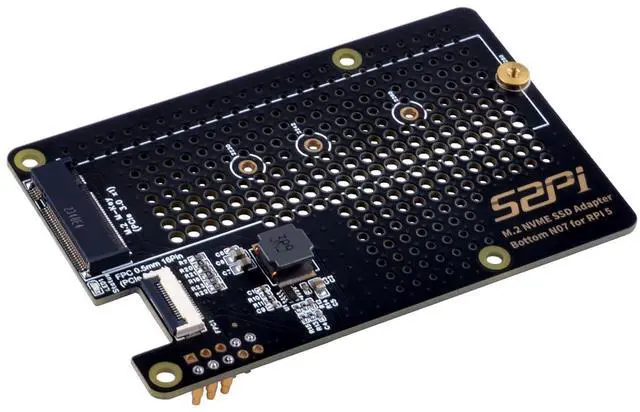
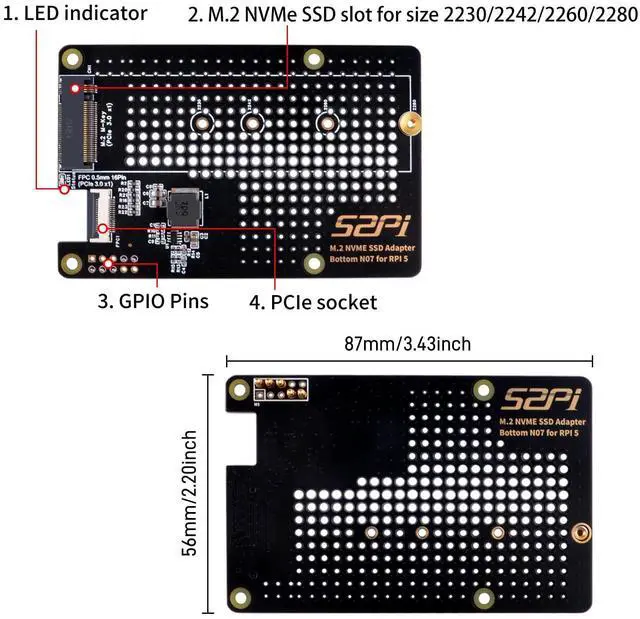
GeeekPi N07 PCIe M.2 M-key NVMe SSD PCIe Peripheral Bottom Board for Raspberry Pi 5, Support M.2 KEY-M NVMe SSD 2230/2242/2260/2280
| Brand | GeeekPi |
| Model Name | Raspberry Pi 5 |
| Ram Memory Installed Size | 8 GB |
| CPU Model | ARMv7 |
| Connectivity Technology | Wi-Fi |
| Processor | ARMv7 |
| RAM | LPDDR4 |
| Wireless Type | 802.11n |
| Series | Raspberry Pi 5 |
| Item model number | N07 |
| Operating System | Linux |
| Item Weight | 1.76 ounces |
| Package Dimensions | 4.13 x 3.19 x 1.06 inches |
| Processor Brand | ARM |
| Manufacturer | GeeekPi |
| Date First Available | February 24, 2024 |


