• BHD52.77
  • VAT-Inclusive Price
Ships from Hong Kong.
Most customers receive within 10-17 days.
Shop it at NeweggBusiness.

Meet Your Seller

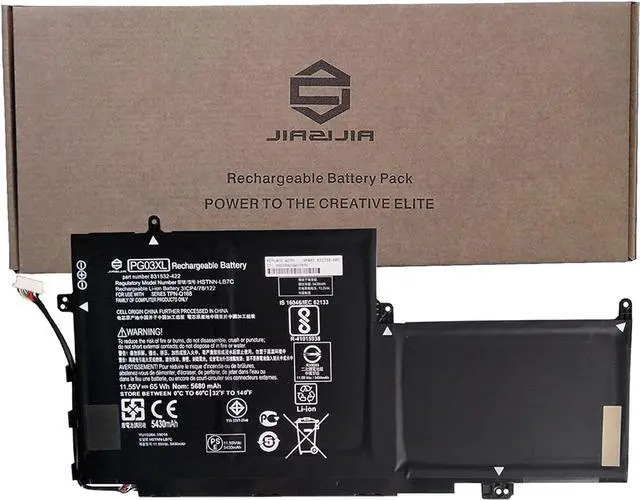
JIAZIJIA PG03XL Laptop Battery Replacement for HP Spectre X360 15-AP011DX 15-AP000NA 15-AP000NF 15-AP000NX Series 831532-422 HSTNN-LB7C 831758-005 831532-421 Black 11.55V 65Wh 5680mAh

  • Model: PG03XL // Voltage: 11.55V // Capacity: 65Wh 5680mAh // Color: Black // Type: Plug & Play Li-ion Battery.
  • Replacement for Part Number: PG03XL 831532-422 HSTNN-LB7C 831758-005 831532-421.
  • Compatible Models: Fit for HP Spectre X360 15-AP011DX 15-AP000NA 15-AP000NF 15-AP000NX 15-AP001NF 15-AP001NX 15-AP002NF 15-AP002NG 15-AP003NF 15-AP003NG 15-AP004NA 15-AP004NF 15-AP004NG 15-AP005NA 15-AP005NF 15-AP006NG 15-AP007NA 15-AP007ND 15-AP010NA 15-AP012DX 15-AP070NZ 15-AP090NZ Series.
  • Note 1: In order to find the right model, please open the back case of your laptop and check the model number of your original battery.
  • Note 2: Before installing the replacement battery, please read the manual carefully.
+
+
Overview
Specs
Reviews
<1>.Type: Plug & Play Rechargeable Li-ion Battery
<2>.Model: PG03XL
<3>.Voltage: 11.55V
<4>.Capatity: 65Wh 5680mAh
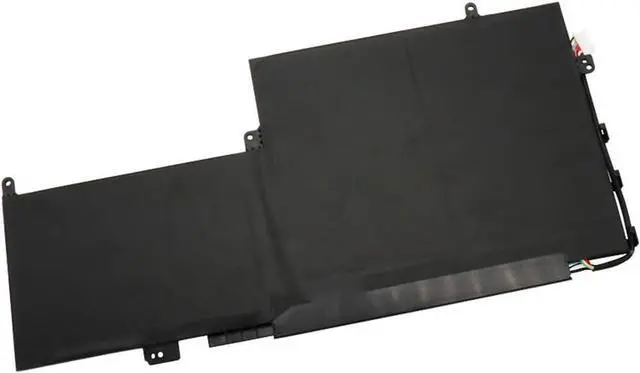
<5>.Interface:Refer to the picture! Please check it!
<6>.Color:Black
<7>.Warranty: 1 year warranty , 30 days' money back guarantee !

<8>.Replacement for Part Number:
PG03XL 831532-422 HSTNN-LB7C 831758-005 831532-421

<9>.Compatible Models (use "Ctrl+F to find your model quickly")
Fit for HP Spectre X360 15-AP011DX 15-AP000NA 15-AP000NF 15-AP000NX 15-AP001NF 15-AP001NX 15-AP002NF 15-AP002NG 15-AP003NF 15-AP003NG Series
15-AP004NA 15-AP004NF 15-AP004NG 15-AP005NA 15-AP005NF 15-AP006NG 15-AP007NA 15-AP007ND 15-AP010NA 15-AP012DX 15-AP070NZ 15-AP090NZ Series

Not all the compatible laptop models have been listed, please open the back case of your laptop and choose the right battery model according to your laptop's origibal battery.

<10>.Package included:
1X PG03XL Battery

<11>.Note:
1.Before placing your order, we highly suggest you to open the back case of your latptop and check out the exact part number of your laptop's original battery.
2.Discharge the new battery use to 5%(not to 0%) and then charge to 95%, and cycle 3-4 times.
3.Do not disassemble, crush or puncture. Do not dispose of in fire or water.
4.If you remove battery for a long time, charge more than 80% at least one time within one months.
5.Don't connect adapter for a long time while using the battery. It may damage the battery.
6.When using the battery, care should be taken to prevent exposure and moisture.

Warranty & Returns

Warranty, Returns, And Additional Information

Return Policies*

  • Return for refund within: 30 days
  • Return for replacement within: non-replaceable
  • This item is covered by ZhangMiaoLing Return Policy
  • *Subject to applicable law
  • Warranty Notice:

    This product does not include manufacturer warranty when purchased or used outside of its designated sales region. By purchasing internationally, you acknowledge that warranty support from the manufacturer will not be available.

Manufacturer Contact Info

LOADING...