
Your Browsing History


Frederick P.
Joined on 03/22/06
0
0

product reviews
- 20
Works great, takes barely any power
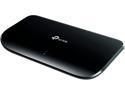
TP-Link 8 Port Gigabit Ethernet Network Switch | Plug and Play | Desktop or Wall-Mount | Plastic Case Ethernet Splitter | Fanless | Traffic Optimization | Unmanaged (TL-SG1008D)
Pros: Gigabit Cheap
Cons: No PoE Unmanaged Isn't magical.
Overall Review: I bought this switch so I could have 1000Mbps connections for all my PCs in my network. I have it plugged into my Cisco ASA 5505, which only has 100Mbps ports. Due to this configuration I am able to have connectivity between PCs on my LAN at 1000Mbps and connections to the cable modem are bottlenecked by the ASA's port speed (which isn't really a problem, since I only have 35Mbps internet anyway). I can't dock it any eggs though. I can't really expect a PoE, managed, gigabit switch anywhere near the price I paid for this. Someday I'll have all this, but until that day comes it's either this, or several hundred dollars (at the very least) for something that does what I need. I'll get by for now...but a man can dream.
12/27/2012See more detail
Finicky, but functional
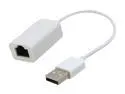
SYBA SY-ADA24024 USB to RJ-45 10/100Mbs Base-T Mini Ethernet Adapter for Travelers
Pros: It works, sorta. It's inexpensive.
Cons: Only 100Mbps, only USB 2.0
Overall Review: I have ordered two of these. On both of them I noticed that some plugs fit fine and others do not lock in at all. One of them uses the opposite cabling from what you would expect and it does not appear to be auto-MDX compatible (in other words, I have noticed I have had to use a crossover cable where a straight-cable should be used; or a straight cable where a crossover should be used) That being said, it works, I can always make an extra cable, and I have this, a straight cable, a crossover cable, and a crossover adapter in my dispatch bag, which all fit, so in a pinch I always have what I need.
12/27/2012See more detail
A solid case at a great price point
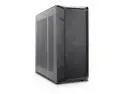
Rosewill Helium NAS ATX Mid Tower Computer Case, Mesh Panel, 4x 140mm PWM Fan, Ideal for DIY NAS, media servers, or small business applications - Black
Pros: - Construction Quality - Wire Management - Airflow
Cons: The drive bay design does not allow for 3.5" SAS drives with many SFF-8482 connectors, with the drives installed in the correct orientation (label-side-up, connectors facing "outboard" (the backside, looking at mobo)...there will not be enough clearance for the side-pandls to go back on. You can, however, install 4x 3.5" SAS drives in the lower slot of each bay, facing "inboard", label-side-down, with plenty of clearance for SFF-8482 connection. This should allow for 3 screws per DRIVE. 3.5" SAS Drives could also be installed label-side-up in the top slot, but only one screw per side will be accessible. I think this is a minor issue, and probably an "edge case" (pardon the pun), and doesn't merit docking eggs.
Overall Review: This was a NAS of Thesius. Started off intending to repurpose equipment and get a secondhand HBA and drives and...well...things got out of hand. Realized my board didn't have the lanes for the HBA and NICs. So bought a new board...but then realized I didn't have a case that fit both the board and the drives. I'm quite glad I could get such a well built and well-thought-out case, especially at this price-point. It may not be as tiny or aesthetically pleasing as some of the more expensive cases, but at the end of the day, the "S" in "NAS" is for "server". This is not a piece of furniture...I'll chose function over form here, any day. And that's not to say this isn't a sleek, good looking case. It is. It absolutely has a professional, "this is an important piece of technology" look to it.
2/6/2026See more detail
It worked...for a year.
OEM Frigidaire Part# 807545704 Console Assembly
Pros: Allowed me run 364 loads of dishes without failing.
Cons: Failed in less than a year.
Overall Review: What a hunk of junk. Dishwasher isn't even 4 years old and it's already used up two control boards. This one died one year, to the date from when I ordered it.
6/8/2017See more detail
Works well, has media controls
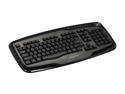
GIGABYTE GK-K6800 Glossy Black 103 Normal Keys 14 Function Keys USB Wired Standard Professional Multimedia Keyboard
Pros: - Multimedia Controls - Holds up to my typing and eating habits
Cons: - None
Overall Review: After about a year of regular use, I have had no problems at all with this keyboard. I eat at least 1-2 meals a day at my computer, have hairy arms and dry skin, and type over 100CWPM when I am trying. For the first 8 months of ownership, I also smoked 1-2 packs of cigarettes a day, much of this over the keyboard. None of these factors have lead to any sort of failure or jams in the past year. That's pretty good in my book. Having a jog dial for the volume control is also a nice touch. I prefer this a lot over the standard up/down button controls but the jog dial appears to be a less common feature on keyboards in this price range. I do not take much advantage of the other media controls. Between this keyboard and a Gigabyte mouse that I had also purchased at the same time (which I find comparable to my old MX-518 in button layout and ergonomics, but lighter and cheaper), Gigabyte accessories have really won me over.
12/27/2012See more detail
Good quiet fan
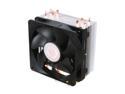
Cooler Master Hyper 212 Plus - CPU Cooler with 4 Direct Contact Heatpipes
Pros: - Easy to install - Option to add a second fan - Quiet enough for my needs
Cons: None
Overall Review: I cannot complain at all about this fan. It has served me well in the year or so that I have had it and hasn't given me one lick of trouble. It comes with clips to install a second fan but I haven't taken advantage of this as the single fan keeps my CPU cool enough for my needs. The fan is also no louder than any of the other fans in my case so its noise is not noticeable at all.
12/27/2012See more detail