
Your Browsing History


Daniel G.
Joined on 09/28/04
0
0

product reviews
- 27
Cute and Fast
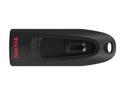
SanDisk 128GB Ultra CZ48 USB 3.0 Flash Drive, Speed Up to 130MB/s (SDCZ48-128G-U46)
Pros: I like the capless design and hole for a lanyard or keyring clip. Shape of the case is a little more stylish than some of the block-shaped competitors. I didn't realize this until I started using it, but the shape is really clever and ergonomically designed. When you slide the USB connector into its open position, the tail end of the unit becomes a convenient tab to push/pull the unit into/from your computer's USB port. The curved shaped of the tab comfortably fits between your thumb and forefinger.
Cons: None yet. Sandisk devices have always been reliable for me, so I don't expect any problems.
Overall Review: Sandisk rates USB 3.0 read speed as "up to 100 MB/s", but it actually does better. Unit comes formatted as xFAT by default, and my CrystalDiskMark test results were: Sequential Read/Write : 114/25 MB/s 512KB Random Read/Write: 51/10 MB/s I bought this 128GB capacity model to store some very large files, so I reformatted it to NTFS. Rerunning CrystalDiskMark produced slightly different results when formatted as NTFS: Sequential Read/Write : 125/12 MB/s 512KB Random Read/Write: 57/1.9 MB/s
11/27/2015See more detail
Should have been better than it is
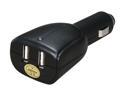
Dolica MS-2USB2000 Black Dual USB DC Car Charger
Pros: As long as it fits your cigarette lighter socket, it charges devices fine.
Cons: Mechanical design flaw prevents charger from staying inserted in some cigarette lighter sockets. Some cars have shallower sockets than others, so the springs that are supposed to be keep the charger in place do not get fully embedded into the socket. It worked fine in my car with a socket 33mm deep, but in my car with a socket 29mm deep the charger kept popping out. There's no reason the plug couldn't have been designed for sockets of varying depths. Also, you can't necessarily *use* your devices while they are charging. My Garmin, Samsung Vibrant, and Sansa MP3 player all thought they were connected to a PC while plugged into this charger. The Sansa didn't care, I could override the Samsung, but the Garmin locked itself in PC Mode and couldn't be used for navigation while plugged into the Dolica.
Overall Review: The OEM Garmin car charger and the OEM Samsung 120V charger both allowed simultaneous usage and charging. The difference is the OEM chargers leave the data lines (USB pins 2-3) open and feed voltage only to pin 1. The Dolica ties pins 2-3 to an internal resistance (I measured 3K ohms) and feeds 2V to the data pins. The signal level on the data pins causes devices to believe they are connected to a PC. I'm not sure why Dolica does this instead of letting the data pins float, but it compromises its use with some devices.
6/10/2011See more detail
Excellent panel, but clumsy stand
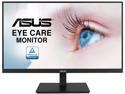
ASUS VA27DQSB 27" 1920 x 1080P Full HD, 75Hz, IPS, Adaptive-Sync, Eye Care, HDMI DisplayPort VGA USB Hub, Frameless, Ergonomic Design, VESA Wall Mountable, Height Adjustable, Built-in Speakers LCD Monitor
Pros: Excellent display quality -- sharp with good colors. No bad pixels. VGA+DP+HDMI input jacks. DP and HDMI cables included in the box. Bezel-less design on three sides helps the display look sleek and not as large as it is. Built-in speakers -- which are by no stretch of the imagination hifi quality, but they're good enough to hear Windows' ubiquitous beeps and dings. If this is being used in an office environment, you don't need hifi speakers anyway, and it's a lot cleaner to have them built-in so you can avoid having to clutter your work surface with separate speakers. Even if you don't intend it for an office environment right now, it's nice to have the option should you some day choose to re-purpose it.
Cons: The display has some vertical adjustment by sliding it up/down the vertical post, but there is no way to lock it in position. It just uses friction to hold its vertical placement. It wouldn't surprise me if, after time, the mechanism can no longer hold its position and permanently sags to its lowest position. I wish there was a simple locking knob. This has to be one of the most unwieldy monitor stands I've ever encountered. It's very difficult to slide the monitor around your desk to adjust its position. You can't lift under the display bezel because of the aforementioned, un-lockable up/down sliding. You can't lift by the base platform because it's too thin to easily hold. It's difficult to lift by grabbing the vertical post because the display starts tilting up/down, and again, because it starts sliding up/down the post, shifting the center of gravity. And if/when you do get it lifted, it's so front-heavy it's hard to keep it from heavily flopping forward into your lap. It's a nuisance, but I don't want to overemphasize it because once you finally wrestle it into submission, you shouldn't have to deal with it on a regular basis.
Overall Review: The display has two USB2 Type-A jacks on the back (with an included USB A-to-B cable to connect to the computer). However, the jacks face downward from the middle of the back cover, so they're nearly impossible to reach or plug anything into them without flipping the whole monitor onto its face first. These won't be jacks that are more convenient to use for temporarily plugging in a flash drive. OTOH, they work fine for semi-permanently plugging in an external USB webcam. Warning: the label on the shipping box is wrong. It identifies the VA27DQSB as a 1920x1200 TFT monitor. Most people think of TFT as the inferior TN-TFT, which changes color and brightness when viewed off axis. IPS is a superior technology, and does not have those deficiencies. After examination, I confirmed the monitor is indeed a 1920x1080 IPS display, not a 1920x1200 TN-TFT display.
2/18/2021See more detail
It's a cable. And it works.
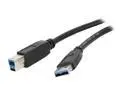
Nippon Labs USB3-6AB 6 ft. USB 3.0 Type A Male to B Male 6ft Cable for Printer and Scanner, Black
Pros: This 6' replacement cable fits perfectly and allows more leeway in device placement.
Overall Review: The stock 3' cable that came with my USB3 device was too short for where I wanted to put it. This cable is a better length. I did a few cursory tests, and USB3 data throughput seems to be the same as with the stock cable.
10/7/2020See more detail
Works. No problems.
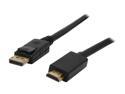
Nippon Labs DP-HDMI-6 6 ft. DisplayPort to HDMI Converter Cable Supporting VR / 3D / 4K, Black - DP to HDMI Adapter - (M/M)
Pros: 6-foot length connects a tower on the floor with a monitor on the desk, while leaving enough slack to keep the cable out of the way of feet.
Overall Review: New computer has only DP outputs, but old monitor has only DVI and HDMI inputs. This fit the bill perfectly. My monitor is 1920x1080, so I did not have a chance to test the cable's signal quality at higher resolutions.
9/18/2020See more detail
Works perfectly ... but overkill for a 3.5" HDD
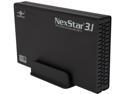
VANTEC NST-370A31-BK Aluminum / Plastic 3.5" Black Standard SATA USB Type-B 3.5” SATA 6 Gb/s to USB 3.1 Gen II Type-A HDD Enclosure
Pros: Vantec cases have a history of manufacturing quality with parts that fit together well. Fanless design for quiet performance. Case material is brushed aluminum, which does not show fingerprints as readily as glossy or plastic cases. Has on/off switch.
Cons: Wish the status light was less obtrusive; it's a bit too bright and can be annoying in a moderately-lit workspace.
Overall Review: Beware newegg seems to mix together reviews for different cases -- even mixing 2.5" cases with 3.5" cases. Make sure you're comparing reviews for the same item. This review is for the NST-370A31 case, designed for 3.5" hard drives. It looks like the case doesn't have a lot of ventilation, but in my tests the case did not get too hot to touch. It gets warm with heavy disk activity, but not too hot to touch -- as has happened with some other cases. Of course, YMMV depending on the thermal characteristics of your chosen hard drive. This case is rated as USB 3.1 Gen 2. However, SATA-III disk drives can't even saturate a USB 3.0 (aka, USB 3.1 Gen 1) connection, though, so this case is actually over-designed. In my tests with a few different disk drives, transfer speed was consistent with a couple other 3.0 cases and docks I have -- and none of which came anywhere close to SSD speeds. SSDs can go faster ... but SSDs are not 3.5" desktop size (they're 2.5" laptop size). So this case is obviously for traditional desktop disk drives. A USB 3.1 Gen 2 case for 2.5" drives may make sense because you might put a SSD in it, but for a 3.5" disk drive you won't need more than a USB 3.0 case. Nevertheless, this case works very well. Being over-designed isn't a negative, but just don't expect it to outperform a USB 3.0 case with any SATA disk drive on the market today.
12/5/2019See more detail
seller reviews
- 5
The solution to rescuing user documents from a non-working laptop with a NVMe drive. Remove the drive from the laptop, pop it in this enclosure, plug it into a working computer's USB port, and copy the data from the NVMe drive to another drive. Worked perfectly.
On-time
Delivery
Product
Accuracy
Customer Service
Satisfactory
1/5/2022See more detail
The solution to rescuing user documents from a non-working laptop with a NVMe drive. Remove the drive from the laptop, pop it in this enclosure, plug it into a working computer's USB port, and copy the data from the NVMe drive to another drive. Worked perfectly.
On-time
Delivery
Product
Accuracy
Customer Service
Satisfactory
1/5/2022See more detail
Third time dealing with this vendor, and all have been excellent.
On-time
Delivery
Product
Accuracy
Customer Service
Satisfactory
12/14/2017See more detail