







Specification:
Model: 90V7W, Battery Type: Lithium polymer, Cell: 3 Cells, Voltage: 7.6V, Capacity: 56Wh, Condition: 100% New from Manufacturer, Grade A Cell
In order to avoid your buying mistakes, please check your original battery model before purchasing.
Attention:
NOT fit for Dell XPS 13-9360 Series and Dell XPS 13-9370 Series
There are 2 batteries(PW23Y - 7.6V/60Wh/4Cells, DXGH8 - 7.6V/52Wh/4Cells),There are similar to this one, but they are not compatible.
- Compatible Part Number:
90V7W JD25G 5K9CP 05K9CP JHXPY 0N7T6 0DRRP 9OV7W DIN02 RWT1R 0JHXPY P54G P54G001 P54G002
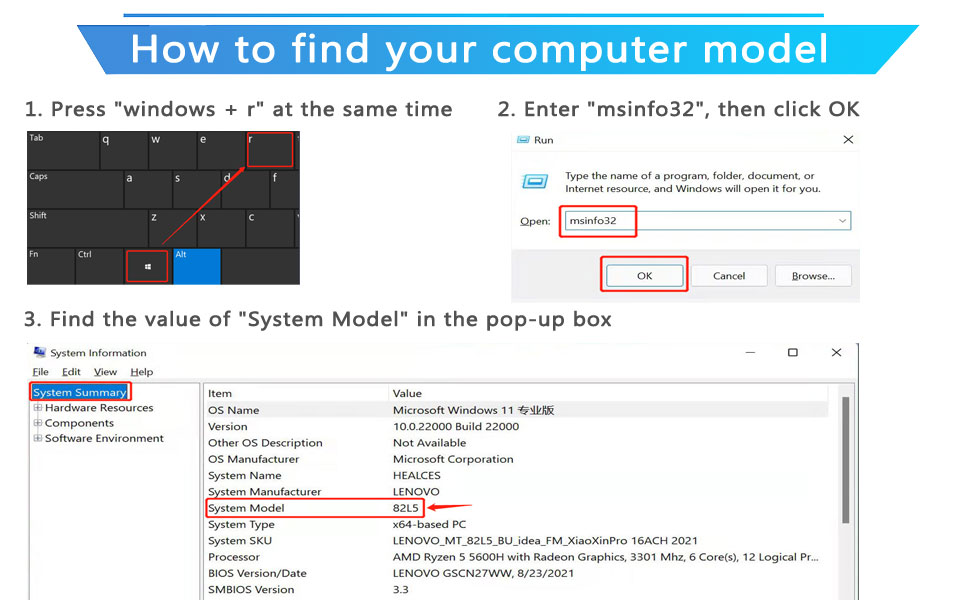
- Compatible with HP Laptop Models:(Use "Ctrl"+"F" to find your laptop model)
- Dell XPS 13-9350 Series
- 13-9350-D1508, 13-9350-D1508G, 13-9350-D1608, 13-9350-D1608T, 13-9350-D1609, 13-9350-D1708
- 13-9350-D1708A, 13-9350-D1708G, 13-9350-D1808T ,13-9350-D1808TG, 13-9350-D2508, 13-9350-D2608T
- 13-9350-D2708, 13-9350-D2708A, 13-9350-D2808T, 13-9350-D2808TG, 13-9350-D3608G, 13-9350-D3708
- 13-9350-D3708G, 13-9350-D3808T, 13-9350-D3808TG, 13-9350-D4505, 13-9350-D4508, 13-9350-D4708, 13-9350-D4708G
- Dell XPS 13D-9343 Series
- 13D-9343-1501, 13D-9343-1508
- 13D-9343-160, 13D-9343-1608T
- 13D-9343-170, 13D-9343-1708
- 13D-9343-180, 13D-9343-1808T
- 13D-9343-350, 13D-9343-3508
- 13D-9343-370, 13D-9343-3708
- 13D-9343-3708A, 13D-9343-5508, 13D-9343-5708
- 13D-9343-5508G, 13D-9343-5608T, 13D-9343-5808T
- 90V7W Battery care instructions:
1. Discharge the new battery use to 5%(not to 0%) and then charge to 95%, and cycle 3-4 times.
2. Do not disassemble, crush or puncture. Do not dispose of in fire or water.
3. After the battery is exhausted, please charge it in time. If it is not charged for a long time, the battery may be damaged.
4. If the battery is not used for a long time and needs to be stored above 70%, the storage time should not exceed 3 months.
5. If you use the charger frequently, please use the battery power regularly, and use it more than once a week.
6. Please use the original charger or famous brand charger, inferior charger will affect the normal charging of the battery.
7. Regularly clean the fan dust, increase the heat dissipation effect, reduce the power consumption, and effectively extend the battery life.
8. When using the battery, care should be taken to prevent exposure and moisture.


1. Unplug all external devices from the laptop, then remove your laptop back cover.
2.Disconnect the old battery, remove the screw with a screwdriver and save it, remove the old battery, and press and hold the laptop's power button for about 10-15 seconds (In order to release the remaining power inside the laptop).
3. Put the new battery into the battery slot, tighten the screws, and connect the cable.
4. Connect the AC adapter and check if your machine can detect the battery again.