




 here!
here!
I’m your shopping assistant for PC builds, upgrades, and everything tech.
Got questions? Ask away!
Start a conversation
here!
I’m your shopping assistant for PC builds, upgrades, and everything tech.
Got questions? Ask away!
Start a conversation Top Rated
 Hot Seller




Any questions? Ask CelesteSM will help you find out quickly.
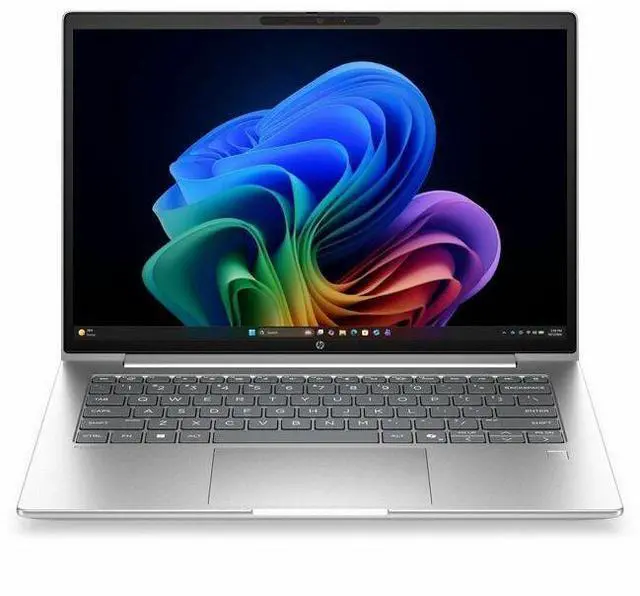
The HP ProBook 4 G2i 14-inch Copilot+ PC is a business-ready laptop with a WUXGA IPS display, Intel Core Ultra 7 355 processor, 16GB memory, and 512GB SSD, making it well suited for professionals, students, and home users who want a portable Windows 11 Pro system for productivity, video calls, and everyday multitasking.
| Attribute | Value |
|---|---|
| Best For | Home, personal, business, and student use on a compact 14-inch notebook designed for everyday productivity and on-the-go work |
| Processor And Core Count | Intel Core Ultra 7 (model 355) processor, 8 cores, up to 4.7 GHz boost, 12 MB L3 cache |
| Memory Configuration | 16 GB installed DDR5 memory (dual-slot design with 2 RAM slots), supports up to 32 GB |
| Storage And Expansion | 512 GB solid-state storage in M.2 form factor (M.2 SSD) |
| Display Spec | 14.0-inch WUXGA (1920 x 1200) IPS LCD, up to 300 nit brightness, ~62% sRGB color gamut |
| Graphics And Video | Integrated Intel graphics (integrated video processor), uses system DDR5 memory for graphics |
| High Speed I O | 1 HDMI port, four total USB ports including USB-C, no Thunderbolt ports reported |
| Wired And Wireless Networking | Wi‑Fi 7 wireless and Bluetooth for connectivity |
| Webcam And Privacy | Front-facing webcam and built-in fingerprint reader for biometric sign-in |
| Battery And Power | Integrated lithium polymer battery (3 cells), 4000 mAh, batteries included and installed |
| Dimensions And Weight | Product dimensions approx. 0.69 x 12.5 x 8.8 inches, item weight about 3.06 lb (3.1 lb display); package dimensions 17.5 x 10.8 x 2.4 inches, package weight 4.45 lb |
| Model Identifiers | HP (Hewlett Packard) ProBook 4 G2i model DG4U6UT#ABA, 2026 model year, United States / North America version |
| Special Features | Pike Silver finish; includes power adapter; display treated with low blue light and anti-glare coating |
Q: Should I buy the HP ProBook 4 G2i 14 or a Dell Latitude 5450?
A: Choose the HP ProBook 4 G2i 14 if you want a newer Copilot+ business laptop platform with Intel Core Ultra 7 355, a 14-inch 1920x1200 display, and built-in NPU support aimed at on-device AI workflows. Choose the Dell Latitude 5450 if you prefer a more established Latitude platform and wider availability in Core Ultra 5 U- and H-series configurations. For everyday office work, meetings, browser-heavy use, and Windows 11 Pro deployment, these two models sit in the same business-laptop class. The HP is the better fit when your buying decision centers on newer AI-PC positioning; the Dell is the safer fit when your priority is sticking with the Latitude ecosystem and its familiar enterprise options.
Q: Is the Core Ultra 7 355 version worth it over the lower-tier Core Ultra 5 325 configuration?
A: Buy this Core Ultra 7 355 configuration if you expect longer-term use, heavier multitasking, or you specifically want the higher-tier processor within the same ProBook 4 G2i chassis. Buy the Core Ultra 5 325 version if your workload is mostly email, Office, web apps, video calls, and light business productivity. Because HP offers both CPUs in otherwise similar 14-inch ProBook 4 G2i configurations, this is mainly a processor-tier decision rather than a design decision. The Ultra 7 model is the more forward-looking choice; the Ultra 5 model is the value-focused choice.
Q: How does the HP ProBook 4 G2i 14 compare with the previous ProBook 440 generation?
A: Choose the ProBook 4 G2i 14 if you want HP's newer platform direction: Copilot+ branding, newer Intel Core Ultra 300-series options, and a clearer focus on AI-assisted business use. Choose the earlier ProBook 440 generation if you are comparing discounted inventory and your needs are standard productivity rather than platform longevity. Reviews of the ProBook 440 G11 describe it as a compact business laptop with good portability, solid office performance, and strong battery behavior, so the older model still makes sense when price is the deciding factor. The newer G2i model is the better upgrade when you want the latest business-platform features and a more current processor generation.
Q: Should I get this ProBook 4 G2i 14 for portability or move up to a more performance-focused 14-inch laptop?
A: Get the ProBook 4 G2i 14 if your priority is a balanced 14-inch business laptop for travel, office work, video meetings, and general productivity. Move up to a performance-first 14-inch model only if your workflow regularly includes sustained heavy compute tasks, development workloads, or creation apps that benefit from higher-power H-series chips or dedicated graphics. This HP configuration uses integrated graphics and a mainstream 16 GB / 512 GB setup, which aligns better with mobile professional use than with workstation-style workloads. In short: choose the ProBook for balanced portability and business use, and choose a higher-performance class only when your software can clearly use the extra power.
Q: How does the HP ProBook 4 G2i 14 compare with a Lenovo ThinkPad E14 Gen 6?
A: Choose the HP ProBook 4 G2i 14 if you want HP's newer Copilot+ positioning and a current Intel Core Ultra 7 355 configuration in a 14-inch business chassis. Choose the ThinkPad E14 Gen 6 if you prefer Lenovo's ThinkPad keyboard and serviceable entry-business platform, especially in common Core Ultra 5 or Ultra 7 U-series trims. Both target practical business productivity rather than premium mobile-workstation use. The HP makes more sense when AI-PC positioning and newer platform generation are part of the purchase decision; the ThinkPad E14 Gen 6 makes more sense when your preference is the ThinkPad ecosystem and familiar typing experience.
Q: Is this a good laptop for meetings, note-taking, and everyday office work?
A: Yes. Based on the listed specs, this model fits standard productivity use well: a Core Ultra 7 processor, 16GB RAM, and a 512GB SSD are appropriate for web apps, documents, spreadsheets, video calls, and multitasking. The built-in webcam, Bluetooth, Windows 11 Pro, and 14-inch 1920 x 1200 IPS display also match the features buyers repeatedly ask about for remote work and office use. It is less suitable if your main work is gaming, 3D work, or heavy GPU-based creation, because it uses integrated graphics.
Q: Is it worth buying as a travel work laptop?
A: For travel work, yes if your priority is a compact 14-inch business laptop for documents, meetings, and browser-based work. The screen size, webcam, Bluetooth, SSD storage, and HDMI output make it practical for working in hotels, client sites, and shared offices. The main unknown is battery life, which is often a deciding factor for travel buyers and is not provided in the product data, so it is best to verify that before buying if unplugged use matters a lot.
Q: Can it handle Zoom, Teams, and normal multitasking without feeling underpowered?
A: Yes for normal business use. A 16GB memory and 512GB SSD configuration is in the range commonly recommended for productivity, and the product listing includes a front webcam and Bluetooth, which are relevant for video calls and headset use. It should comfortably handle conferencing, email, web tabs, Office apps, and light multitasking. If you regularly run large media projects or GPU-heavy software, this is not the ideal fit because it has integrated graphics rather than a dedicated GPU.
Q: Who is this laptop best suited for?
A: This model is best suited for professionals, students, and home-office users who need a business-style 14-inch Windows laptop for writing, spreadsheets, meetings, research, and general productivity. It is a stronger match for office and remote-work tasks than for pen input or tablet-style note-taking, because the listing says it is non-touch. Buyers who want a convertible for handwritten notes or creative touch workflows should look at a 2-in-1 instead.
Q: What are the main trade-offs versus a 2-in-1 or creator-focused laptop?
A: The trade-off is focus. This HP ProBook configuration is better aligned with practical office productivity: standard clamshell design, non-touch display, integrated graphics, HDMI, webcam, and business-oriented Windows 11 Pro. A 2-in-1 gives more flexibility for handwritten notes and tablet use, while a creator-focused model may offer a higher-end display or dedicated graphics for editing and design. In return, this ProBook should be the more straightforward choice for buyers who mainly need work, meetings, and general business software.
Q: Is the HP ProBook 4 G2i 14 a good fit for everyday work and travel?
A: Yes, it looks best suited to mainstream work use: web apps, Office, video calls, documents, and general multitasking. The 14-inch size, 1920x1200 display, 16 GB RAM, 512 GB SSD, integrated graphics, webcam, Bluetooth, HDMI, and Windows 11 Pro all align with what buyers in Reddit discussions typically want from a portable business laptop. The main trade-off is that this configuration is not aimed at gaming or GPU-heavy creative work.
Q: Who is this laptop suitable for, and who should skip it?
A: It is a sensible option for professionals, students, and home users who need a compact Windows laptop for productivity, meetings, browsing, and note-taking. Buyers who need touch input, pen support, or stronger graphics performance should skip this model, because this listing is non-touch and uses integrated graphics.
Q: Is 16 GB RAM and a 512 GB SSD enough for this kind of laptop?
A: For typical business and personal use, yes. Reddit discussions around current work laptops repeatedly treat 16 GB RAM and a 512 GB SSD as a practical baseline for multitasking, office apps, browser-heavy use, and video meetings. If you expect large local media libraries, virtual machines, or heavier creative workloads, you may want more memory or storage.
Q: Is the Copilot+ branding a real reason to buy this laptop?
A: Only if you specifically want Windows AI features and prefer having newer NPU-capable hardware. In community discussion, Copilot+ is usually treated as a secondary buying factor rather than the main reason to choose a laptop. For most buyers, the stronger decision factors are still size, RAM, storage, display, keyboard, ports, and overall price.
Q: What are the main trade-offs of choosing this HP ProBook 4 G2i 14 configuration?
A: The main trade-offs are straightforward: it prioritizes portability and general productivity over premium extras. This listing does not include a touchscreen, and integrated graphics limit it for gaming, 3D work, or heavier video production. It makes more sense as a practical work laptop than as a high-performance or creator-focused machine.


