• $1,449.99
  • Free 15-day Returns
  • Login to Make an Offer
    Sold by Newegg

    Shipped by Newegg

    Price alert

    Best Sellers

    Top Rated
    4.5 (17,989 total ratings)
    • $1,514.78
    • + FREE SHIPPING
    Top Rated
    4.4 (8,586 total ratings)
    • $1,523.64
    • + FREE SHIPPING
    Top Rated
    4.5 (9,017 total ratings)
    • $1,538.95
    • + FREE SHIPPING
    Shop it at NeweggBusiness.

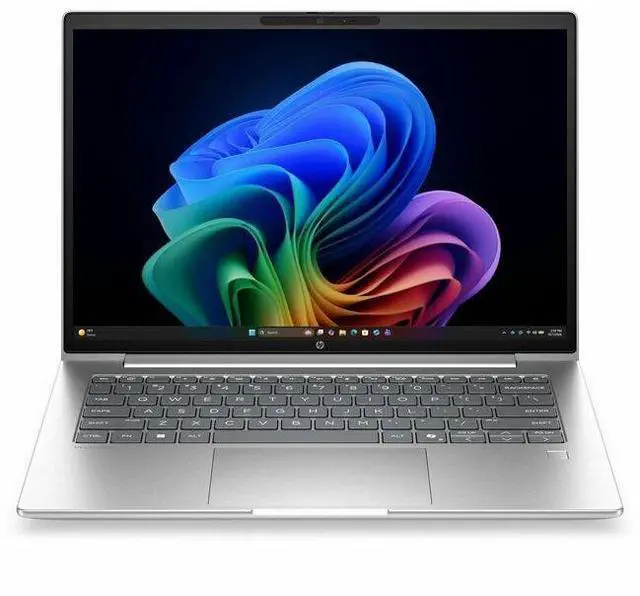
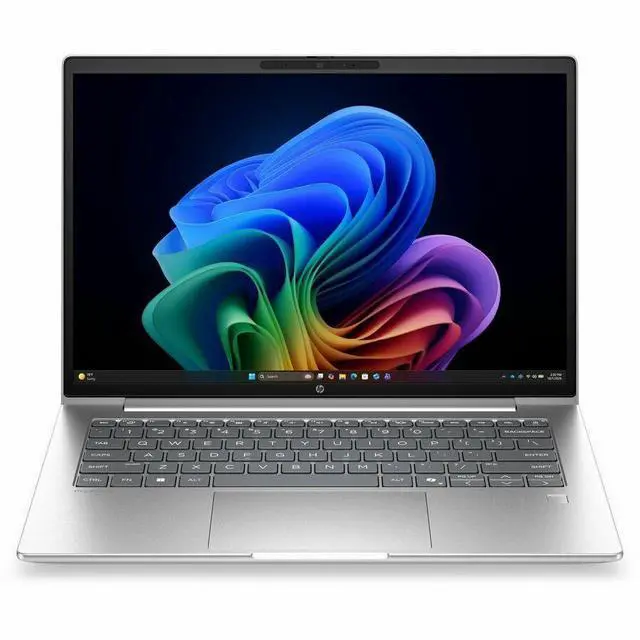
    HP ProBook 4 G2a 14" Notebook - WUXGA - AMD Ryzen AI 7 445 - 16 GB - 512 GB SSD - English Keyboard - Pike Silver - AMD Chip - 1920 x 1200 - Windows 11 Pro - AMD - In-plane Switching

    • WUXGA
    • AMD Ryzen AI 7 Ryzen AI 400 445
    • 16 GB
    • 512 GB SSD
    • English Keyboard
    • Pike Silver
    • AMD Chip
    • 1920 x 1200
    • Windows 11 Pro
    • AMD
    • In-plane Switching (IPS) Technology
    • Front Camera/Webcam
    • IEEE 802
    +
    +
    Overview
    Specs
    Reviews
    See all Q & A
    avatar

    Any questions? Our AI mode will help you find out quickly.

    14 PB4G2a14NGAI RAI7445 16G 51

    Warranty & Returns

    Warranty, Returns, And Additional Information

    Warranty

    • Limited Warranty period (parts): 1 year
    • Limited Warranty period (labor): 1 year
    • Read full details

    Return Policies

    Manufacturer Contact Info

    LOADING...
    LOADING...

    Learn about this product

    The HP ProBook 4 G2a is a 14-inch Windows 11 Pro laptop with a WUXGA IPS display, AMD Ryzen AI 7 processor, 16GB memory, and 256GB SSD, making it a practical fit for professionals, students, and home users who want everyday productivity, video calls, and portable work in a compact design.

    Recommended For

    • Hybrid office workers who spend most of the day in browsers, Teams/Zoom, email, docs, and spreadsheets, and want a 14-inch business laptop with Windows 11 Pro, security positioning, and enough battery for a normal workday.
    • Small-business buyers or managed users who specifically want a mainstream business notebook rather than a consumer model, especially if Windows Pro features, fleet consistency, and vendor security messaging matter more than entertainment extras.
    • Users who want a portable work machine for frequent commuting, client visits, or campus-to-office movement, where a 14-inch 16:10 display and all-day productivity matter more than having a large screen or high-end graphics.
    • Productivity-focused users who occasionally do light photo edits, short video edits, or simple creative tasks, but whose main workload is still office apps and multitasking rather than GPU-heavy production.

    Real-World Use Scenarios

    • Working in Microsoft 365, Slack, browser tabs, and video meetings at the same time is the main fit here; users should expect smooth day-to-day office work and enough headroom for multitasking, but this is still an integrated-graphics business laptop rather than a workstation.
    • For hybrid work such as Zoom or Teams calls, document sharing, and webcam use on the go, the likely experience is straightforward and business-oriented: built-in webcam, modern wireless support, and a 14-inch 1920x1200 display suit remote meetings and travel better than heavy creative workloads.
    • Using Windows 11 AI features such as on-device background effects, live captions, or Copilot+ style tasks is a realistic scenario; users should expect support for local AI features, but the biggest day-to-day benefit is convenience in meetings and productivity rather than dramatic speed gains in regular apps.
    • Light photo edits, simple Canva work, and short 1080p video trims are reasonable uses; the likely result is workable performance for occasional content tasks, while larger projects, heavier effects, or frequent exports will feel limited by the Radeon 840M integrated graphics and entry-level SSD capacity.
    • Students and mobile professionals using it for note-taking, research, streaming, and cloud-based apps should find it well matched to everyday portable computing, but the 256GB SSD means local storage can fill quickly if they keep large media files offline.
    • Casual or older games, emulator use, and low-settings 1080p gaming are possible in limited form, but buyers should expect this to be a secondary use case; community discussion and benchmark reporting around the same Ryzen AI 7 445 and Radeon 840M point to modest graphics results compared with stronger integrated GPUs.

    Spec Summary

    AttributeValue
    Best ForEveryday home/personal use and business/student workflows on a 14" Windows 11 Pro notebook powered by an AMD Ryzen AI 7 processor
    Processor And Core CountAMD Ryzen AI 7 (model 445) — 6 cores, up to 4.6 GHz maximum turbo, 8 MB L3 cache
    Memory Configuration16 GB installed DDR5 RAM, 2 memory slots, supports up to 64 GB
    Storage And ExpansionM.2 solid-state storage (M.2 form factor); reported capacities differ across attributes (256 GB and 512 GB are both listed)
    Display Spec14.0" WUXGA (1920 x 1200) IPS LCD, max brightness 300 nit, color gamut ~62 (sRGB); anti-glare and low blue light features
    Graphics And VideoIntegrated AMD Radeon 840M graphics, graphics memory type listed as DDR5 SDRAM; video output via HDMI
    Ports And Connectivity1x HDMI; 4 total USB ports including USB-C; no Thunderbolt ports reported; hardware interfaces include USB, HDMI, USB-C and Bluetooth
    Wireless And NetworkingWi‑Fi 6E and Bluetooth wireless connectivity; connectivity technologies listed as Wi‑Fi, Bluetooth, HDMI and USB
    Webcam And SecurityFront-facing webcam present; fingerprint reader for biometric authentication
    Battery And PowerInstalled lithium‑polymer battery (3 cells) with 4912 mAh energy content; battery included and packed with equipment; battery weight listed as 0.46 lb
    Physical And DimensionsNotebook chassis size reported as 0.69 x 12.5 x 8.8 inches; item weight ~3.1 lb; package dimensions 17.3 x 10.7 x 2.3 inches and package weight 4.5 lb; color Pike Silver
    Model IdentifiersHP ProBook 4 G2a, model DH8D7UT#ABA (2026), manufacturer Hewlett Packard, targeted for United States/North America
    Other FeaturesNo touchscreen; optical drive not available; listed extras include low blue light and anti‑glare coating

    Reference Q&A

    Q: Should I buy this HP ProBook 4 G2a or a Ryzen AI 5 business laptop?

    A: Choose this ProBook 4 G2a when you want HP’s newer ProBook platform with Ryzen AI 400 branding, Windows 11 Pro, and a 14-inch 16:10 business-laptop design. For real-world performance, the upgrade from Ryzen AI 5 340 to Ryzen AI 7 445 is usually modest because both chips use Radeon 840M graphics and 50 NPU TOPS; the main difference is CPU tuning and platform generation rather than a large graphics jump. If your workload is mostly Office, web, video calls, and AI-assisted productivity, a lower-tier Ryzen AI 5 model can be the better value. This ProBook makes more sense if you prefer the ProBook feature set and want some extra CPU headroom without moving to a heavier performance class.

    Q: Is this HP ProBook 4 G2a worth choosing over a higher-tier Ryzen AI 7 350 or Ryzen AI 7 450 laptop?

    A: Pick this ProBook if you want a business-first 14-inch notebook for productivity, meetings, and AI PC features, and you do not need a stronger integrated GPU. Step up to a Ryzen AI 7 350 or Ryzen AI 7 450 system if you expect heavier multitasking, more sustained compute work, or more graphics-sensitive use, because those higher-tier chips are commonly paired with Radeon 860M graphics instead of Radeon 840M. In practice, that higher tier is the better fit for light creator work or lighter gaming, while this ProBook is the better fit for mainstream business use and portability.

    Q: How does this HP ProBook 4 G2a compare with an Intel Core Ultra business laptop?

    A: This ProBook is the better choice if you want an AMD-based Copilot+ style business laptop with a 50 TOPS NPU and integrated Radeon 840M graphics. An Intel Core Ultra 5 226V class system is the better alternative when Thunderbolt 4 support or a specific Intel-based fleet standard matters more. For everyday office work, both classes are aimed at premium productivity and AI-assisted workflows. The practical decision usually comes down to platform preference, port requirements, and whether you value AMD’s Radeon integrated graphics path or Intel’s Thunderbolt-centered ecosystem.

    Q: Is this ProBook better for portability or should I get a performance-first laptop instead?

    A: Choose this ProBook if your priority is a lighter 14-inch business laptop for travel, meetings, browser-heavy work, and standard productivity. Its integrated Radeon 840M graphics and 16 GB memory are appropriate for mainstream business use, but a performance-first laptop is the better choice if you expect gaming, heavier media work, or larger local AI workloads. In short, this model is better aligned with mobility and office productivity, while a higher-power laptop with Radeon 860M-class graphics or dedicated graphics is the better fit for performance-led use.

    Q: Is this a good laptop for office work, video meetings, and everyday business tasks?

    A: Yes. This configuration is well suited to Microsoft Office, web apps, email, video calls, and general multitasking. The 16GB of memory, SSD storage, 14-inch 1920 x 1200 IPS display, webcam, Bluetooth, and Windows 11 Pro match the feature set buyers repeatedly ask about for work laptops. The main limitation is not speed for office use, but capacity: 256GB of storage is enough for typical documents and cloud-based work, but may feel tight if you keep large local files.

    Q: Is it worth buying as a travel work laptop?

    A: For travel-focused work, this looks like a practical choice if your priorities are portability, a business-friendly 14-inch size, and standard productivity features rather than premium extras. The 14-inch WUXGA screen, integrated webcam, Bluetooth, HDMI, and Windows 11 Pro make it suitable for working on the go. The trade-off is that this listing does not indicate touch support or higher storage, so it is better for conventional business travel use than for users who want a more premium, flexible, or media-heavy setup.

    Q: Can it handle an external monitor setup for desk work?

    A: Yes for basic desk setups. This model includes an HDMI port, so it should connect directly to one external monitor without extra hardware. That makes it a reasonable fit for home office or hot-desk use. If you need multiple external displays, a dock or adapter may still be required, which is a common question on competitor retail Q&A pages for similar laptops.

    Q: Who is this laptop best suited for?

    A: It is best suited for users who want a straightforward business or personal productivity laptop: remote workers, students in non-graphics-heavy programs, managers, sales staff, and anyone mainly using browser-based tools, documents, spreadsheets, email, and meetings. It is less ideal for buyers who need a touchscreen, lots of local storage, or stronger graphics for gaming or creative workloads.

    Q: What are the main trade-offs versus a similar 14-inch Ryzen business laptop with 512GB storage or touch support?

    A: The main advantage of this HP configuration is that it covers the core business checklist: 14-inch WUXGA IPS display, 16GB RAM, SSD, webcam, HDMI, Bluetooth, and Windows 11 Pro. The trade-offs are the smaller 256GB SSD and no touchscreen. Compared with similar 14-inch business models that offer 512GB storage or touch, this model is the better fit for users who mainly want standard work performance, while those needing more local files, more flexibility, or more premium features may prefer a higher-spec alternative.

    Q: Is this HP ProBook 14 a good fit for everyday work and school use?

    A: Yes for general productivity. Based on the listed specs, it is well suited to web work, documents, video calls, spreadsheets, note-taking, and typical multitasking. The 14-inch 1920x1200 IPS display is practical for work, 16GB RAM is enough for mainstream use, and Windows 11 Pro fits office-oriented use. The main limit is storage: 256GB SSD is usable, but it can feel small if you keep lots of files or apps locally.

    Q: Is it worth buying if I want a practical 14-inch laptop for work and travel?

    A: It can be worth buying if your priority is a compact business-style laptop for productivity rather than gaming or premium features. The 14-inch size, integrated graphics, webcam, HDMI, Bluetooth, and Windows 11 Pro make it a sensible work-and-travel option. The trade-offs are that this configuration is basic in storage capacity and does not appear aimed at touch, creator, or gaming use.

    Q: Can this replace an older home or office laptop?

    A: Yes, for most users coming from an older mainstream laptop, this is a reasonable replacement for everyday office and personal computing. It has a modern 16GB memory setup, SSD storage, a webcam, and a 1920x1200 display, which are the basics many buyers discuss when comparing ProBook models. It is a stronger replacement for office work than for users who need large local storage, dedicated graphics, or a touchscreen.

    Q: Is this a good choice for light gaming or graphics-heavy work?

    A: Only for light graphics use. The listed Radeon 840M is integrated graphics, so this system is better for everyday tasks and lighter visual workloads than for demanding games, 3D work, or heavier creative apps. If gaming performance or sustained graphics performance is a buying priority, a laptop with stronger integrated graphics or a dedicated GPU would be a safer choice.

    Q: What are the main trade-offs of this configuration?

    A: The biggest trade-offs are storage and feature ceiling. This model looks balanced for routine productivity, but 256GB SSD is modest, there is no touchscreen, and the integrated graphics position it below creator or gaming laptops. In short: it fits users who want a straightforward work laptop, but it is less ideal for large media libraries, heavier graphics workloads, or buyers expecting more premium extras.