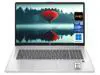
Acer Aspire Go 15 AI Ready Laptop - Intel Core i9-13900H - 16GB RAM - 512GB SSD - Windows 11 Home (NX.JSDAA.001)
  •  
  • $789.99 
  • Save: 12%
  • $898.99
  • Free 30-day Returns
  • Login to Make an Offer
    Sold by Newegg

    Shipped by Newegg

    Price alert

    Best Sellers

    Top Rated
    4.5 (9,016 total ratings)
    • $934.22
    • + FREE SHIPPING
    Top Rated
    4.4 (8,586 total ratings)
    • $937.83
    Shop it at NeweggBusiness.

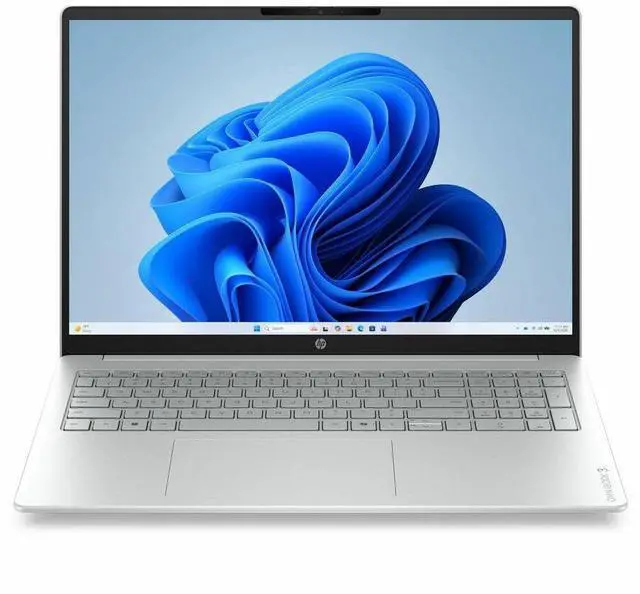
    HP 16" R5 230 8GB 512GB NonTouch Model D4QG8UA#ABA

    • Brand HP,
    • Model D4QG8UA#ABA
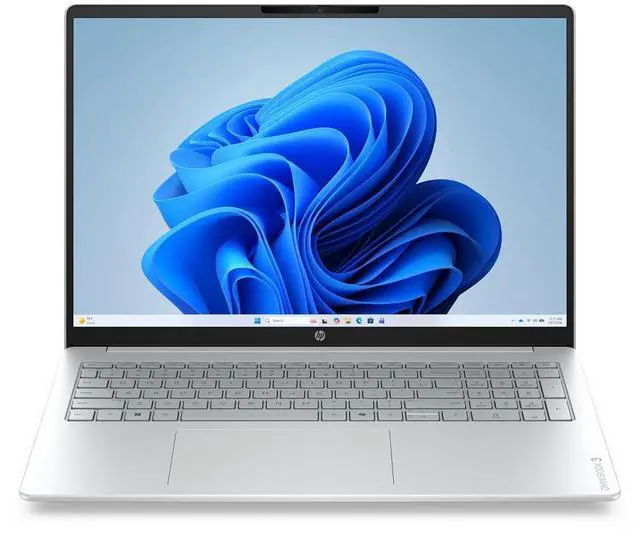
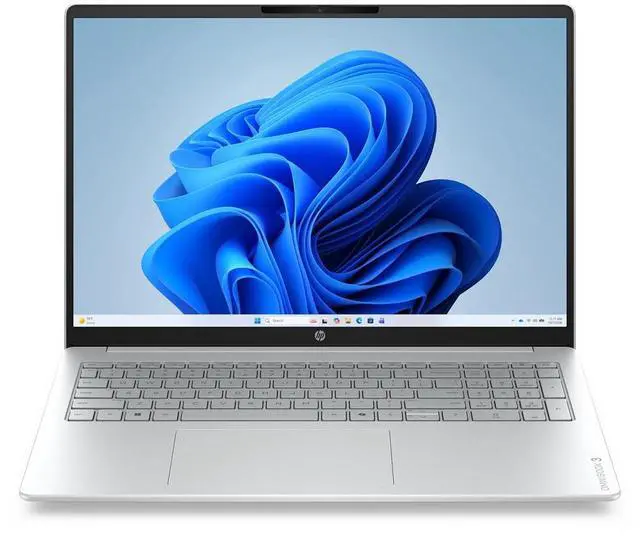
    • HP Omnibook 3; Ryzen 5 230 (6C) 16 NPU TOPs; AMD Radeon 740M G Graphics; 8GB DDR5; 16.0 2K (1920x1200) Antiglare IPS 300 nits; Non-Touch; 512GB PCIe Gen4 Value; Cloud AI; Wi-Fi 6 + BT 5.4 ax 2x2; FHD Webcam; Dual array digital mics; USB C; Microedge Backlit HD Audio 65 Watt USB-C GaN 4 Cell 68Whr Fast Charge Windows 11 Home 1 Year Warranty; Glacier Silver.
    +
    +
    Overview
    Specs
    Reviews
    See all Q & A
    avatar

    Any questions? Our AI mode will help you find out quickly.

    16" R5 230 8GB 512GB NonTouch

    Warranty & Returns

    Warranty, Returns, And Additional Information

    Warranty

    • Limited Warranty period (parts): 1 year
    • Limited Warranty period (labor): 1 year
    • Read full details

    Return Policies

    Manufacturer Contact Info

    LOADING...
    LOADING...

    Learn about this product

    The HP OmniBook 3 16 is a 16-inch Windows laptop built for everyday productivity, schoolwork, and web-based multitasking, with a Ryzen 5 230 processor, 8GB DDR5 memory, and 512GB PCIe Gen4 storage that fit users who want a large-screen home or campus laptop.

    Recommended For

    • Students or home users who mostly live in a browser and Office apps, but want a larger 16-inch screen for split-screen homework, documents, and video calls. HP positions the OmniBook 3 as a mainstream Windows laptop, and review coverage consistently frames the 16-inch model as a budget productivity machine rather than a specialty device.
    • Remote workers who care more about battery life, webcam use, and day-to-day office responsiveness than premium materials or workstation-class speed. Across reviews, the OmniBook 3 line is repeatedly highlighted for long runtime, practical productivity focus, and video-call basics.
    • Shoppers comparing sale-priced big-screen laptops for everyday use, especially if they want a numpad, 512GB SSD, and a roomier display without moving up to a premium class. Review coverage repeatedly treats the OmniBook 3 16 as strongest when bought as a value purchase.
    • Users who need a simple Windows laptop for light photo edits, streaming, admin work, and occasional multitasking, but are not planning heavier creative apps. The Ryzen 5 230 configuration provides modern everyday performance, while the overall product positioning stays firmly in mainstream use.

    Real-World Use Scenarios

    • College or office work with many browser tabs, Word, spreadsheets, email, and video streaming should feel fine for everyday productivity, but the 8GB RAM setup is the main limit if the user keeps a lot of apps open at once.
    • Remote classes, Zoom, and everyday video calls are a natural fit: the FHD webcam and dual mics match how reviewers describe the OmniBook 3 as usable for meetings, with clear enough image and voice quality for school and work calls.
    • Watching movies, YouTube, and split-screen browsing on the 16-inch 1920x1200 anti-glare display should be comfortable, especially for users who want a larger screen for home use rather than a smaller travel-first laptop.
    • Commuters or students using it away from an outlet for a workday should get practical battery life for notes, browsing, and streaming, and the 68Wh battery with HP fast charging is better suited to long sessions than quick bursts only.
    • Light photo edits, Canva work, and simple content creation are realistic, but heavier editing or larger multitasking projects will feel constrained sooner because this model pairs entry-level integrated graphics with 8GB of memory.
    • Casual gaming such as esports, older games, and low-settings titles is the realistic ceiling; users expecting modern AAA gaming or consistently smooth high-detail play should look for a stronger GPU and more RAM.

    Spec Summary

    AttributeValue
    Best For16-inch HP laptop suited for general-purpose productivity and everyday use on a larger display
    Display Spec16.0-inch screen — larger display footprint that helps with multitasking and content viewing
    Model IdentifiersBrand: HP

    Reference Q&A

    Q: Should I choose this HP OmniBook 3 16 with Ryzen 5 230 and 8GB RAM, or move up to a 16GB version?

    A: Choose this 8GB / 512GB configuration for web, Office, streaming, schoolwork, and general home use. Move to a 16GB version if you expect heavier multitasking, longer-term ownership, or light gaming on the integrated GPU. That is the more practical upgrade because integrated Radeon graphics use system memory, so extra RAM helps both responsiveness and graphics headroom. HP also sells OmniBook 3 16 configurations with the same Ryzen 5 230 and 16GB memory, which makes this a common same-model comparison rather than a different class of laptop.

    Q: Is this HP OmniBook 3 16 a better fit than a lower-tier 16-inch model with an Athlon and 4GB RAM?

    A: Yes if you want a laptop for everyday use that feels less limited. This OmniBook 3 configuration is the stronger choice for multitasking, browser-heavy use, office work, and basic creative tasks because it moves from an Athlon / 4GB baseline to a 6-core Ryzen 5 platform with DDR5 memory and a larger 512GB SSD. The lower-tier Athlon version still fits very light use, but this Ryzen 5 model is the safer choice for users who want more working room without moving into a premium tier.

    Q: How does this Ryzen 5 230 HP OmniBook 3 compare with a higher-tier Ryzen 5 230 configuration that has Radeon 760M graphics?

    A: If the higher-tier configuration really includes Radeon 760M, choose that version when graphics performance matters more than storage or entry price. AMD positions Ryzen 5 230 with Radeon 760M, and benchmark databases consistently place Radeon 760M above Radeon 740M. That makes the higher-tier version the better fit for light gaming, GPU-accelerated apps, and more headroom over time. This Newegg listing is still the better fit if your priority is mainstream productivity and you want a simpler, lower-commitment configuration.

    Q: Should I buy this 16-inch OmniBook 3, or go with a smaller laptop if portability matters more?

    A: Choose this 16-inch OmniBook 3 if screen space, a roomier keyboard deck, and home or campus desk use matter more than travel convenience. A smaller 14-inch class system is the better choice if you carry your laptop daily and want less bulk. The trade-off is straightforward: this HP model is positioned as a mainstream large-screen laptop, so it makes more sense for productivity-first use than for portability-first buying.

    Q: Is this a good laptop for office work, meetings, and everyday productivity?

    A: Yes for basic to moderate productivity. The 6-core Ryzen 5 processor, 8GB DDR5 memory, 512GB SSD, 16-inch 1920x1200 IPS display, FHD webcam, dual microphones, Wi-Fi 6, and USB-C make it a practical fit for web work, documents, video calls, and multitasking at a normal office level. The main limitation is the 8GB RAM, which is acceptable for light office use but less ideal for heavier multitasking or longer-term headroom.

    Q: Who is this laptop best suited for?

    A: It is best suited for students, home users, and office users who want a large-screen Windows laptop for browsing, documents, streaming, remote meetings, and routine productivity. It is less suitable for buyers who need a touch display, gaming-focused graphics, or higher multitasking capacity out of the box.

    Q: Is 8GB RAM enough, or should I look for a 16GB alternative?

    A: 8GB is enough for lighter workloads such as web browsing, Microsoft 365, note-taking, email, and video calls. If you regularly keep many tabs open, multitask across several apps, or want better longevity, a 16GB model is the safer choice. On similar HP laptops, retail Q&A repeatedly shows memory capacity and upgradeability are common buyer concerns, so this is one of the main decision points for this model.

    Q: Is this worth buying as a travel work laptop?

    A: It can work for travel if you want a larger display for spreadsheets and multitasking, and the 68Wh battery plus USB-C GaN charging are practical advantages. The trade-off is portability: a 16-inch laptop is generally less compact than a 13- or 14-inch model, so it makes more sense for users who travel occasionally but still want a roomy screen.

    Q: What are the main trade-offs versus a similar touchscreen or 16GB model?

    A: The main trade-offs are memory and input features. This HP configuration gives you a large 16-inch 1920x1200 IPS screen, 512GB SSD, modern wireless, and a current Ryzen platform, but it is non-touch and has 8GB RAM. A comparable touchscreen or 16GB alternative is usually better for handwriting, more demanding multitasking, and longer-term flexibility, while this model is the more straightforward choice for standard laptop use.

    Q: Is this HP OmniBook 3 a good buy for everyday work and school use?

    A: Yes for basic productivity. Its 6-core Ryzen processor, 16-inch 1920x1200 IPS display, 512GB SSD, Wi-Fi 6, and FHD webcam fit web work, documents, video calls, and multitasking better than many entry-level laptops. The main trade-off is the 8GB RAM, which is acceptable for light use but limits heavier multitasking and long-term headroom.

    Q: Is 8GB RAM enough on this model, or is that a reason to skip it?

    A: For light browsing, office apps, streaming, and video calls, 8GB can be enough. For heavier multitasking, coding with many apps open, or keeping the laptop for several years, 8GB is the weakest part of this configuration and is the main reason to consider a higher-memory alternative.

    Q: Can this laptop handle light gaming?

    A: It is suitable for light or casual gaming, not demanding modern AAA gaming. The integrated Radeon 740M graphics are fine for older, lighter, or lower-settings games, but this is still a non-gaming laptop with no dedicated GPU.

    Q: Who is this HP 16-inch OmniBook 3 best suited for?

    A: It is best for buyers who want a large-screen laptop for home, study, office work, streaming, and video calls. It makes more sense for general-use buyers than for gamers, creators, or power users, because the 8GB RAM and integrated graphics set clear limits on heavier workloads.

    Q: What are the main trade-offs of choosing this model?

    A: The main advantages are the large 16-inch 1920x1200 display, modern connectivity, USB-C charging, and a usable mainstream Ryzen platform for daily tasks. The main trade-offs are 8GB RAM, integrated graphics, a non-touch display, and a value-tier SSD, so it is a practical budget productivity laptop rather than a high-performance or premium model.