here!
I’m your shopping assistant for PC builds, upgrades, and everything tech.
Got questions? Ask away!
Start a conversation
here!
I’m your shopping assistant for PC builds, upgrades, and everything tech.
Got questions? Ask away!
Start a conversation






Any questions? Ask CelesteSM will help you find out quickly.

Provide a noticeable all round
speed and Performance boost
without stuttering or lag

Bring you closer to the people
and things you love while
giving you a place to think,
express and create

Offer the great value for running video and professional applications that keep you productive

Backlit Keyboard

DDR4 RAM cuts back voltage by 40% and boosts performance and bandwidth by 50% as compared to DDR3, which gives you less overall power consumption

M.2 drive with a PCIe interface has increased performance and takes advantage of non-volatile memory express (NVMe) protocol which increases the performance and has a reduced latency
| Brand | HP |
|---|---|
| Color | Silver |
| Features | Wifi 6,Bluetooth 5.3 |
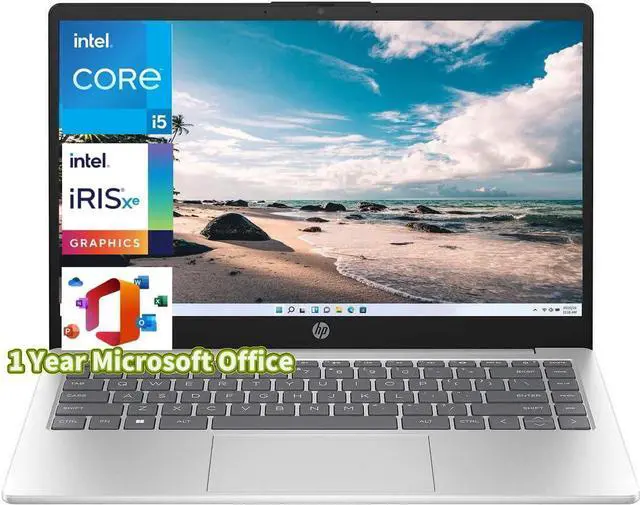
| CPU | 13th Gen Intel Core i5-1335U (10-Core) Processor |
| Graphic | Intel Iris Xe Graphics |
| Memory (RAM) | Up to 64 GB |
| Operating System | Windows 11 Home/Pro |
| Processor | Intel Core i5 |
| Screen Resolution | FHD(1920 x 1080) |
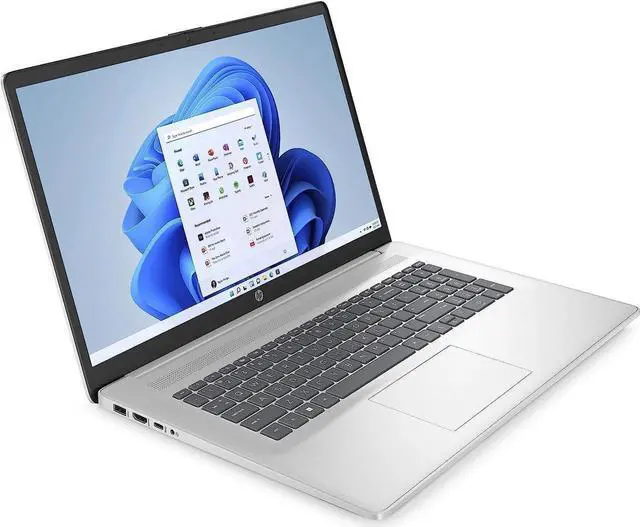
| Screen Size | 17.3 in. |
| SSD | Up to 2 TB |
| Touchscreen | NO |
| Dimensions | 15.78" x 10.15" x 0.78" |
| Weight | 4.6 lbs |
CPU:13th Gen Intel Core i5-1335U (10-Core) Processor
Memory: Up to 64 GB DDR4 RAM
Hard Drive: Up to 2TB PCIe NVMe M. 2 Solid State Drive
Operating System: Windows 11 Home/Pro
Display:17.3" IPS Anti-Glare FHD (1920 x 1080) Display
Graphics:Intel Iris Xe Graphics
Ports:
1x USB Type-C
2x USB Type-A
1 AC smart pin
1x HDMI 1.4 b
1x Combination Headphone/Microphone Jack
Wireless Connectivity: Wi-Fi 6 and Bluetooth 5.3
Keyboard:HP Backlit Keyboard with Numeric Keypad
Battery:3-cell, 41 Wh Lithium-ion prismatic Battery
Dimensions:15.78" x 10.15" x 0.78";4.6 lbs
Color:Silver
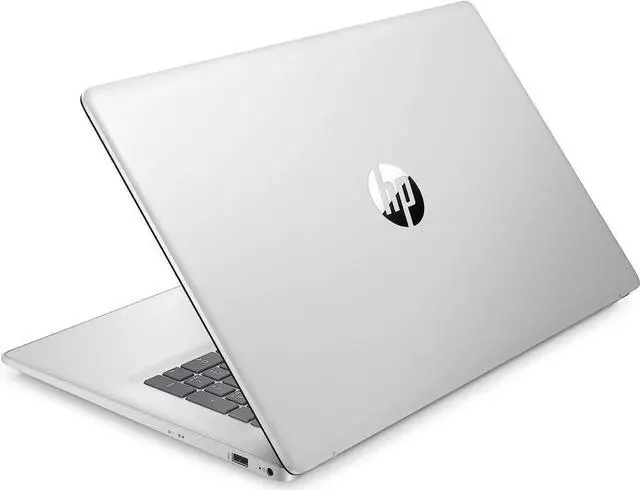
The HP 17 is a Windows 11 Pro laptop with a 17.3-inch Full HD display, 13th Gen Intel Core i5-1335U, 64GB RAM, and a 2TB SSD, making it well suited to office work, multitasking, and storing large local files.
| Attribute | Value |
|---|---|
| Best For | Work and business use, with 64GB of memory and a 2TB SSD for multitasking and file storage |
| Processor | 13th Gen Intel Core i5 |
| Display | 17.3-inch Full HD display with 1920 × 1080 resolution |
| Memory Configuration | 64GB DDR4 memory at 3200 MHz |
| Storage | 2TB PCIe SSD |
| Wireless Connectivity | Wi-Fi 6 and Bluetooth 5.3 |
| Operating System | Windows 11 Pro |
| Keyboard | Backlit keyboard |
| Color | Silver |
Q: HP 17 with 64GB RAM and 2TB SSD vs. the 8GB/256GB HP 17: which should I choose?
A: Choose this Newegg configuration if you want more memory and storage, plus a 17.3-inch FHD (1920 × 1080) display and Windows 11 Pro. HP’s HP 17-cn3582nr configuration has 8GB RAM, a 256GB SSD, and a 17.3-inch HD+ display, making it the lower-capacity configuration.
Q: HP 17 with Core i5-1335U vs. HP Laptop AI 17 with Core Ultra 7: which configuration fits my priorities?
A: Choose this Newegg HP 17 if 64GB RAM, a 2TB SSD, and Windows 11 Pro are your priorities. Choose the HP Laptop AI 17-cn5037nr if you prefer its Core Ultra 7 processor platform; HP lists that model with 16GB RAM, a 256GB SSD, a 17.3-inch FHD display, and Windows 11 Home in S mode.
Q: Should I choose this HP 17 or an HP Laptop 15?
A: Choose this HP 17 for its larger 17.3-inch FHD display and its listed 64GB RAM and 2TB SSD. Choose the HP Laptop 15-cn3v3ua if you prefer a 15.6-inch screen; HP lists that configuration with 8GB RAM and a 256GB SSD.
Q: Is this laptop suitable for office work and multitasking?
A: Yes. Its 13th Gen Intel Core i5 processor, 64GB of RAM, 2TB SSD, and 17.3-inch FHD display suit office apps, web browsing, and running multiple applications. The integrated Intel Iris Xe graphics are not a substitute for a dedicated GPU for demanding graphics work.
Q: Is it a good choice for video meetings and remote work?
A: It has a 720p HD webcam and Wi-Fi 6, which support basic video calls and wireless connectivity. The listed specifications do not state the microphone quality, and the 720p camera may be limiting if high video detail is important.
Q: Is this 17.3-inch laptop practical to carry while traveling?
A: It can be carried, but it is better suited to desk-to-desk use or occasional travel than to frequent daily commuting: the listed weight is 4.6 pounds, and its 17.3-inch size is relatively large. Battery life is not specified, so check it if you need long unplugged work sessions.
Q: Is it suitable for gaming or graphics-intensive work?
A: It can handle everyday graphics and lighter tasks, but its Intel Iris Xe is integrated graphics, not a dedicated graphics card. For demanding games, 3D work, or GPU-heavy creative applications, consider a system with a dedicated GPU.
Q: Is this HP 17 a good fit for office work and multitasking?
A: It is configured for productivity: the Core i5-1335U, 64 GB RAM, 2 TB SSD, and 17.3-inch FHD display suit typical office tasks and keeping multiple applications open. A Reddit discussion of a similar HP 17 with the same processor considered it as a home desktop replacement. ([reddit.com](https://www.reddit.com/r/laptops/comments/175l79f?utm_source=openai))
Q: Is this HP 17 suitable for gaming?
A: It is better suited to work and everyday use than demanding games. The listed Intel Iris Xe graphics are integrated, not a dedicated gaming GPU; a Reddit discussion about a similar HP 17 also raised the lack of a dedicated GPU as a gaming trade-off. ([reddit.com](https://www.reddit.com/r/laptops/comments/194tusv?utm_source=openai))
Q: Is this HP 17 worth buying?
A: That depends on its price and your priorities. Reddit discussions of similar HP 17 models with the i5-1335U considered value in relation to the sale price and noted trade-offs; this listing’s price is not included here, so its value cannot be determined from the specifications alone. ([reddit.com](https://www.reddit.com/r/ShopCanada/comments/15cvu70?utm_source=openai))