
A dorm desk gives you roughly three feet of territory in which to study, write, game, video-call home, and occasionally eat instant noodles. It is simultaneously your office, your library, your theater, and the only square footage in the building that is truly yours. The difference between a desk that fights you all semester and one that quietly makes you better is not money, and it is definitely not size; it is a handful of deliberate choices made once, in the right order. Here is how to turn a cramped slab of university furniture into the most productive corner of your room, zone by zone, with real prices checked on Newegg at this writing.

Who Needs This?
Anyone whose entire workspace, bedroom, and living room share one address. The constraints of dorm life are stubbornly physical: a desk with little depth, walls you cannot drill into, a roommate whose sleep schedule inverts yours during midterms, and a laptop that was never designed for six-hour hunched-over writing sessions. There is also a constraint nobody warns freshmen about: visual chaos. In a room where your bed is visible from your desk and your desk is visible from your bed, a cluttered workspace quietly taxes your focus every waking hour. Every recommendation below attacks one of these constraints directly, and the whole plan is modular, so you can build it across two semesters of budgets instead of one painful checkout.
Zone 1: The Screen, Where Posture Is Won or Lost
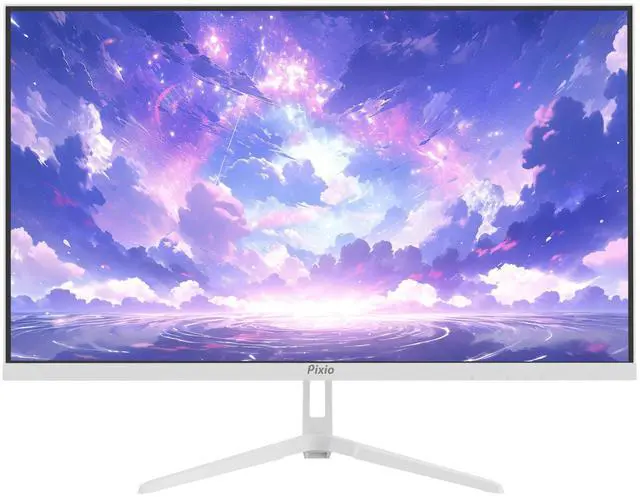
Ask any ergonomist, or any senior with a physical therapy bill, and they will tell you the same thing: the single most transformative upgrade for a laptop-bound student is an external monitor raised to eye level. The reason is anatomical. A laptop screen forces your gaze, and therefore your neck, downward by twenty degrees or more, and your shoulders follow. Hours of that posture, repeated daily, is how twenty-year-olds develop what clinicians politely call tech neck. Raise the screen so its top edge sits at eye height and the problem largely disappears.
The productivity math is just as compelling. A 27-inch panel at 2560×1440 resolution offers roughly 1.8 times the pixels of a typical 1080p laptop display, which in practice means a research paper and its sources genuinely side by side, a spreadsheet showing enough columns to be useful, or code and documentation sharing the screen without the alt-tab dance that fragments attention. The Pixio PX275 Wave, a 27-inch 1440p IPS monitor listed at $189.99 at this writing, is exactly this kind of do-everything panel: IPS color that keeps photos and films looking right from any seating angle, a 100Hz refresh rate that makes scrolling silky and casual gaming legitimately enjoyable after hours, and a white finish that keeps a small room feeling airy rather than looming over it.
Whatever monitor you choose, resist the included stand. Factory stands plant a foot the size of a dinner plate in the exact center of your only work surface. A clamp-style arm bolts to the rear edge of the desk instead, floats the screen above everything, and returns a laptop-sized patch of prime real estate to you instantly; browse single monitor arms on Newegg, where most models install in ten minutes with nothing but the included hex key and support far more weight than any 27-inch panel requires.
Zone 2: The Input Deck, Small but Mighty

Full-size keyboards waste a third of their width on a number pad most students touch twice a semester, and on a shallow dorm desk that stolen width comes directly out of your mouse hand’s territory. The fix is the 75% layout, which keeps every key students actually use, including the full function row for lecture-recording shortcuts and the arrow cluster essay editing depends on, in a footprint dramatically narrower than the boards most people grew up with.
The Womier WD75 V2 ($93.99) is a snapshot of how absurdly good this category has become at student prices. Tri-mode connectivity means it pairs over Bluetooth with your laptop, links via a low-latency 2.4GHz dongle to a desktop, and falls back to USB-C wired when you forget to charge, though with an 8000mAh battery, forgetting takes weeks. The switches are hot-swappable, meaning that if your roommate objects to clacking during 1 a.m. essay sprints, you can pull the switches and drop in silent ones without touching a soldering iron. Gasket mounting and a wood-accented case make it feel like a hobbyist board, and QMK/VIA support lets you remap any key, so the pause key you never use can become a mute button for surprise video calls.
One under-appreciated note: a good keyboard outlives everything else on this list. Laptops get replaced, monitors get upgraded, but a quality mechanical board follows you from dorm to apartment to first job. Cost per year of service, it is arguably the best value on the desk.
Zone 3: The Connection Hub, One Cable to Rule Them All

Picture the daily workflow you actually want: walk in from class, drop your bag, plug a single USB-C cable into the laptop, and everything comes alive, monitor, keyboard, mouse dongle, and charging, all at once. That is not a luxury flagship-office feature anymore; it is what any decent USB-C docking station does for well under a hundred dollars. The dock lives permanently behind the monitor, every peripheral plugs into it once, and your laptop connects to the entire empire through one cable.
Two buying rules keep you out of trouble. First, match the dock’s power delivery rating to your laptop’s charging wattage, a 65W dock will slow-charge a laptop that shipped with a 100W brick, especially under load. Second, check that the dock’s video output matches your monitor’s best input at full resolution and refresh rate; a QHD 100Hz panel deserves a dock that can actually drive it. Get those two specs right and the factory charger retires permanently to your backpack as a lecture-hall spare, which is exactly where it belongs.
Zone 4: The Sanity Layer
Small things carry outsized weight in a shared 12-by-15 room. A warm-temperature desk lamp does two jobs: it spares your roommate the overhead fluorescents during late sessions, and it gives your brain a light-based boundary between desk time and bed time, which matters more than it sounds when both happen within eight feet of each other. Cable management sounds like a personality quirk until you live with the alternative; a cable tray screwed under the desk lip, or even a strip of adhesive clips, keeps the floor vacuumable and the charger findable. A headphone hook on the desk edge saves your headset from the textbook avalanche. And a cheap desk pad unifies the whole surface visually, protects the university furniture from your deposit’s perspective, and doubles as a giant mousepad.
None of these items costs more than a pizza, and collectively they are the difference between a desk that looks like a workstation and a desk that looks like a lost-and-found bin.
The Build Order, on a Student Budget
If the full setup outruns this month’s budget, buy in this order. Monitor first: it improves every hour at the desk, academic or otherwise, and the posture benefit compounds daily. Monitor arm second, because it multiplies the value of the space you just invested in. Keyboard third, when the laptop’s own keys start feeling like a compromise. Dock fourth, when the cable shuffle officially becomes annoying. Lamp, tray, and hooks fill stocking-stuffer gaps. Spread across a semester, no single purchase stings, and by finals week the whole system is humming.
Verdict: Three Feet, Fully Weaponized
One QHD monitor floating on an arm, one compact wireless keyboard, one dock, one lamp: that is the entire formula, and the core of it lands under $300 plus whatever dock your laptop deserves. It fits any dorm, packs flat for summer storage, and follows you to every apartment after graduation. Start with the screen, add pieces as the budget allows, and browse compact mechanical keyboards on Newegg when you are ready to upgrade the typing feel. Your spine and your GPA will both notice.
Read More
- RTINGS: The Best Office Monitors — Lab-tested picks if you want alternatives to our monitor choice.
- Tom’s Hardware: Best Gaming Keyboards — Wider keyboard options across sizes and budgets.
- Pixio Official — Manufacturer specifications and warranty details for the PX275 Wave.
- Newegg: USB-C Docking Stations — One-cable hubs for every laptop brand and budget.
- Newegg Insider: Best 1440p OLED Gaming Monitors — If your desk doubles as a serious gaming station.
Related Posts
- How to Choose a Mechanical Keyboard in 2026: Switches, Layouts, and Build
- HyperX Alloy Origins Core keyboard and Aqua switches sound test
- Quick Look: Rosewill Neon K90 RGB Keyboard
- Azio’s Retro Classic mechanical keyboards combine old-school charm with new tech
- Why Big-Memory Budget Laptops Are the Smart Buy for 2026
Frequently Asked Questions
Common questions about dorm room desk setups.