
Running AI models on your own machine, from local large language models (LLMs) to image and video generators, has gone mainstream in 2026. More people than ever want to experiment with AI privately, without sending data to the cloud or paying monthly for API access. But the rules for choosing a GPU for AI are meaningfully different from choosing one for gaming, and buying the wrong card can leave you unable to run the very models you bought it for. For gaming, raw rendering speed rules. For AI, one spec towers above the rest: video memory, or VRAM. Here is how to pick the right graphics card for local AI work, and why the memory number should be the first thing you check.
Why VRAM Is King for AI

The fundamental rule of local AI is simple: a model has to fit inside your GPU’s memory to run well. When you load a language model or an image generator, its parameters occupy VRAM, and if the model is too large for the memory you have, it either refuses to load or spills over into far slower system memory, which cripples performance to the point of being unusable. This is why VRAM capacity, not clock speed or rendering benchmarks, decides which models you can actually run on a given card.
The practical consequence is that a larger, more capable language model, or a high-resolution image and video workflow, can demand a great deal of memory. More VRAM translates directly into more capability: the ability to run bigger, smarter models, to work at higher resolutions, and to keep more context in memory at once. When you are shopping for AI, read the memory number before anything else, because it defines the ceiling of what your machine can do.
What to Look For
After VRAM capacity, three more factors shape AI performance. Memory bandwidth affects how quickly data moves in and out of the GPU, and the RTX 50 series uses fast GDDR7 memory that helps here. Tensor cores are the specialized hardware that accelerates the matrix math underlying AI, and newer generations perform this work faster and more efficiently. Finally, and easy to overlook, software support matters enormously: NVIDIA’s CUDA ecosystem remains the most broadly supported by AI tools, frameworks, and tutorials, which is why NVIDIA cards dominate this space and why nearly every local AI guide assumes you are running one. Match the card to the size of the models you plan to run, then let bandwidth and tensor performance sort out how fast they run.
Best Overall: GeForce RTX 5090 (32GB)
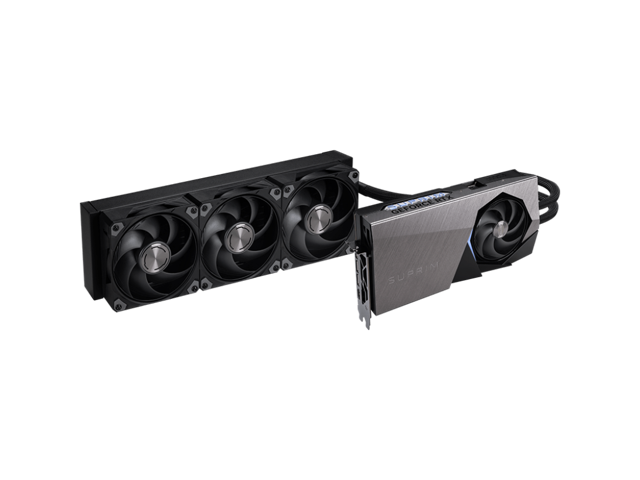
The MSI Suprim GeForce RTX 5090 32GB ($4,099.99) is the consumer card to beat for local AI, and it is not particularly close. Its 32GB of GDDR7 is the largest memory pool in the GeForce lineup, letting you load larger language models and run the kind of demanding image and video generation locally that smaller cards simply cannot handle. If AI is the primary reason you are building this machine, the extra memory pays for itself in the models it unlocks and the workflows it makes possible. It is also, of course, the fastest gaming card available, so it never feels like a compromise.
Best Value: GeForce RTX 5080 (16GB)
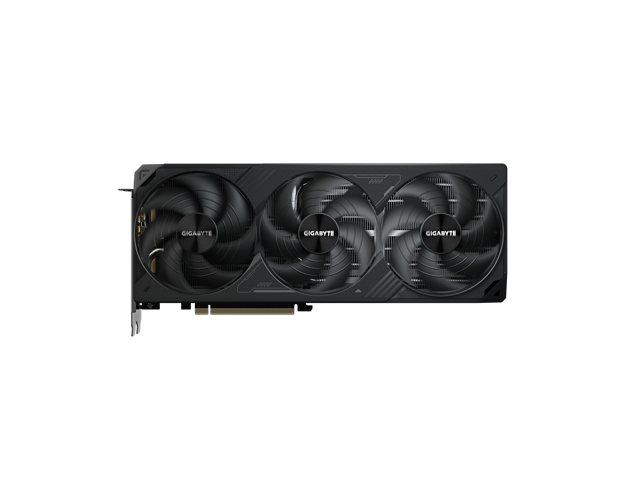
Not everyone needs 32GB, and not everyone can justify the flagship’s price. The GIGABYTE WINDFORCE GeForce RTX 5080 16GB ($1,399.99) handles a wide range of popular quantized LLMs and image models comfortably, and it doubles as a top-tier gaming card for when you are done experimenting. For hobbyists and developers getting started with local AI who also game on the same PC, it is the practical sweet spot: enough memory for real work, at a price that does not require a second mortgage.
Entry Point: GeForce RTX 5070 Ti (16GB)
Want to dip a toe into local AI without the flagship outlay? The MSI SHADOW GeForce RTX 5070 Ti 16GB ($979.99) shares the same 16GB of VRAM as the RTX 5080 at a lower price, making it an affordable on-ramp to running models at home while still delivering excellent 1440p gaming. Because VRAM is the gating factor, its 16GB lets it run the same broad class of quantized models as its pricier sibling, just with a bit less raw speed. It is the value entry point for anyone who wants to learn and tinker before deciding how deep to go.
Final Verdict
If serious local AI is the goal and budget allows, the RTX 5090’s 32GB is in a class of its own and the clear choice for running the largest models. For a strong balance of AI capability, gaming performance, and price, the RTX 5080 is the mainstream pick most people should consider, while the RTX 5070 Ti is the budget-conscious entry point that still opens the door to real experimentation. In every case, the guiding principle is the same: buy for the memory your models need first, then enjoy the excellent gaming performance as a bonus. Compare current cards in the Newegg RTX 5090 listings and across the wider RTX 50 series.
Read More
- NVIDIA Official: GeForce RTX 50 Series — Official specifications including VRAM for each model.
- Tom’s Hardware: Best Graphics Cards — Independent GPU rankings and analysis.
- GitHub: llama.cpp — A popular open-source tool for running LLMs locally, with VRAM guidance.
- Newegg: GeForce RTX 5090 — Live pricing on the 32GB flagship.
- Newegg: GeForce RTX 5080 — Compare 16GB mainstream options.
Related Posts
- Back-to-School Portable Storage: What Students Should Actually Buy in 2026
- Buying the Ryzen 7 7700X3D on Newegg: Everything in One Cart
- Back-to-School Desk Setup: How to Build a Study Station in Five Steps
- Best Gaming CPU Under $350 in 2026
- ASUS UGen300: A Hailo-10H AI Accelerator for Local, Offline Inference
Frequently Asked Questions
Answers to the most common questions about choosing a GPU for AI.