
Choosing a motherboard in 2026 is no longer just a question of chipset or brand — it starts with a fundamental decision that shapes every other component you buy: what size do you need? The three dominant form factors — ATX, Micro-ATX, and Mini-ITX — each represent a different philosophy about how a PC should be built, used, and upgraded. Understanding these differences before you buy can save you money, frustration, and a desk full of components that don’t fit together.
Why Form Factor Matters More Than Ever in 2026
The rise of high-core-count CPUs, PCIe 5.0 SSDs, and GPU designs that now span three or four PCIe slots has pushed motherboard design to evolve faster than at any point in the past decade. At the same time, the popularity of compact builds — driven in part by home office setups and living room gaming PCs — has pushed Mini-ITX and Micro-ATX into territory they once couldn’t occupy.
In 2026, the form factor you choose determines how many expansion slots you get, how many M.2 NVMe drives you can mount, the quality of your VRM (voltage regulator module) — which directly affects overclocking headroom — and whether your case will fit under your desk.
 Understanding the Three Core Form Factors
ATX: The Full-Size Standard
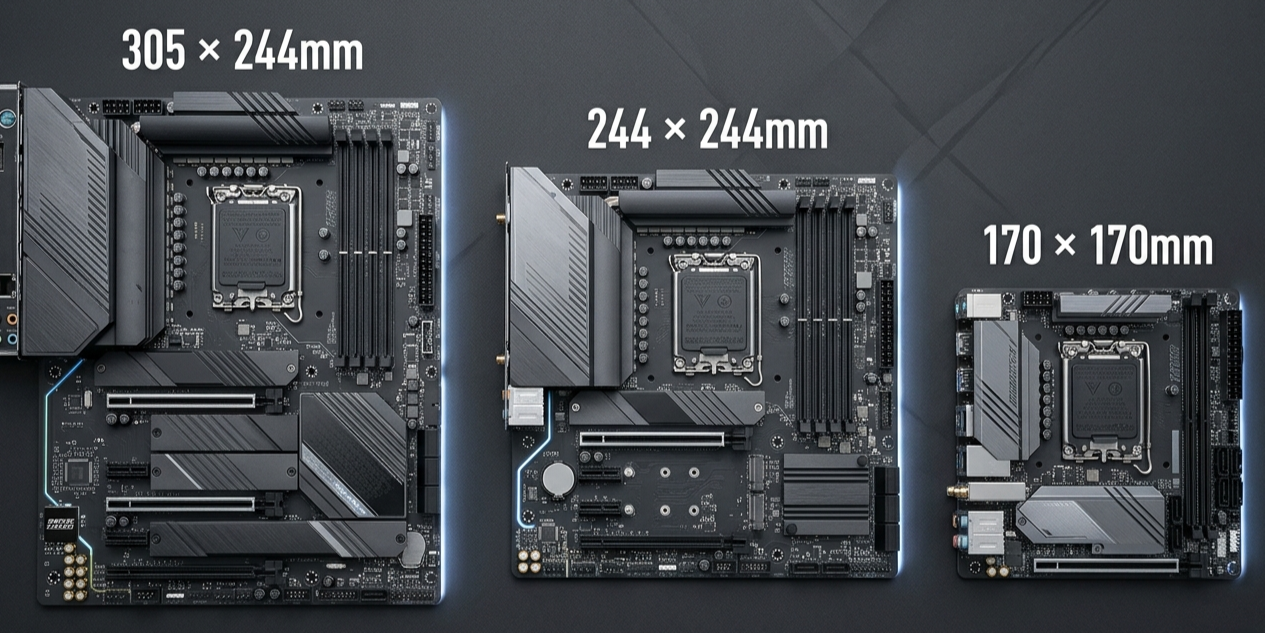
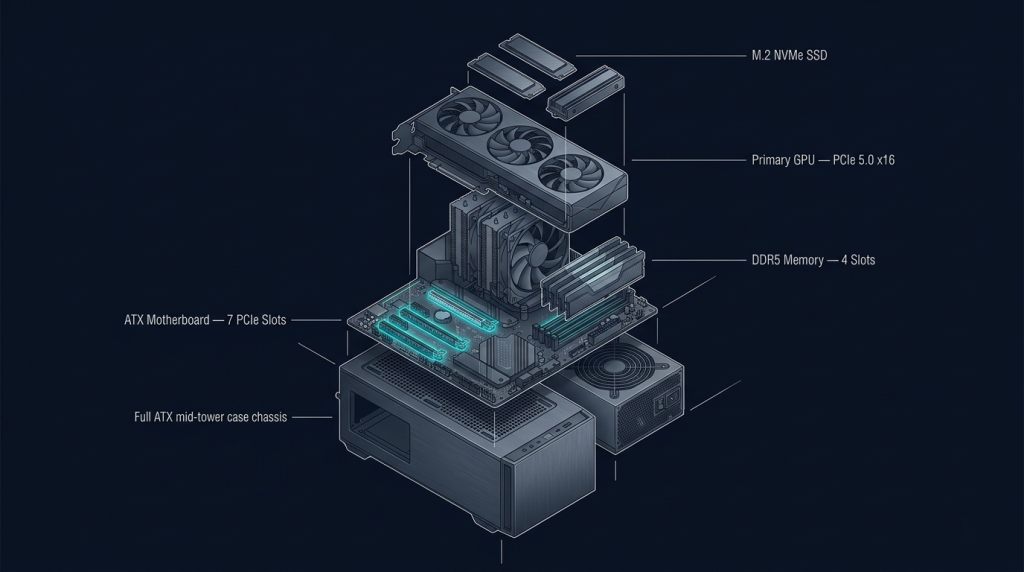
At 305mm × 244mm, ATX remains the dominant form factor for enthusiast and professional builds. ATX motherboards typically offer the most expansion slots (up to 7 PCIe slots), the most M.2 slots (often four to six on high-end models), multiple USB headers, and the most robust VRM configurations for high-TDP processors.
For users pairing their board with the latest Intel or AMD processors — such as the Intel Core Ultra 9 285K or the AMD Ryzen 9 9950X — ATX is almost always the right starting point. High TDP chips benefit from the larger PCB real estate ATX provides, which allows board manufacturers to fit more VRM phases and better heatsink coverage.
In 2026, top-tier ATX boards from brands like ASUS, MSI, and GIGABYTE routinely include five or six M.2 slots — a response to the rapid adoption of PCIe 5.0 SSDs that require better thermal dissipation.
 Micro-ATX: The Versatile Middle Ground
At 244mm × 244mm, Micro-ATX boards are smaller than ATX while retaining most of the functionality. Micro-ATX motherboards typically include four PCIe slots and three to four M.2 slots — enough for a powerful single-GPU build with multiple NVMe drives.
The key advantage of Micro-ATX is flexibility. These boards fit both mid-tower and Micro-ATX cases, giving builders the option to run a compact system without sacrificing features. For mainstream buyers using AMD Ryzen processors in the mid-range — Ryzen 7 9700X or Ryzen 5 9600X — a well-chosen Micro-ATX board often provides everything needed at a lower price point than a comparable ATX option.
One trend worth noting: in 2026, several Micro-ATX boards now ship with Wi-Fi 7 integration and PCIe 5.0 x4 M.2 slots — features that were previously exclusive to full ATX designs. This narrowing of the feature gap has made Micro-ATX a genuinely compelling option even for enthusiast builds.
Mini-ITX: Small Footprint, Full Performance
At 170mm × 170mm, Mini-ITX is the smallest standard form factor, and it has been the biggest beneficiary of the technological advances of the past two years. Mini-ITX motherboards contain just two RAM slots and a single PCIe x16 slot, but modern designs compensate with intelligent space management.
The challenge with Mini-ITX in 2026 is thermal management. Pairing a 65W CPU with a compact cooler inside a small case is entirely manageable, but placing a 170W processor like the Intel Core Ultra 9 285K inside a 15-liter case requires careful planning around airflow and cooler height clearance. For most Mini-ITX builders, a 65W or 105W TDP CPU is the practical ceiling without aggressive cooling solutions.
ASRock’s Mini-ITX boards have gained a strong following in the compact build community for their feature density — often fitting two M.2 slots, a full PCIe x16 slot, and onboard Wi-Fi within that 170mm footprint.
2026 Form Factor Comparison at a Glance
| Specification | ATX | Micro-ATX | Mini-ITX |
|---|---|---|---|
| Dimensions | 305 × 244mm | 244 × 244mm | 170 × 170mm |
| PCIe Slots | Up to 7 | Up to 4 | 1 (x16) |
| M.2 NVMe Slots | 4–6 | 3–4 | 1–2 |
| RAM Slots | 4 | 4 | 2 |
| VRM Quality | Best | Good | Varies |
| Case Compatibility | Mid/Full Tower | All sizes | ITX / SFF Cases |
| Price Range | $120–$800+ | $80–$400 | $100–$450 |
| Best For | Enthusiasts, workstations | Mainstream, versatile builds | Compact, living room, HTPC |
 Platform Considerations: AM5 vs LGA1851 in 2026
The motherboard form factor interacts directly with your CPU platform choice. AMD’s AM5 socket — home to the Ryzen 7000 and 9000 series processors — is available across all three form factors on X870E (ATX), B850 (ATX/Micro-ATX), and A620 (Micro-ATX/Mini-ITX) chipsets. Intel’s LGA1851 platform similarly spans all three formats. The critical difference is chipset: higher-end chipsets (X870E, Z890) are predominantly found on ATX boards, while mid-range and entry chipsets (B850, B760) dominate Micro-ATX and Mini-ITX.
For builders prioritizing overclocking, PCIe 5.0 lanes to both GPU and SSD simultaneously, or Thunderbolt 5 connectivity, ATX is the pragmatic choice. For those who want a capable, stable daily driver without excess slots they’ll never fill, Micro-ATX hits the value sweet spot. For anyone building a compact PC for gaming, home theater, or as a secondary machine, Mini-ITX’s constraints are acceptable trade-offs against its significant size and aesthetic advantages.
 Matching Your Case to Your Board
Form factor selection also locks in your computer case choice. Full ATX tower cases offer the best airflow and storage bay options but require dedicated desk space. Micro-ATX cases often provide the best balance — compact enough to sit beside a monitor, spacious enough for a 240mm AIO cooler and a full-size GPU. A quality ATX case in 2026 typically supports up to 420mm radiators and GPUs up to 420mm in length, accommodating even the largest three-fan cards on the market.
The Right Choice for Your Build in 2026
If you’re building a PC in 2026, the form factor decision is simpler than it looks once you answer three questions:
- How many GPUs and PCIe devices do you need? More than one GPU or a PCIe capture card? Go ATX.
- What’s your TDP? Above 125W under sustained load? Prioritize ATX boards with strong VRM specifications.
- How much space do you have? If desk space is a premium, Micro-ATX or Mini-ITX will serve you well without meaningful performance compromise.
In 2026, no form factor is a second-class choice. Each solves a different problem — and for the right builder, each is the perfect answer.

Related Posts
- AMD vs. Intel Motherboards in 2026: Platform Architecture, Chipset Hierarchy, and What Actually Differs
- Wi-Fi 7, PCIe 5.0, and DDR5: How 2026 Motherboards Are Redefining PC Connectivity
- Wi-Fi 6E vs Ethernet: Which Connection Delivers the Ultimate Gaming Experience at Home in 2026?
- The ASUS ROG Zenith II motherboard is the 3rd-gen Threadripper’s best friend
- 5 of the best TRX40 motherboards to pair with Threadripper 3000 CPUs