
Nothing derails a semester quite like unreliable internet. A video lecture that stalls at the worst moment, a submission portal that times out at 11:58pm, a group call where you are the person everyone says they cannot hear. Student housing is unusually good at producing these problems, because you are usually sharing bandwidth with a lot of people, working around walls you are not allowed to drill through, and relying on equipment somebody else chose. What follows is organized by living situation rather than by product, because the right fix genuinely depends on where you live. Prices were verified on Newegg on July 28, 2026.
Before You Buy Anything: Check What You Are Allowed to Do
If you live in a dorm, read the residential IT policy first. Many universities prohibit personal routers on campus networks, and for a sound technical reason: a room full of competing access points on overlapping channels makes the Wi-Fi worse for everyone, including you. Plugging in a router in violation of policy can also get your network port disabled, which is a much worse problem than slow Wi-Fi.
If a router is off the table, the single best upgrade in a dorm is a wired connection. Most dorm rooms have an Ethernet jack, and a cable removes interference, congestion and the wireless variability that causes most stalling. A USB-C hub with an Ethernet port, such as the Anker 565 11-in-1 USB-C hub, gives a modern thin laptop a wired port along with video output and extra USB, which turns one cable into a docking solution for your desk.
Scenario 1: A Shared Apartment, Standard Layout, Tight Budget
If you and two or three roommates share a normal apartment and the landlord’s provided router is the weak link, one good single router usually solves it. The TP-Link Archer AX55 at $74.99 is a Wi-Fi 6 AX3000 router with Gigabit ports, and Wi-Fi 6 is the standard that matters most in shared housing.
The reason is a feature called OFDMA, which lets the router talk to several devices within the same transmission window rather than serving them strictly one at a time. In a two-bedroom apartment with four laptops, four phones, a television, a speaker and a game console, that scheduling efficiency is what keeps everything responsive while someone streams. Raw top speed matters far less than how gracefully a router handles a crowd.
Scenario 2: You Want Wi-Fi 7 Without Paying Wi-Fi 7 Prices
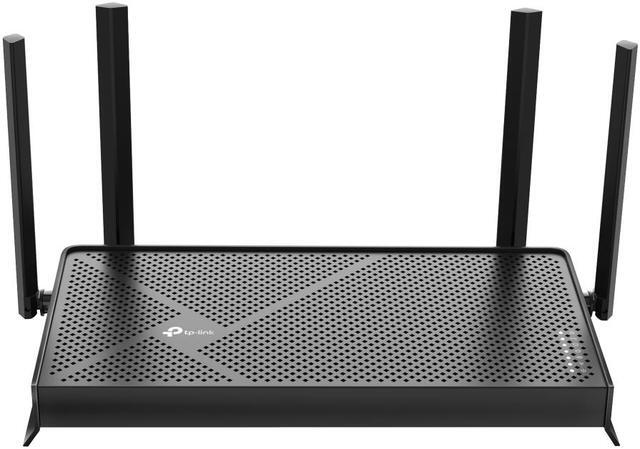
Wi-Fi 7 has come down in price faster than most people realize. The TP-Link Archer BE230 is $79.99, a dual-band BE3600 router with four streams and, notably, two 2.5 Gigabit ports alongside three Gigabit ports. That is five dollars more than the Wi-Fi 6 option above.
Two things make this worth the small premium. The 2.5 Gigabit ports mean the router will not become the bottleneck if your internet plan is faster than a Gigabit, which is increasingly common. And Wi-Fi 7 devices, including recent phones and laptops, can use wider channels and a more efficient scheduling scheme, so the router stays current as your devices are replaced over four years. If you want a Wi-Fi 7 router with more emphasis on built-in network security features, the Netgear Nighthawk RS100 at $149.99 is the alternative in the same BE3600 class.
Scenario 3: An Older House With Thick Walls and Dead Zones

Student housing is often subdivided older houses, and those have lath-and-plaster walls, brick chimney stacks and awkward long hallways. No single router, however powerful, can push a clean signal through that geometry, because the limitation is physics rather than transmit power. The answer is more than one access point.
A mesh system is the tidy version of that idea: two or more nodes that share one network name and hand your devices between them as you move. The TP-Link Deco BE23 two-pack at $139.99 is a Wi-Fi 7 BE3600 mesh system, which is remarkable value for two Wi-Fi 7 nodes. Place one node where the internet enters the building and the second roughly halfway to the dead zone, not inside it. A node that cannot hear the first node clearly has nothing useful to relay.
Scenario 4: A Larger Shared House, Many Roommates
Once you are past four people and two floors, coverage and capacity both become issues at the same time. The TP-Link Deco AX3000 whole-home mesh system at $149.98 is a Wi-Fi 6 mesh setup with MU-MIMO, which lets the network communicate with multiple devices simultaneously rather than in sequence, and that is exactly what a full house needs.
One political note that matters more than the hardware: agree with your housemates on where the nodes go before you buy. Mesh systems work best with nodes spread through common areas, and they work badly if one person takes a node into their bedroom and closes the door. If everyone contributes, everyone gets to weigh in on placement, and the network works.
Four Fixes That Cost Nothing
Before spending anything, try these. Move the router out into the open; routers hidden in cupboards, behind televisions or on the floor lose a surprising amount of range, and they belong high and central. Split your bands if your router presents them separately, keeping 2.4GHz for smart devices and 5GHz or 6GHz for laptops and phones, since 2.4GHz travels further but is much slower and far more congested.
Change the Wi-Fi channel if you can see a dozen neighboring networks, because overlapping channels in a dense building cause more slowdowns than distance does. And run a wire for whatever sits still: a desktop, a console or a television gains nothing from Wi-Fi and, more importantly, stops competing for airtime with the devices that do need it. If you do decide to buy, you can compare current options on Newegg’s Wi-Fi 6 router listings and Wi-Fi 7 router listings.
The Short Answer
Dorm room: check the policy, and if personal routers are not allowed, use the Ethernet jack with a USB-C hub. Shared apartment on a budget: the TP-Link Archer AX55 at $74.99. Best value overall: the TP-Link Archer BE230 at $79.99, since Wi-Fi 7 and 2.5 Gigabit ports for five dollars more is an easy call. Dead zones and thick walls: the Deco BE23 two-pack at $139.99. A full house of roommates: the Deco AX3000 mesh at $149.98, or the Nighthawk RS100 at $149.99 if you want a single router with stronger security features. And move the router off the floor before you buy anything at all.
Read More
- Tom’s Hardware: Best Wi-Fi Routers — Independent throughput and range testing across router classes.
- RTINGS: Best Mesh Wi-Fi Systems — Measured coverage and roaming performance for multi-node setups.
- Wi-Fi Alliance: Wi-Fi CERTIFIED 7 — Official explanation of what Wi-Fi 7 adds over Wi-Fi 6 and 6E.
- FTC: How to Secure Your Home Wi-Fi Network — Official guidance on securing a home or shared-house network.
- Newegg: Wi-Fi 6 Routers — Compare single routers and mesh systems by speed class and ports.
Related Posts
- Back to School: How to Fix Dorm Wi-Fi and Wired Networking
- Best Power Supplies in 2026
- Best Gaming Laptops in 2026
- How Much Memory an AM5 Build Actually Needs in 2026
- CL36, CL30, CL28 or CL26? Picking a DDR5-6000 Latency Tier
Frequently Asked Questions
Answers to the most common questions about Wi-Fi in dorms and student apartments.