"Are side intake fans actually good for cooling?" It's a simple question that pops up on r/buildapc all the time, usually from someone who loves the look of a glass-front case but worries they're giving up temperatures for it.
My short answer: side intake works well in cases designed around it. Problems start when people treat a fishbowl case like a mesh-front case and put the fans wherever they fit.
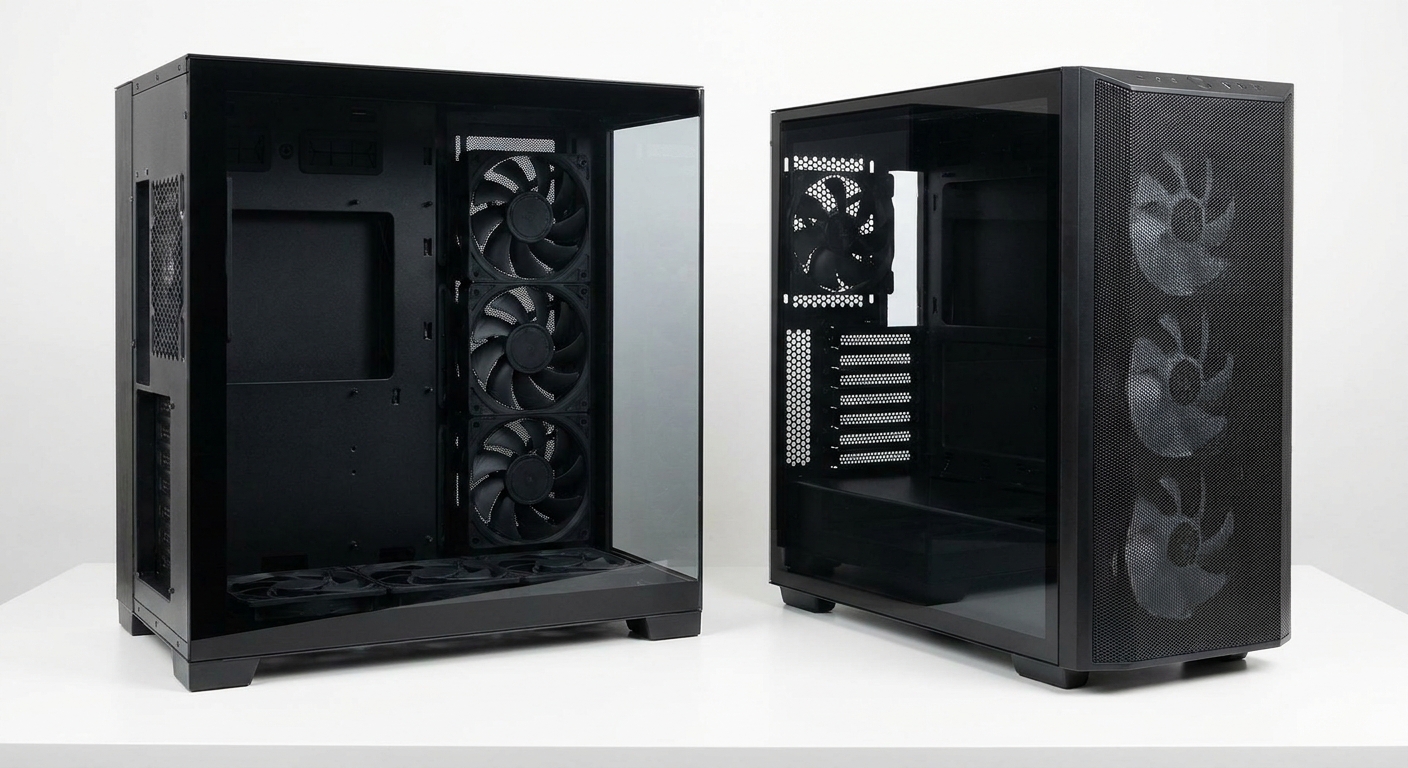
The contenders
A "fishbowl" case has glass on the front and side, often with no corner pillar, and usually a dual-chamber layout that hides the power supply behind the motherboard. Air comes in through the side and bottom. A mesh-front case is the traditional layout: fans behind a perforated front panel pushing air straight back toward the CPU and GPU.
Side-by-side
| Case (per listing) | Style | Fans included | Intake path |
|---|---|---|---|
| HYTE Y70 | Dual-chamber, 3 glass sides | None | Side 3x120, bottom 3x120 |
| NZXT H9 Flow (2025) | Dual-chamber glass | 3x140 side, 1x120 rear | Side and bottom |
| MONTECH KING 95 PRO | Dual-chamber, curved glass front | Six ARGB fans with hub | Side and bottom |
| Lian Li O11 Dynamic EVO | Dual-chamber glass | None | Side and bottom |
| Fractal Design North | Wood-slat front | 2x140 front | Front |
| Lian Li LANCOOL 217 | Front intake with large fans | 2x170, 2x120, 1x140 | Front |
Deep dive: how fishbowl cases cool
The design works because the bottom fans sit directly under the graphics card, which is the hottest part in most gaming PCs. Side fans feed the rest of the chamber. With the power supply and drives tucked behind the motherboard tray, there's less in the way.
The HYTE Y70 shows the layout clearly. Its listing shows mounts for three 120mm fans on the side, three on the bottom, three on top and one at the rear, with no fans included. That flexibility is great, but you have to plan it: side and bottom as intake, top and rear as exhaust.

The NZXT H9 Flow (2025) ships with three 140mm side fans and a 120mm rear fan, and supports up to three more on the bottom. The MONTECH KING 95 PRO is the easiest to get right out of the box, because it comes with six ARGB PWM fans and a hub, plus dust filters on the bottom, side and top. The Lian Li O11 Dynamic EVO is the classic of the genre if you plan to choose every fan yourself.

Deep dive: why mesh-front cases are more forgiving
A mesh front gives fans a short, unobstructed path into the case. Even if you don't think much about fan direction, front intake and rear exhaust tends to work. The Fractal Design North is the one I'd pick if you want something that looks like furniture with a straightforward airflow path.

The Lian Li LANCOOL 217 takes the opposite approach to a fishbowl case. According to its listing, it comes with five fans, including two 170mm fans in the front, and supports a 360mm radiator on top and graphics cards up to 380mm long.
Fans: where most fishbowl builds go wrong
In a glass case, fans are part of the look. That's why reverse blade fans exist: they flip the airflow while keeping the nice side facing out. The Lian Li UNI FAN TL Flex Reverse Blade 3-pack is designed for exactly this kind of bottom and side intake, and it includes a controller.
If you care more about airflow than RGB, the ARCTIC P12 Pro PST 5-pack is a practical way to fill a case. Arctic lists a 600 to 3000 RPM range, a 0 RPM mode below 5% PWM and fluid dynamic bearings.
A simple fan plan for a fishbowl case
If I were filling a typical dual-chamber case from scratch, I'd start with three intake fans on the bottom, three intake fans on the side, three exhaust fans on top and one exhaust fan at the rear. That's slightly more intake than exhaust, which keeps dust going through the filters. If you're using a top-mounted AIO radiator, set it to exhaust so it isn't pulling GPU heat back across the CPU.
Winner by category
- Looks and showing off the build: fishbowl, with the HYTE Y70 or O11 Dynamic EVO.
- Least effort for good temperatures: mesh front, or a fishbowl that ships with fans like the KING 95 PRO.
- Hot GPUs: a fishbowl with bottom intake fans can be excellent, as long as the top and rear are set to exhaust.
- Dusty rooms: whichever case has filters on every intake, and run slightly positive pressure.
So yes, side intake fans work. Plan the airflow before you plan the RGB, and a glass case can run just as cool as it looks.
Frequently Asked Questions
Do side intake fans cool as well as front intake fans? In a case designed for it, yes. Fishbowl cases place intake fans on the side and bottom, often closer to the graphics card than front fans would be. The case layout matters more than which panel the fans are on.
Are fishbowl cases worse for airflow than mesh cases? Not necessarily, but they depend more on getting the fan setup right. A mesh-front case is more forgiving if you install fans without much planning.
What are reverse blade fans for? Reverse blade fans move air in the opposite direction while keeping the nicer front side facing out. In glass cases they let bottom and side intake fans look clean from the outside.
Should I run positive or negative air pressure? Slightly positive pressure, with a bit more intake than exhaust, usually keeps dust out because air leaves through gaps instead of being pulled in through them. Make sure intake fans sit behind dust filters.
Does a dual-chamber case help cooling? Moving the power supply and drives behind the motherboard tray clears space in the main chamber, so intake air reaches the GPU and CPU with fewer obstructions.
Read More
- Best PC Cases for Airflow in 2026 (Newegg Insider): Our airflow-first case roundup, including mesh-front designs.
- O11 Dynamic EVO RGB (Lian Li): Lian Li's official page for the O11 Dynamic EVO family.
- Why X3D CPUs Run Hot, and the Coolers I'd Pair With Them (Newegg Insider): Pair your case with the right CPU cooler.
- Air Cooler vs AIO in 2026 (Newegg Insider): How case airflow changes the air versus liquid decision.
- Dual-Chamber PC Cases (Newegg): Browse fishbowl and dual-chamber cases.