A r/buildapc thread caught my eye: someone whose chair was "on her last legs" admitted they were freaking out about replacing it, because there's no way to test chairs anymore. I get it. A chair is the one piece of a PC setup you touch for eight hours a day, and most of us now buy it from a photo.
The good news is that you can get most of the way there with a tape measure and a few honest questions. Here's how I work through it.
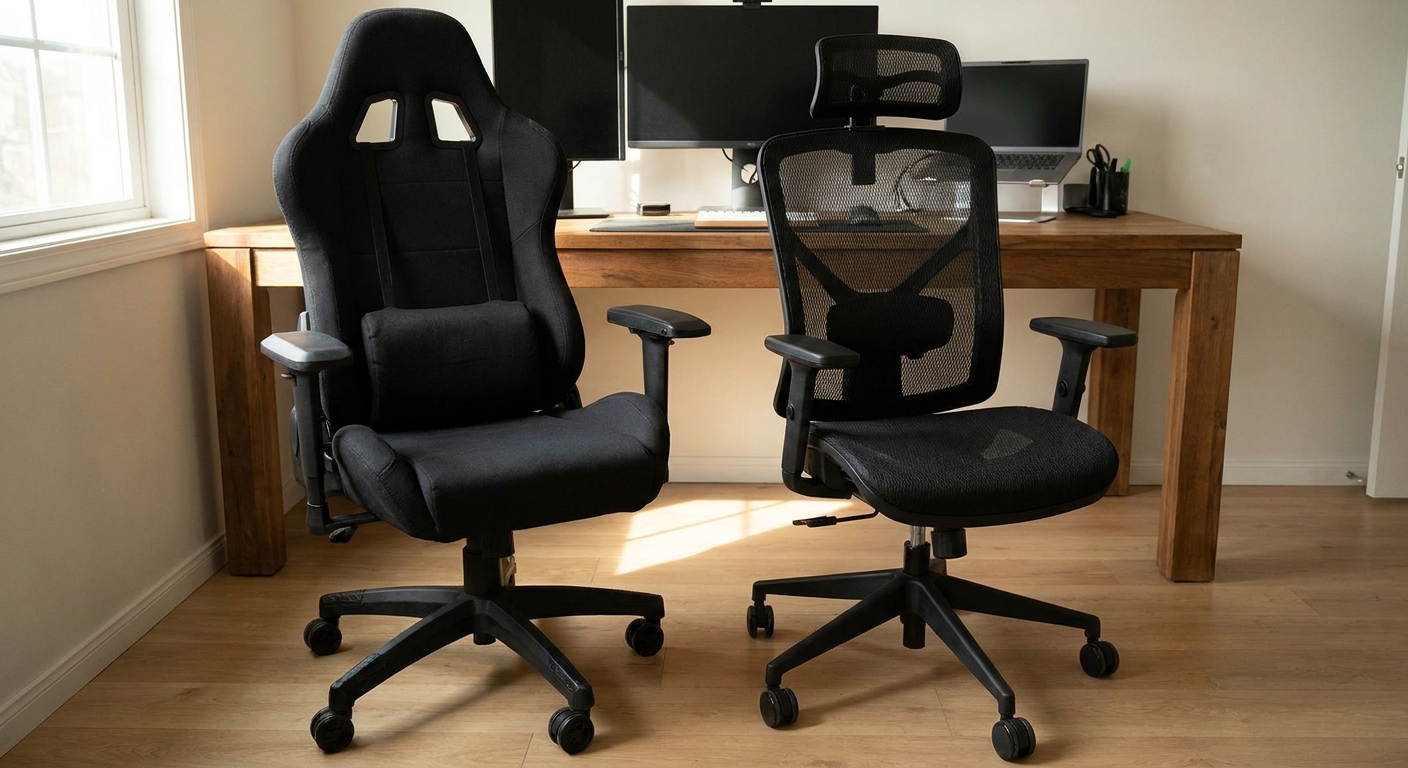
Should I buy a gaming chair or an office chair?
I'd stop thinking of it as a category choice. A racing-style gaming chair has a tall back, side bolsters and usually a separate lumbar pillow. An ergonomic office chair tends to build lumbar support into the backrest and gives you more ways to adjust the seat and arms. Neither is "correct." What matters is whether the chair fits your body and the way you sit.
If you lean back a lot, game with a controller and like a deep recline, a gaming chair can be great. If you type all day and sit upright, I lean toward an office chair with real adjustment.
What should I measure before I click buy?
A few numbers do most of the work. Seat height range, so your feet sit flat with your thighs roughly level. Seat width and depth, so you're not perched on the edge or pressing the backs of your knees. Backrest height, so your shoulder blades are supported. And weight capacity. OSHA's workstation checklist is a good, plain-language guide for what "fits" means.
Then look at the casters. One listing I looked at, the Steelcase Series 2, is sold specifically with casters for carpet floors. That detail sounds small until your chair won't roll.
Mesh, fabric or leatherette?
Mesh is the coolest for long sessions in a warm room. Fabric is soft and quiet. Leatherette wipes clean but can get warm. If your PC already turns your office into a sauna, mesh is the easy choice.
The chairs I'd shortlist
For an all-day desk chair, the Sihoo Doro C300 Pro V2 is the one I'd look at first. The listing calls out 8D armrests, a wide 3D headrest and a mesh build. Adjustable arms are the feature I'd least want to give up if I'm typing all day.

If you want something simpler, the original Sihoo Doro-C300 lists a four-position backrest, three recline positions, 3D armrests and a 300 lb rating. The SIHOO B100 Pro is another mesh option with adaptive lumbar support and 4D arms.
For a basic mesh chair, the SIHOO M18 high-back mesh chair gives you something you can actually measure against: a 20 x 20 inch seat, a 16.9 to 20.8 inch seat height range and a 331 lb capacity. That's exactly the kind of data I want when I can't sit in it first.
On the gaming side, the Corsair TC100 Relaxed is a straightforward leatherette racing-style chair. It's a good fit if you like that look and a slightly roomier seat.

If you game more than you work, the Dowinx fabric gaming chair has a pocket spring cushion, a footrest and a 90 to 135 degree recline, with a 300 lb rating. A footrest is an underrated feature for long controller sessions.

And if you just want a soft fabric gaming chair that doesn't look like a race car, the Arozzi Torretta Soft Fabric comes with two support pillows and a fluid-repellent fabric.
Do armrests and recline really matter?
Armrests matter more than most people expect. If they can't drop low enough to slide under the desk, you end up sitting farther back than you want, and your shoulders creep up while you type. I'd look for arms that adjust up and down at minimum, and ideally side to side too.
Recline is more personal. A deep recline is great for watching a stream or playing with a controller between work sessions, but if you sit upright all day, a firm recline lock that holds you at a slight angle is more useful than a chair that leans back to nearly flat.
How would I reduce the risk of a bad fit?
I'd do three things. Read reviews from people who share your height and build, not just the star rating. Check the return policy before you order. And give yourself a week of real use before you decide, because the first day in any new chair feels strange.
My take
If most of your time is spent working or typing, I'd buy an ergonomic mesh chair with adjustable arms and real lumbar support. If you mostly lean back and game, a gaming chair can make sense, but measure carefully and don't count on the pillows to fix a poor fit.
Frequently Asked Questions
Is a gaming chair better than an office chair for long sessions? Not automatically. Many racing-style gaming chairs rely on pillows for lumbar support and have raised side bolsters, while ergonomic office chairs usually offer more adjustment in the lumbar, seat and armrests. Fit matters more than the category.
What measurements should I check before buying a chair online? Compare the seat height range with your knee height, the seat width and depth with your hips and thighs, the backrest height with your torso, and the weight capacity with your weight. Then check the return policy.
Is mesh or fabric better? Mesh breathes better in warm rooms. Fabric and padded foam feel softer at first. Leatherette is easy to wipe clean but can feel warm over long sessions.
Do I need adjustable armrests? If you use a keyboard and mouse, yes. Armrests that move up, down and sideways let you keep your shoulders relaxed and your forearms supported at desk height.
How do I buy a chair if I can't try it in person? Use measurements, read reviews from people with a similar height and build, check that the casters suit your floor, and buy where returns are straightforward.
Read More
- Computer Workstations: Chairs (OSHA): OSHA's checklist for chair height, backrest, seat pan and armrest fit.
- Gaming Chairs (Newegg): Browse gaming chairs by material, recline and weight capacity.
- Office Chairs (Newegg): Browse ergonomic and mesh office chairs.
- Best Wireless Gaming Headsets in 2026 (Newegg Insider): If you are upgrading your setup, our headset roundup is a good next stop.
- Best 4K TVs for GTA 6 on PS5 and Xbox (Newegg Insider): For couch gaming setups where a desk chair is not the main seat.