Shopping for a new laptop can quickly become a comparison of processor names, memory types, display panels, and port lists. This 2026 laptop buying guide breaks down the specifications that matter most, whether you are looking for a student laptop, business notebook, everyday system, or content creation machine. The right choice is not always the most expensive laptop—it is the one that fits the way you work, study, create, and stay connected.
2026 Laptop Buying Guide: Why the Right Specs Matter
Your laptop's specifications influence everything from startup speed and multitasking to portability, image quality, and long-term usefulness. For everyday browsing and office work, a modern Core i5 or Ryzen 5 laptop with 16GB of memory and a 512GB SSD makes a practical starting point. If you use creative applications, run demanding workloads, or want support for local AI features, look for more cores, faster memory, and an integrated or discrete graphics processor.
- Choose 16GB RAM for normal productivity and 32GB for demanding multitasking.
- Prefer an NVMe PCIe SSD over older hard drives for faster startup and file access.
- Look for a 1080p webcam if frequent video meetings matter.
- Check battery capacity, charger wattage, weight, and port selection together.
What to Look For in a Laptop
The display is one of the features you interact with most, so it deserves close attention. A 15.6-inch 1920 x 1080 IPS panel is a dependable fit for general work, while a higher-resolution OLED panel can deliver stronger contrast and wider color coverage. Refresh rate, brightness, glare, and touch support can also make a meaningful difference depending on where and how you use the laptop.
- CPU: Compare core count and processor class, not just the brand name.
- Memory: 16GB DDR4 is suitable for everyday use; 32GB LPDDR5X is better for demanding workflows.
- Storage: 512GB works for office files, while 1TB or 2TB is better for media libraries.
- Wireless: Wi-Fi 6, Wi-Fi 6E, and Wi-Fi 7 offer different levels of future readiness.
- Ports: Thunderbolt 4, USB-C charging, HDMI, card readers, and Ethernet can reduce adapter needs.
Best Laptop Picks for Different Buyers
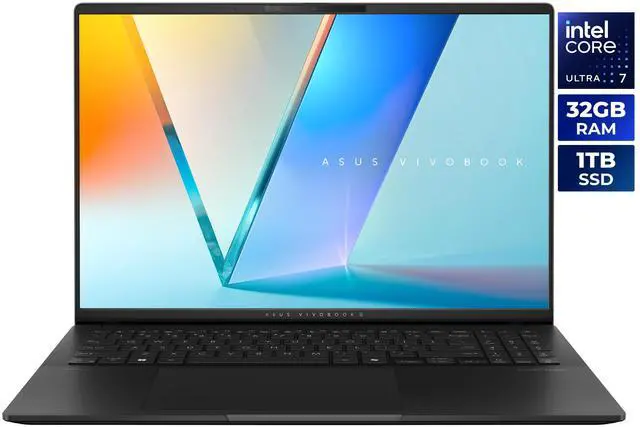
If you want a premium productivity laptop with an impressive display, the ASUS Vivobook S 16 S5606CA-NS79 is a strong option. It combines a 16-inch 2880 x 1800 OLED display, 120Hz refresh rate, and 100% DCI-P3 coverage with an Intel Core Ultra 7 255H processor, 32GB LPDDR5X-7500 memory, and a 1TB PCIe Gen 4 SSD. Wi-Fi 7, two Thunderbolt 4 ports, and a 75WHrs battery round out its premium feature set.
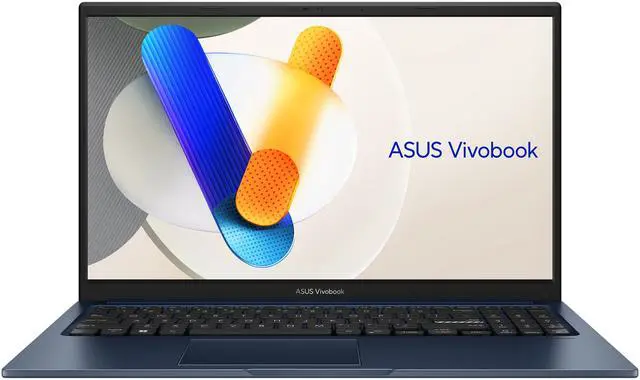
For affordable everyday computing, the ASUS Vivobook F1504VA-BS51T includes a 15.6-inch touchscreen, Core i5-1334U processor, 16GB DDR4-3200 memory, and a 512GB PCIe Gen 3 SSD. The MSI Modern 15 B13M-1097US offers a similar Core i5-1334U and 16GB configuration, along with a non-touch IPS display.
Shoppers who want extra memory should look at the Acer Aspire Go 15 AG15-42P-R6GZ. Its configuration includes a Ryzen 7 5825U, 48GB DDR4-3200, a 512GB PCIe Gen 4 SSD, Wi-Fi 6, HDMI 2.1, and Gigabit Ethernet. For CPU-heavy multitasking, the ASUS Vivobook 15 F1502 delivers a 14-core Core i9-13900H alongside 32GB DDR4-3200 and a 2TB PCIe SSD.
Final Verdict
The best laptop for you in 2026 should match your workload, not simply win on one specification. Begin by identifying the software you use, then set a realistic budget and prioritize the features that will affect daily use most: memory, SSD capacity, display quality, battery, and ports. The ASUS Vivobook S 16 is the strongest all-around choice for a premium screen and modern connectivity. For practical daily computing, consider the ASUS Vivobook 15 or MSI Modern 15. The Acer Aspire Go 15 stands out for its high memory capacity, while the Core i9 ASUS Vivobook 15 provides substantial storage and processing headroom.
Frequently Asked Questions
How much RAM should a laptop have in 2026?
For everyday browsing, office work, and school tasks, 16GB of RAM is a practical minimum. Choose 32GB if you regularly edit photos or video, use virtual machines, manage large projects, or multitask across demanding applications.
Is a 512GB SSD enough for a new laptop?
A 512GB NVMe SSD is enough for office documents, schoolwork, applications, and moderate media storage. Choose a 1TB or 2TB drive if you keep large photo libraries, video projects, games, or downloaded media on the laptop.
Should I buy an OLED laptop display?
OLED displays are a strong choice if you value deep contrast, vibrant colors, and an excellent viewing experience for entertainment or creative work. IPS panels can offer better value and may be preferable for shoppers who prioritize cost, battery efficiency, or long periods of static desktop use.
Is an Intel Core i5 or AMD Ryzen 5 processor good enough in 2026?
A modern Core i5 or Ryzen 5 processor is suitable for browsing, productivity software, video meetings, streaming, and general multitasking. For advanced content creation, software development, local AI workloads, or heavy multitasking, consider a higher-tier processor with more cores and additional memory.
What laptop ports and wireless features should I check before buying?
Look for USB-C charging, multiple USB ports, HDMI, and any card reader or Ethernet connection your workflow requires. Wi-Fi 6 is adequate for most homes, while Wi-Fi 6E or Wi-Fi 7 can provide greater capacity and future readiness with compatible network equipment.
Read More
- ASUS Vivobook S 16 OLED (S5606) Official Product Page — Review the official display, processor, memory, storage, battery, and connectivity details for the ASUS Vivobook S 16.
- ASUS Vivobook 15 (F1504) Tech Specs — Check the available processor, operating system, display, memory, storage, and configuration options for the ASUS Vivobook 15.
- Acer Aspire Go 15 AG15-42P Official Specifications — Explore the Acer Aspire Go 15 platform, including its AMD processor options, Full HD IPS display, memory, storage, and connectivity.
- MSI Modern 15 B13M Official Specifications — See the official MSI Modern 15 B13M specifications, including display, processor, battery, ports, and productivity-focused features.