Data is accumulating faster than most people realize. Between 4K home videos, RAW photography archives, game libraries, remote work documents, and media collections, the average household generates terabytes of storage demand every year. For anyone who has outgrown the limits of external hard drives or the recurring costs of cloud subscriptions, a Network Attached Storage device — a NAS — provides a fundamentally different approach: centralized, always-on, private storage that grows with your needs. In 2026, NAS hardware has matured to the point where configuring a home or small business storage server is genuinely accessible to buyers without an IT background.
What Is a NAS and Why Does Storage Architecture Matter?
A NAS is a dedicated device that connects to your home or office network and makes its storage available to every device on that network simultaneously. Unlike a USB hard drive plugged into one computer, a NAS serves files to your laptop, TV, gaming console, phone, and work desktop concurrently, without any single machine acting as host. The storage inside a NAS is not just a pile of drives — it is organized into a specific configuration, called a RAID array, that determines how data is distributed, protected, and recovered.
Understanding storage architecture before buying a NAS is important because the decisions you make upfront determine both your practical capacity and your protection against data loss. A NAS with four drive bays running four 8TB NAS drives does not necessarily give you 32TB of usable space — the RAID configuration you choose will consume some portion of that capacity for redundancy.
 RAID Configurations: The Foundation of NAS Storage
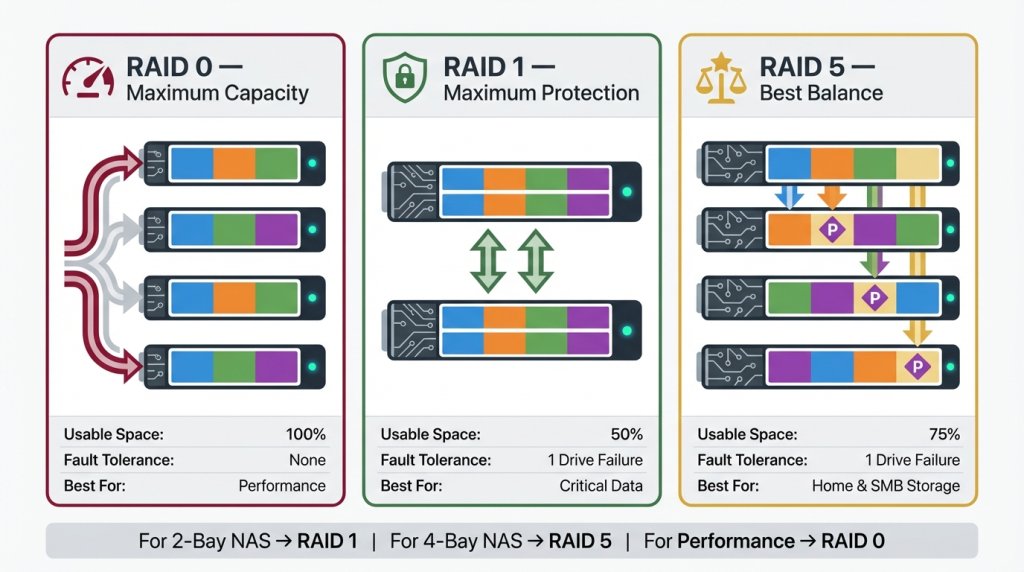
RAID — Redundant Array of Independent Disks — is the technology that turns multiple physical drives into a single logical storage pool with varying levels of redundancy. The three configurations most relevant to NAS buyers in 2026 are RAID 0, RAID 1, and RAID 5.
RAID 0 stripes data across all drives simultaneously, delivering maximum read and write speeds and using 100 percent of available drive capacity. Four 8TB drives in RAID 0 give you 32TB usable. The critical limitation is that RAID 0 provides zero redundancy — if any single drive fails, all data across the entire array is lost. RAID 0 is appropriate for scratch storage, caching, or non-critical large file work where performance matters more than protection.
RAID 1 mirrors data identically across two drives, so each drive is an exact copy of the other. With two 8TB drives in RAID 1, you have 8TB usable with full redundancy — if one drive fails, the other contains a complete copy and the system continues operating uninterrupted while you replace the failed drive. RAID 1 is ideal for critical personal data in a two-bay NAS.
RAID 5 distributes data and parity information across three or more drives, allowing one drive to fail without data loss while providing much better storage efficiency than RAID 1. Four 8TB drives in RAID 5 yield approximately 24TB usable with single-drive fault tolerance. RAID 5 is the most popular choice for four-bay and larger desktop NAS deployments because it balances capacity, performance, and data protection practically. Many buyers start with desktop NAS devices configured in RAID 5 as their primary home or small office storage solution.
 NAS-Optimized Hard Drives: Why Standard Drives Fall Short
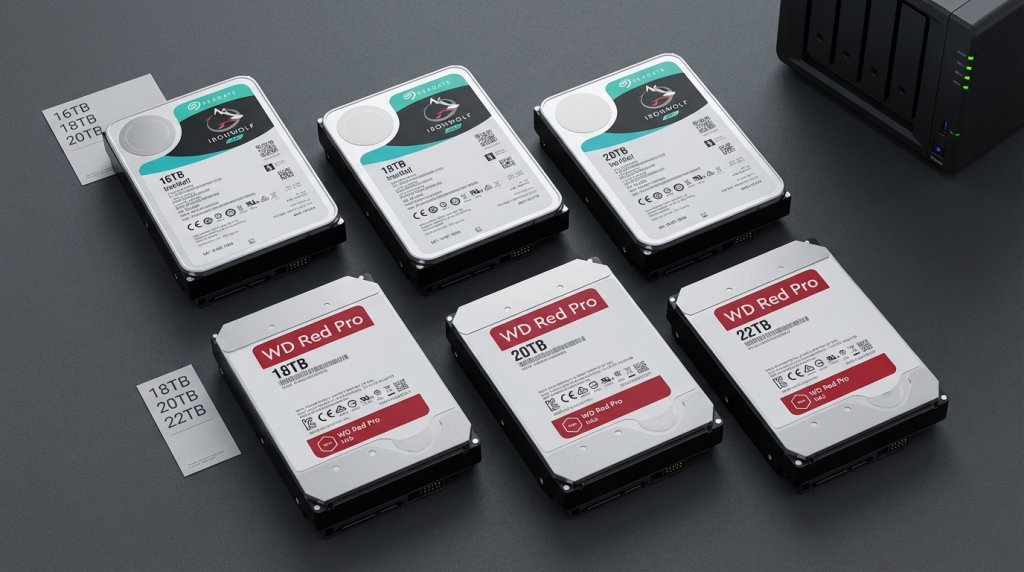
Not every hard drive is suitable for NAS use. Consumer-grade desktop drives are designed for intermittent workloads — a few hours of activity per day with rest periods between. A NAS runs continuously, often 24 hours a day, seven days a week, with multiple simultaneous users reading and writing data. Consumer drives under these conditions exhibit higher failure rates, generate excessive heat, and are not tuned for the vibration created by multiple drives spinning in proximity within the same chassis.
NAS-specific hard drives address these conditions directly. NAS hard drives from manufacturers including Seagate IronWolf, Western Digital Red Pro, and Toshiba N300 are rated for 24/7 operation with higher workload ratings — often 180TB per year or more, compared to 55TB for consumer drives. They incorporate rotational vibration compensation sensors that adjust read/write heads dynamically when neighboring drives create mechanical interference, reducing the error rates that lead to drive failure in multi-bay enclosures.
In 2026, NAS drive capacities have extended to 24TB and 28TB in the consumer segment, with enterprise NAS drives reaching 32TB per disk. At these densities, a six-bay desktop NAS in RAID 5 can deliver over 100TB of usable storage — more than most individuals or small businesses will ever need — in a desktop enclosure that sits quietly on a shelf.
Drive Bays, Scalability, and Planning Ahead
The number of drive bays in a NAS determines both your immediate capacity and your upgrade path. Two-bay NAS devices are the entry point for personal use, offering simplicity and low initial cost at the expense of scalability. Four-bay and six-bay devices are the sweet spot for most buyers, providing RAID 5 redundancy, meaningful capacity, and room to add drives as your storage needs grow.
Eight-bay and larger desktop NAS enclosures, as well as rackmount NAS devices, serve small businesses, creative studios, and power users with demanding capacity or concurrent-user requirements. Rackmount units install into standard server racks alongside networking equipment and other infrastructure, which makes them appropriate for businesses with existing rack deployments.
A common mistake is purchasing a NAS filled to capacity at launch. Best practice is to buy a NAS with more bays than you need immediately, populate half the bays with large NAS drives, and leave the remaining bays empty for future expansion. When you need more capacity, adding drives and expanding the storage pool online — without losing existing data — is a feature supported by virtually every modern NAS operating system including Synology DSM, QNAP QTS, and TrueNAS.
 Calculating Your Real Storage Needs
Estimating storage requirements requires honest accounting of what you actually store and how fast that collection grows. A family photo and video archive might generate 200–300GB per year. A 4K video editing project can consume 5–10TB for a single production. A media server library of 500 Blu-ray rips in 4K HDR requires 20–40TB depending on compression settings.
Tools like Newegg's NAS Builder allow you to configure a complete NAS system — enclosure, drives, memory, and accessories — based on your capacity targets and use case, removing much of the guesswork from the specification process. Browsing the full NAS category on Newegg provides a broad view of current enclosures across every price and capacity tier.
Expanding Beyond Drives: SSD Caching
Modern NAS devices support SSD caching, where a small NVMe or SATA SSD acts as a read and write cache in front of the mechanical hard drive array. Frequently accessed files are served from the SSD at several times the read speed of spinning drives, dramatically improving the responsiveness of directories and files accessed repeatedly. SSD write caching absorbs burst write operations at SSD speeds before flushing data to the slower mechanical array in the background.
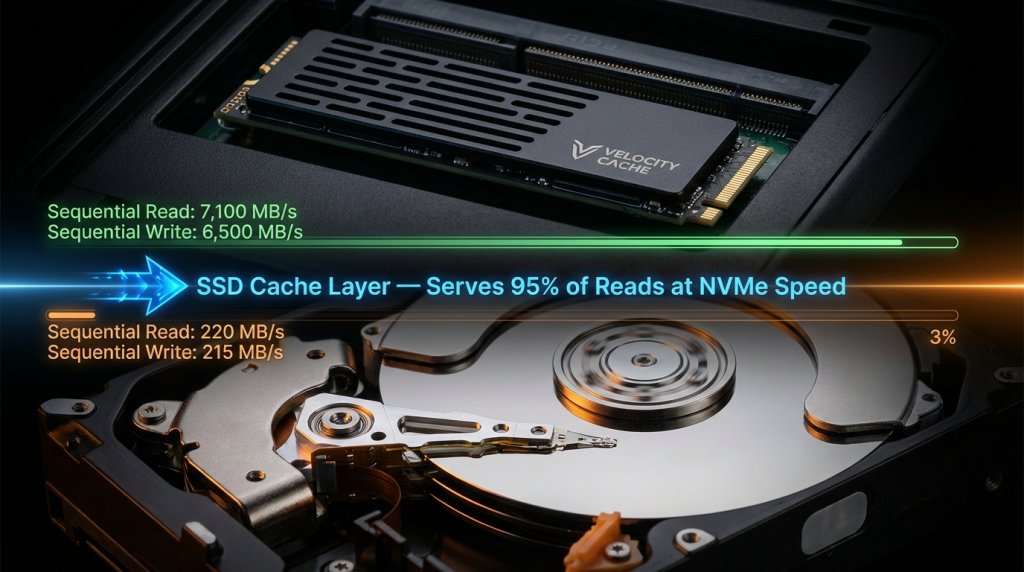 For buyers streaming media from a NAS to multiple devices simultaneously, running virtual machines on a NAS, or using a NAS as a working storage drive for photo or video editing, SSD caching closes the performance gap between a NAS and a dedicated local storage device. Many four-bay and six-bay desktop NAS enclosures include dedicated M.2 cache slots that do not consume a standard drive bay, leaving full capacity available for the primary storage array.
A NAS built thoughtfully — with the right RAID configuration, purpose-built NAS drives, appropriate bay count, and an SSD cache — is among the most cost-effective storage investments available to individuals and small businesses in 2026. Unlike cloud subscriptions, the cost is fixed at purchase, and unlike single external drives, the data is protected, accessible to everyone on the network, and expandable without starting over.