
As artificial intelligence transforms every aspect of computing, a new category of laptops has emerged that fundamentally reimagines how we interact with our devices. When browsing laptop listings in 2026, you’ll increasingly encounter the “Copilot+ PC” designation—a term that represents far more than a marketing label. This comprehensive guide explains what Copilot+ PC means, how these AI-powered systems differ from traditional laptops, and whether this technology matters for your computing needs.
What Is a Copilot+ PC?
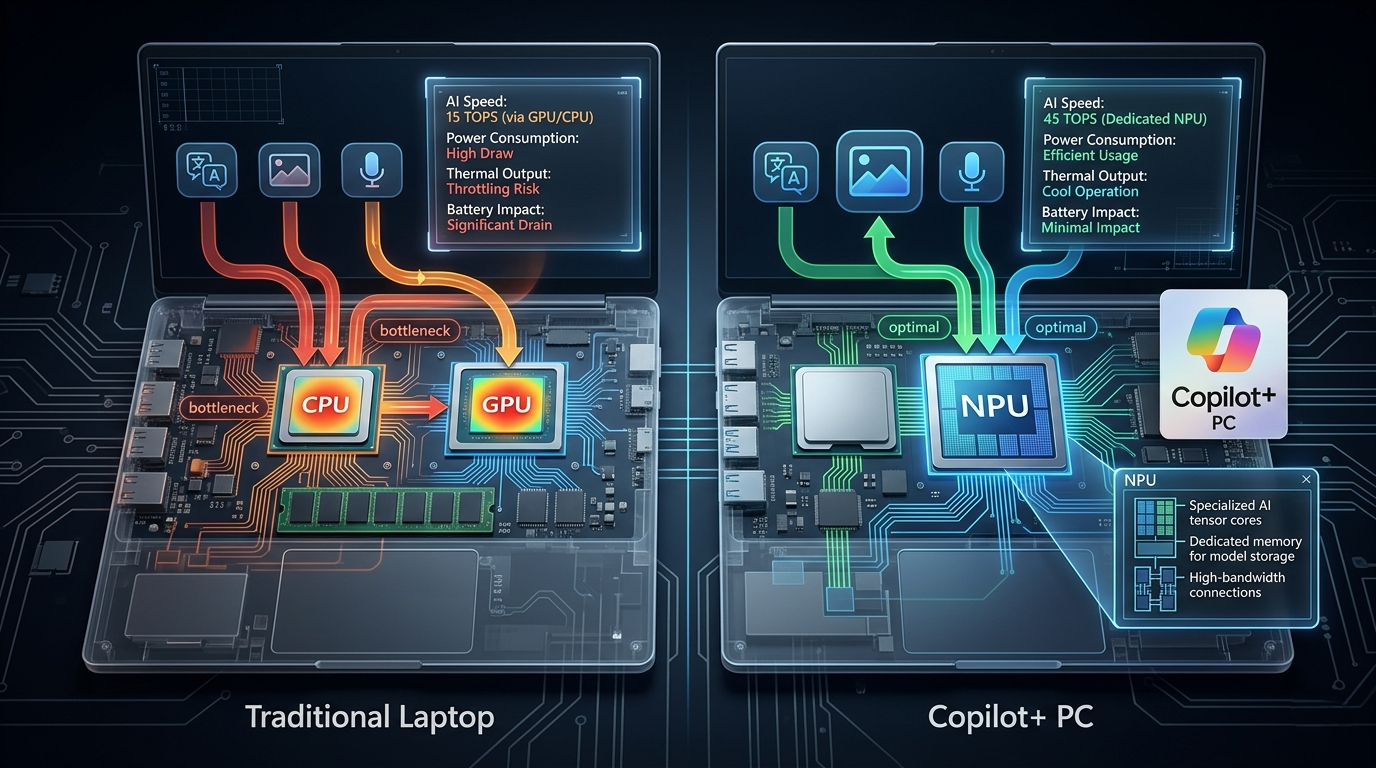
Copilot+ PC represents Microsoft’s specification for laptops equipped with dedicated Neural Processing Units (NPUs) capable of executing at least 40 trillion operations per second (TOPS). These aren’t simply computers with AI software installed—they’re machines with specialized silicon designed specifically for artificial intelligence workloads.
The “Copilot” name references Microsoft’s AI assistant, integrated deeply into Windows 11, that leverages this dedicated hardware to provide context-aware assistance, real-time language processing, intelligent automation, and advanced creative tools. The “plus” indicates hardware exceeding minimum AI processing requirements, ensuring smooth, responsive AI experiences.
The NPU: The Brain Behind AI Computing
Traditional laptops rely on CPUs (Central Processing Units) for general computing and GPUs (Graphics Processing Units) for graphics and parallel processing tasks. Copilot+ PCs add a third crucial component: the NPU, or Neural Processing Unit, optimized specifically for the matrix multiplication and tensor operations that power modern AI.
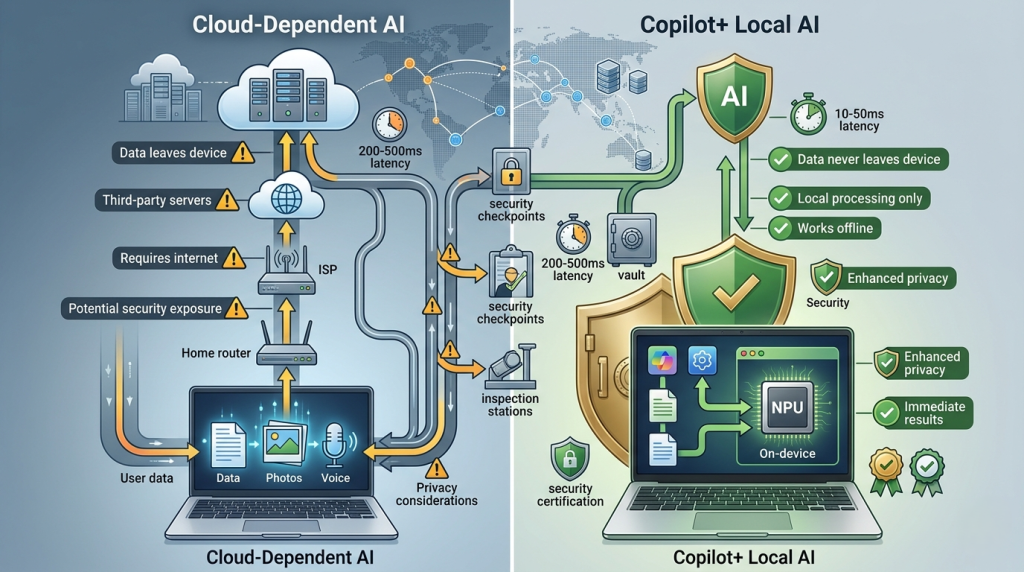
This dedicated AI silicon handles machine learning inference locally on your device rather than sending data to cloud servers. The result is faster AI responses, enhanced privacy through local processing, and AI functionality that works offline without internet connectivity—a revolutionary shift from cloud-dependent AI services.
In 2026, major processor manufacturers have integrated powerful NPUs into their latest chips. Intel gaming laptops and AMD gaming configurations now commonly include these AI accelerators alongside their traditional computing and graphics capabilities.
Copilot+ PC Capabilities in 2026
The practical capabilities enabled by Copilot+ PCs extend far beyond voice assistants or simple automated tasks. These systems fundamentally enhance how users interact with technology across diverse scenarios.
Real-Time Language Processing
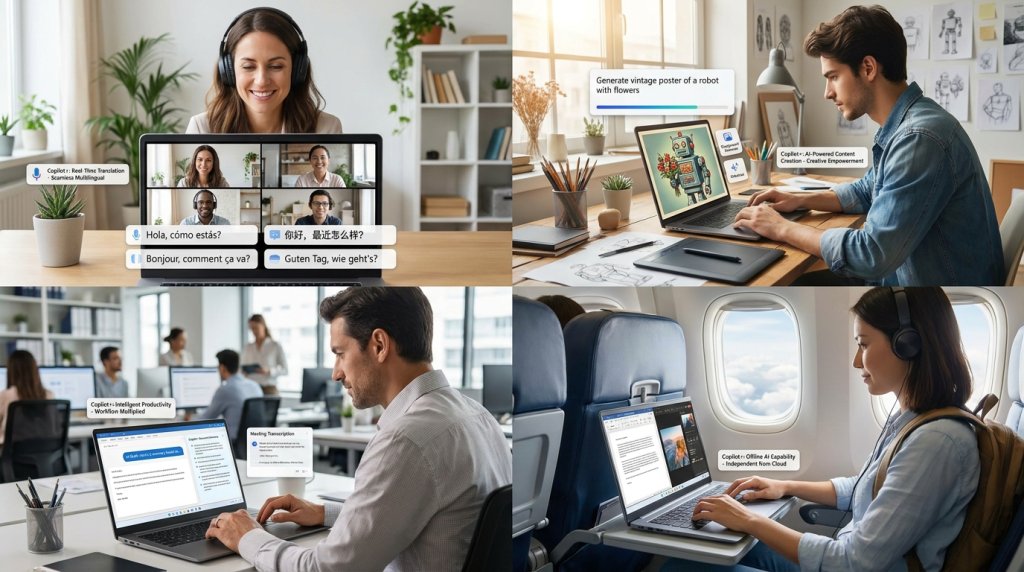
Copilot+ PCs handle real-time translation and transcription locally, converting spoken words across dozens of languages instantly without cloud latency or internet requirements. Live video call translation, automatic meeting transcription, and multilingual subtitle generation happen seamlessly in the background.
Intelligent Content Creation
AI-powered creative tools leverage NPUs to generate images from text descriptions, remove backgrounds from photos instantly, upscale images while adding detail, and even generate music or sound effects based on descriptions. These compute-intensive tasks that once required powerful gaming laptops or cloud services now run smoothly on AI-optimized hardware.
Context-Aware Assistance
The AI assistant understands context across your entire system—your documents, emails, browsing history, calendar, and active projects. It can answer questions about your own data, summarize lengthy documents instantly, suggest relevant information based on current tasks, and automate complex workflows that previously required manual steps.
Enhanced Productivity Features
Windows Copilot provides intelligent writing assistance that adapts to your style, automatic email categorization and response suggestions, smart search that understands intent rather than just matching keywords, and predictive task automation that learns your work patterns.
Hardware Requirements and Specifications
Microsoft’s Copilot+ PC certification requires specific hardware capabilities beyond the 40 TOPS NPU threshold.
Minimum Requirements:
- NPU with 40+ TOPS AI processing capability
- 16GB RAM minimum (often more in practice)
- 256GB SSD storage minimum
- Integrated or discrete GPU meeting minimum specifications
- Windows 11 Pro or Enterprise (for full feature access)
- High-quality webcam and microphone for AI interaction features
When exploring options through the Laptop Finder, Copilot+ certified systems will typically carry these specifications as baseline configurations, with premium models offering substantially more RAM and storage capacity.
Copilot+ PC Comparison Matrix
| Feature | Traditional Laptop | Copilot+ PC |
|---|---|---|
| AI Processing | CPU/GPU only | Dedicated NPU (40+ TOPS) |
| AI Response Speed | Variable (often cloud-dependent) | Near-instant (local processing) |
| Offline AI Capability | Limited or none | Extensive local AI features |
| Privacy | Data sent to cloud for AI | Local processing preserves privacy |
| Battery Impact | High for AI tasks on CPU/GPU | Efficient NPU reduces battery drain |
| Minimum RAM | 8GB typical | 16GB minimum |
| Real-time Translation | Not available or cloud-based | Local real-time processing |
| AI Image Generation | Cloud services required | Local generation capability |
Battery Life and Efficiency Advantages
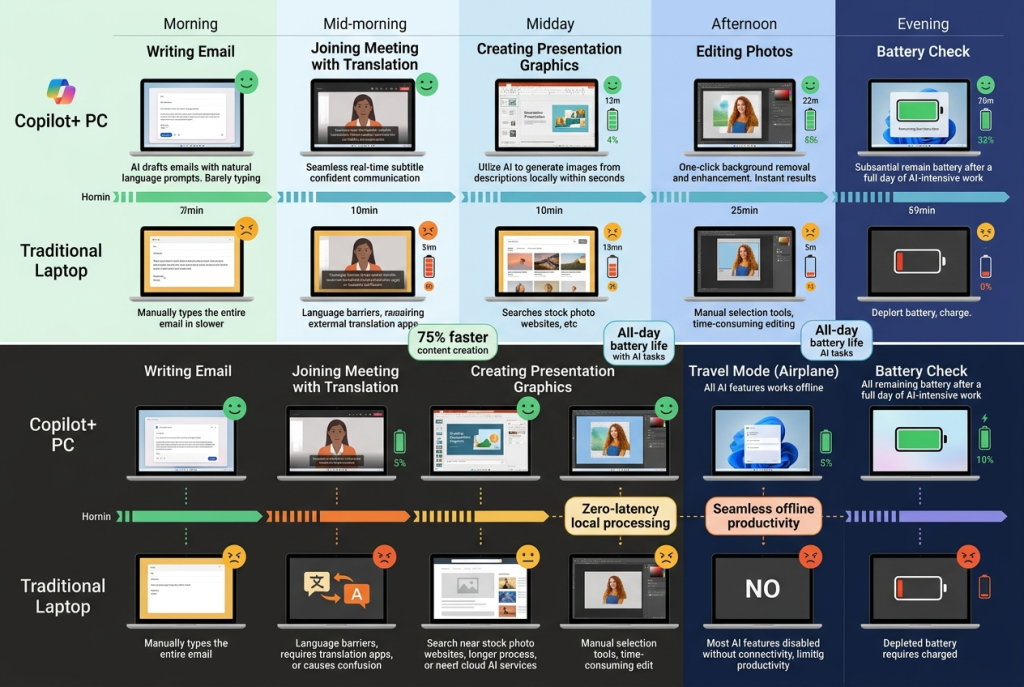
NPUs consume significantly less power than CPUs or GPUs when handling AI workloads, creating surprising battery life advantages for AI-intensive tasks. A traditional laptop running AI image generation through its GPU might drain battery rapidly, while a Copilot+ PC handles identical tasks with minimal battery impact.
This efficiency extends beyond dedicated AI tasks. Background AI features like intelligent notification management, proactive system optimization, and predictive resource allocation run continuously without noticeable battery drain, improving overall system efficiency.
Gaming and Creative Professional Considerations
For gaming laptops with NVIDIA GeForce RTX 50 Series GPUs, Copilot+ capability adds interesting dimensions beyond traditional gaming. NVIDIA’s latest GPUs include their own AI tensor cores that complement system NPUs, enabling advanced features like AI-powered DLSS 4 upscaling, frame generation, and ray reconstruction.
Creative professionals working with AI-enhanced photo editing, video processing, or 3D rendering benefit enormously from NPU acceleration. Tasks like background removal, object selection, content-aware fill, and style transfer execute nearly instantaneously, transforming workflows that previously involved significant waiting.
Business and Enterprise Applications
Business laptops with Copilot+ capability offer enterprises powerful tools for improving productivity and security. AI-powered threat detection, intelligent data loss prevention, automated compliance monitoring, and smart resource management all leverage NPU capabilities.
The local AI processing addresses enterprise privacy concerns, as sensitive data never leaves the device for cloud AI processing. This makes Copilot+ PCs particularly attractive for organizations handling confidential information or operating in regulated industries.
2-in-1 and Portable Configurations
2-in-1 convertible laptops with Copilot+ capability create particularly compelling experiences. The combination of touchscreen interfaces, stylus input, and AI assistance enables natural interaction paradigms—sketching rough ideas that AI refines, handwriting recognition with context awareness, and gesture-based AI commands.
The efficiency of NPU processing makes Copilot+ features viable even in thin-and-light ultraportables where traditional AI processing through CPU or GPU would create thermal and battery concerns.
Understanding the Ecosystem
Copilot+ PC exists within a broader AI computing ecosystem. While Microsoft defines the specification and provides Windows integration, the hardware comes from traditional laptop manufacturers using processors from Intel, AMD, and Qualcomm—all incorporating powerful NPUs.
Third-party software developers increasingly target Copilot+ capabilities, creating applications that leverage NPU acceleration for everything from video editing to scientific computing. This growing ecosystem makes Copilot+ certification increasingly valuable beyond Microsoft’s built-in features.
Comparing to Traditional Windows Laptops
Standard Windows laptops without NPUs still run Windows 11 and access cloud-based Copilot features, but the experience differs significantly. Cloud AI involves latency, requires internet connectivity, raises privacy considerations with data leaving your device, and may incur usage-based costs for intensive AI operations.
Copilot+ PCs provide the premium AI experience Microsoft envisions for Windows—immediate, private, and always-available regardless of connectivity. However, traditional laptops remain perfectly functional for users whose workflows don’t heavily involve AI features.
Storage and System Requirements
The AI models stored locally on Copilot+ PCs require substantial storage. The minimum 256GB SSD specification reflects this reality, but serious users should consider 512GB or 1TB configurations available through premium laptop upgrade deals.
AI model storage, operating system, applications, and user files quickly consume available space. Fortunately, modern SSD storage offers fast, reliable capacity at increasingly accessible price points.
Future-Proofing and Investment Considerations
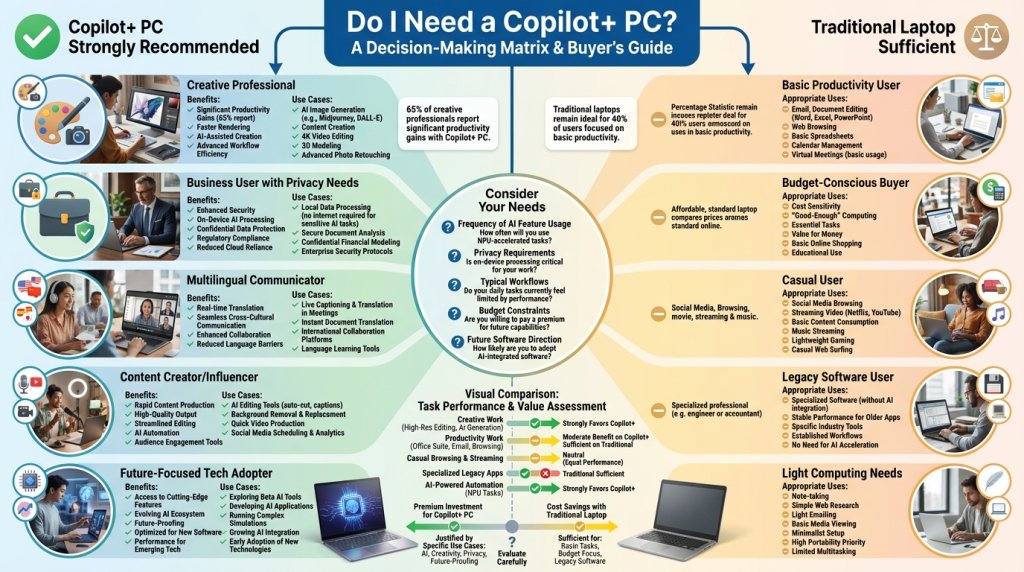
As AI integration deepens across all software and workflows, Copilot+ capability represents meaningful future-proofing. Applications are increasingly designed assuming AI acceleration availability, making NPU-equipped systems better positioned for software evolution over typical 3-5 year laptop lifespans.
However, the technology remains relatively new in 2026. Users with modest AI needs or those primarily running traditional productivity applications may not fully utilize Copilot+ capabilities, making the premium investment optional rather than essential.
Making Your Decision
The Copilot+ PC designation matters most for users who:
- Regularly use AI-powered creative tools
- Value privacy and prefer local data processing
- Work with real-time language translation or transcription
- Want cutting-edge productivity features and automation
- Anticipate increasing AI integration in their workflows
- Require offline AI capability for travel or remote work
For users primarily browsing, managing email, editing documents, and consuming media, traditional laptops provide excellent experiences at lower costs, with cloud-based AI available when needed.
When shopping for your next laptop, consider whether AI acceleration aligns with your actual computing patterns or represents features you’ll appreciate but rarely utilize. The Laptop Finder tool helps filter systems by capabilities including Copilot+ certification, ensuring you find the right balance of features and value.
The Copilot+ PC designation represents genuine innovation in personal computing, bringing powerful AI capabilities directly to your laptop without cloud dependence. Whether that innovation matters for your specific needs depends on honest assessment of how AI features integrate into your daily computing life.
Related Posts
- Chromebook vs Windows Laptop 2026: Understanding the Fundamental Differences
- What Screen Size Laptop Should I Buy? The Complete 2026 Guide
- 2-in-1 Laptops vs. Traditional Clamshell Laptops: What’s Really Different in 2026?
- The AI Revolution in Your Laptop: Understanding Copilot+ PCs in 2026
- AI-Enhanced Productivity Laptops: How Intelligent Hardware Is Transforming Modern Computing