Your Browsing History
Meet Your Seller
Visit JoesGE Store
FOLLOW
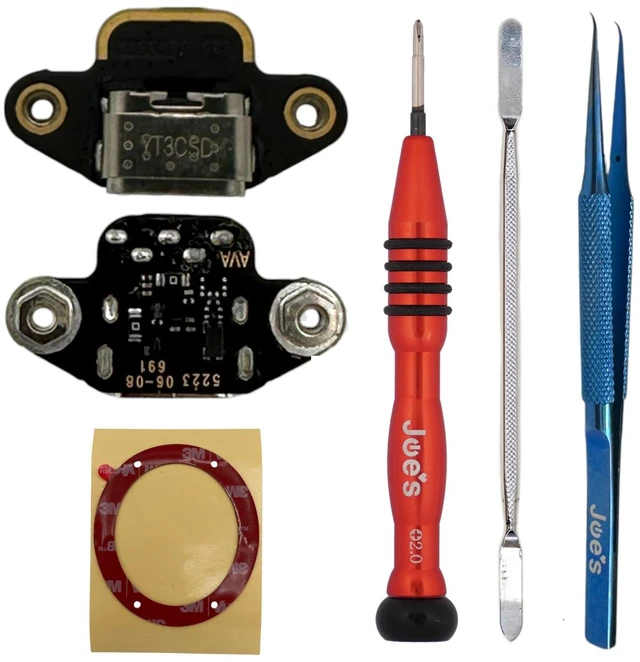
Beats Solo 4 A3140 USB-C Charging Port PCB 820-03433 Black OEM Replacement Parts (Charger Port + Repair Kit)
- Genuine OEM Beats USB-C charger port PCB, part number 820-03433
- Restores USB-C charging and wired USB-C audio
- Mounts inside the right ear cup panel
- Beats Solo 4 Wireless, model A3140 (model number is printed inside the right panel)
- Not compatible with Beats Solo 3 Wireless (A1796), Solo Pro (A1881), Solo Buds or Studio Pro
+
+
Overview
Specs
Reviews
Any questions? Ask CelesteSM will help you find out quickly.
Try me now
Key Features:
- Genuine OEM Beats USB-C charger port PCB, part number 820-03433
- Restores USB-C charging and wired USB-C audio
- Mounts inside the right ear cup panel
Compatibility:
- Beats Solo 4 Wireless, model A3140 (model number is printed inside the right panel)
- Not compatible with Beats Solo 3 Wireless (A1796), Solo Pro (A1881), Solo Buds or Studio Pro
What's Included:
Charger Port option:
- 1x Beats Solo 4 USB-C charger port board (820-03433)
Charger Port + Repair Kit option (everything used in our video in one box):
- 1x Beats Solo 4 USB-C charger port board (820-03433)
- JoesGE 2.0mm Phillips precision screwdriver
- Strong metal pry tool for the ear pad and port glue
- Curved precision tweezers for holding the wires while soldering
- 3M ear pad adhesive tape to reseal the ear pad
Installation Notes:
- Difficulty: Moderate
- Soldering is required to attach the wires. A soldering iron is not included.
- Remove the right ear pad to reach the board. Follow along with the video above.
Warranty & Returns
Warranty, Returns, And Additional Information
Warranty
- Please contact the Seller directly for warranty information. Warranty information may also be found on the Manufacturer's website.
- CONTACT
Return Policies
- Return for refund within: 30 days
- Return for replacement within: 30 days
- This item is covered by JoesGE Return Policy
Manufacturer Contact Info
- For a directory of all our manufacturers, please click below.
- Manufacturers Directory
LOADING...