


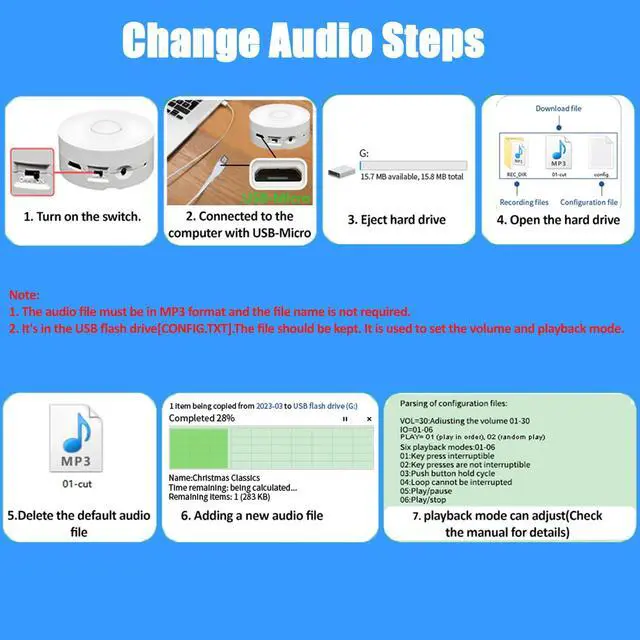
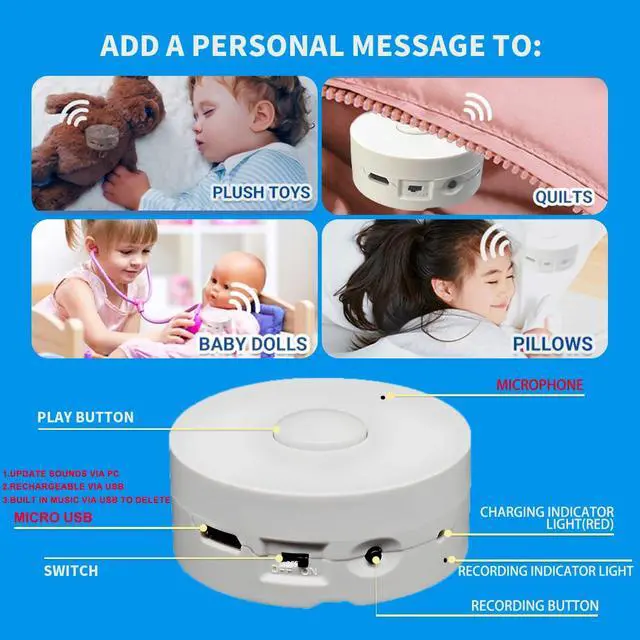
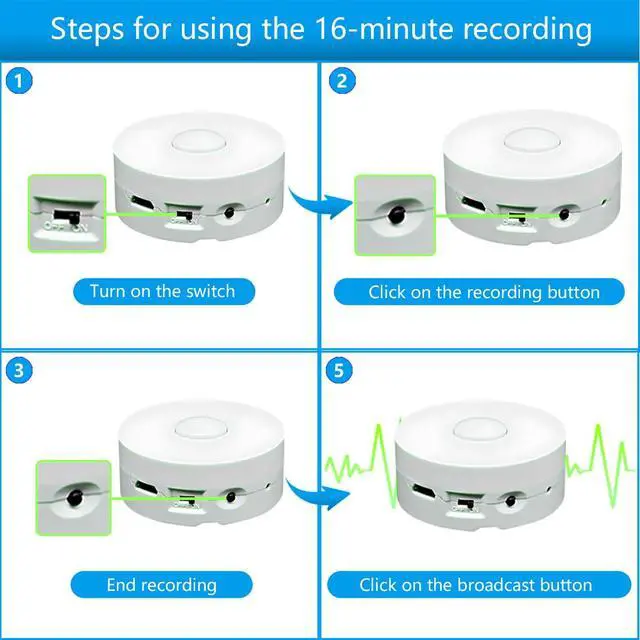


You can go to the computer to set the playback mode, there are six different modes of playback instructions tutorial: first turn on the switch - connect to the computer - pop up the hard drive - open the hard drive - click on the "config.txt" configuration file.
- Parsing of configuration config files.
- VOL=30 :Adjusting the volume : 01-30
- IO=01: Six playback modes:01-06
- PLAY= 01 (play in order), 02 (random play)
- 01:Key press interruptible(Press to start playing, and during playback, press play again to play the next track.)
- 02:Key presses are not interruptible(Press once to start playback, during playback in the press invalid, the current song ends automatically transition to the next song.)
- 03:Push button hold cycle(Click the play button to loop the song, release the button to stop playing immediately.)
- 04:Loop cannot be interrupted(holding the button, play in a loop. After releasing the button, finish playing the current music and stop.)
- 05:Play, pause (Press once to play, press again to pause, and press again to resume from the paused point.)
- 06:Play, stop (Press once to play, and during playback, press again to stop play.)
.

 16 Minutes Voice Recorder |  16 Minutes Music Box Custom Message Present for Christmas Halloween New Year ... |  16 Minutes Voice Recording Box |  16 Minutes Voice Recorder for Stuffed Anima | 195 Seconds Digital Voice Recorders |  195 Seconds Record Custom Message for Plush Toy | |
|---|---|---|---|---|---|---|
| Customer Reviews | — | — | — | — | — | — |
| Price | — | — | — | — | — no data | — no data |
| Color | White | White | Yellow | Yellow | White | White |
| Memory /Min | 16 Min | 16 Min | 16 Min | 16 Min | 195 Seconds | 195 Seconds |
| Quantity | 1 Pack | 2 Pack | 1 Pack | 2 Pack | 1 Pack | 2 Pack |
| Downloadable | ? | ? | ? | ? | no data | no data |
| Recording | ? | ? | ? | ? | ? | ? |
| Rechargeable | ? | ? | ? | ? | ? | ? |
You can go to the computer to set the playback mode, there are six different modes of playback instructions tutorial: first turn on the switch - connect to the computer - pop up the hard drive - open the hard drive - click on the "config.txt" configuration file.
- Parsing of configuration config files.
- VOL=30 :Adjusting the volume : 01-30
- IO=01: Six playback modes:01-06
- PLAY= 01 (play in order), 02 (random play)
- 01:Key press interruptible(Press to start playing, and during playback, press play again to play the next track.)
- 02:Key presses are not interruptible(Press once to start playback, during playback in the press invalid, the current song ends automatically transition to the next song.)
- 03:Push button hold cycle(Click the play button to loop the song, release the button to stop playing immediately.)
- 04:Loop cannot be interrupted(holding the button, play in a loop. After releasing the button, finish playing the current music and stop.)
- 05:Play, pause (Press once to play, press again to pause, and press again to resume from the paused point.)
- 06:Play, stop (Press once to play, and during playback, press again to stop play.)
.
16 Minutes Voice Recorder | 16 Minutes Music Box Custom Message Present for Christmas Halloween New Year ... | 16 Minutes Voice Recording Box | 16 Minutes Voice Recorder for Stuffed Anima | 195 Seconds Digital Voice Recorders | 195 Seconds Record Custom Message for Plush Toy | |
|---|---|---|---|---|---|---|
| Customer Reviews | — | — | — | — | — | — |
| Price | — | — | — | — | — no data | — no data |
| Color | White | White | Yellow | Yellow | White | White |
| Memory /Min | 16 Min | 16 Min | 16 Min | 16 Min | 195 Seconds | 195 Seconds |
| Quantity | 1 Pack | 2 Pack | 1 Pack | 2 Pack | 1 Pack | 2 Pack |
| Downloadable | ? | ? | ? | ? | no data | no data |
| Recording | ? | ? | ? | ? | ? | ? |
| Rechargeable | ? | ? | ? | ? | ? | ? |