



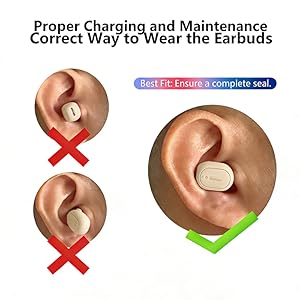
Tired of earbuds that fall out? Get the perfect fit in 2 simple steps:
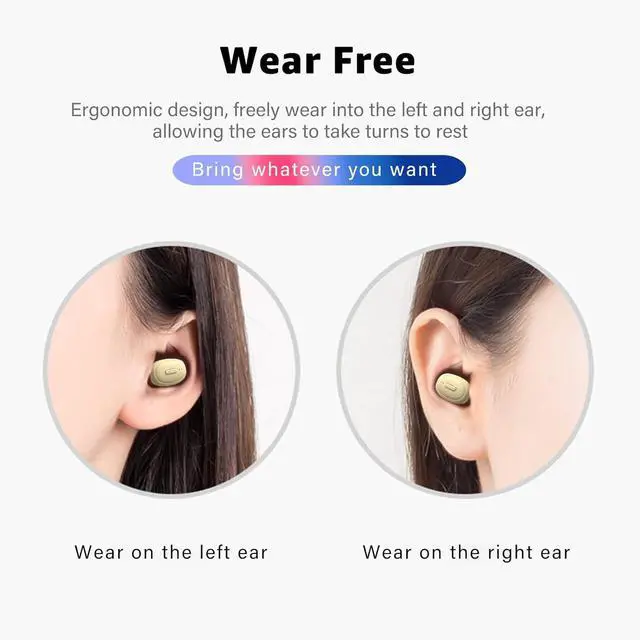
INSERT: Place the earbud into your ear canal.
ROTATE & SECURE: Gently rotate the earbud slightly forward until you feel it sit snugly. A secure fit prevents it from falling out and improves sound quality.
Note: This product may not be suitable for users with very small ear canals.
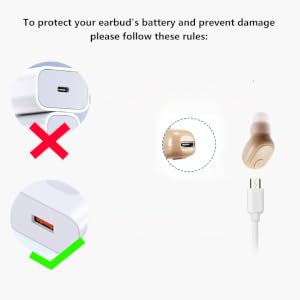
Charging for Optimal Battery Life
To ensure the longevity of your earbud, please charge it using a standard 5V/1A USB-A port (e.g., from a computer or a standard wall adapter).
Important: High-power PD fast chargers (over 15W) are not recommended, as they can cause overheating and may shorten the battery's overall lifespan.
Please Note: No charging case or wall adapter is included.

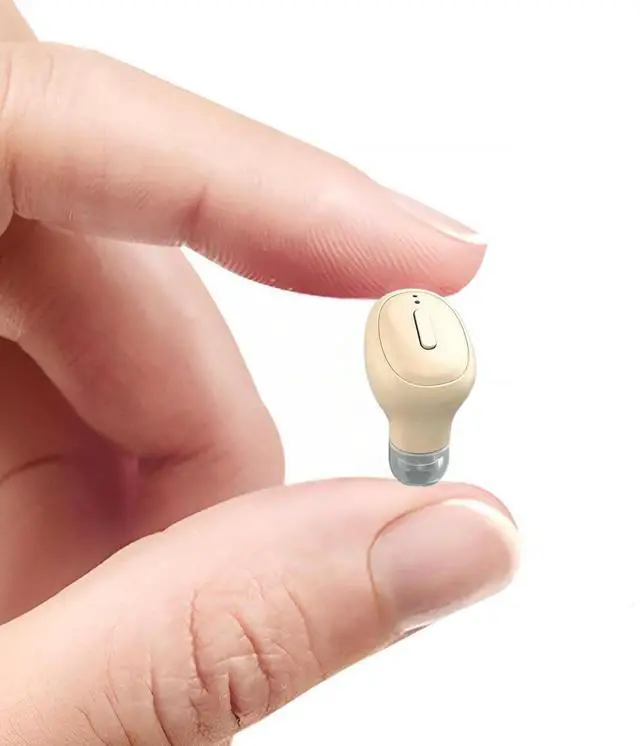
Designed for Your Comfort: Please Check the Dimensions
We want every customer to have the best possible wearing experience. Please carefully review this detailed dimension chart. It's designed to help you judge if this mini earbud is a good fit for you.
[NOTE] For users with narrow ear canals, prolonged wear may cause discomfort. This earbud may not be suitable for continuous all-day use in smaller ears.
For most users, the ergonomic design provides a secure and comfortable experience.
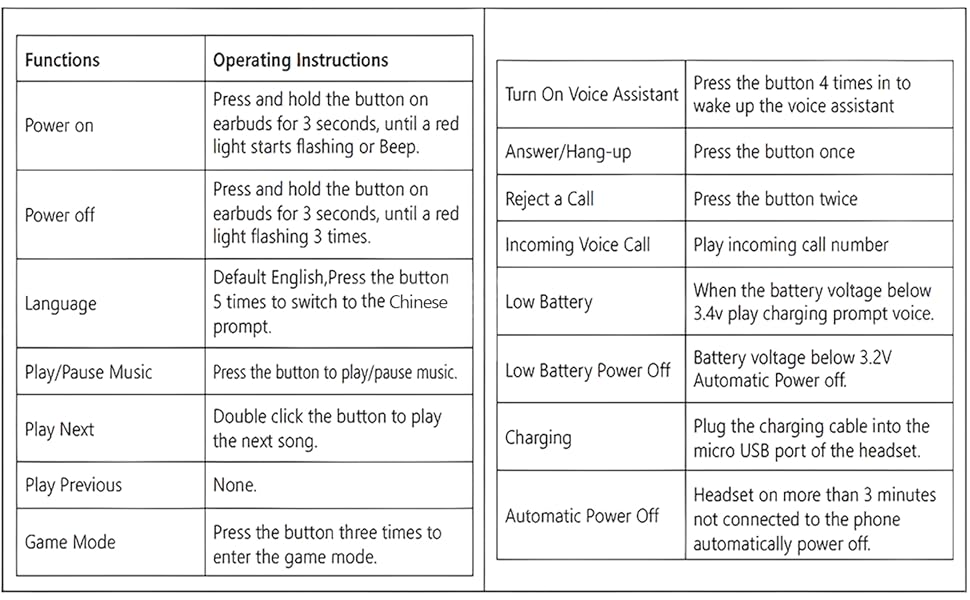
Q: How to operate to get STEREO SOUND through any two earbuds paired:
1. First turn off the Bluetooth of the mobile phone, disconnect the earbuds from the mobile phone
2. Then press the buttons on both two earbuds at the same time and hold on 5 seconds to turn on the power of the two earbuds at the same time(the light will be turn on also)
3. Then waiting for 3 seconds, after double-click the button of two earbuds at the same time, if you find only one earbud light flashing, the two earbuds are successfully paired,
4. And turn on bluetooth of the phone, find the Bluetooth name, connect the earbuds and enjoy it.
Q: How to change the language?
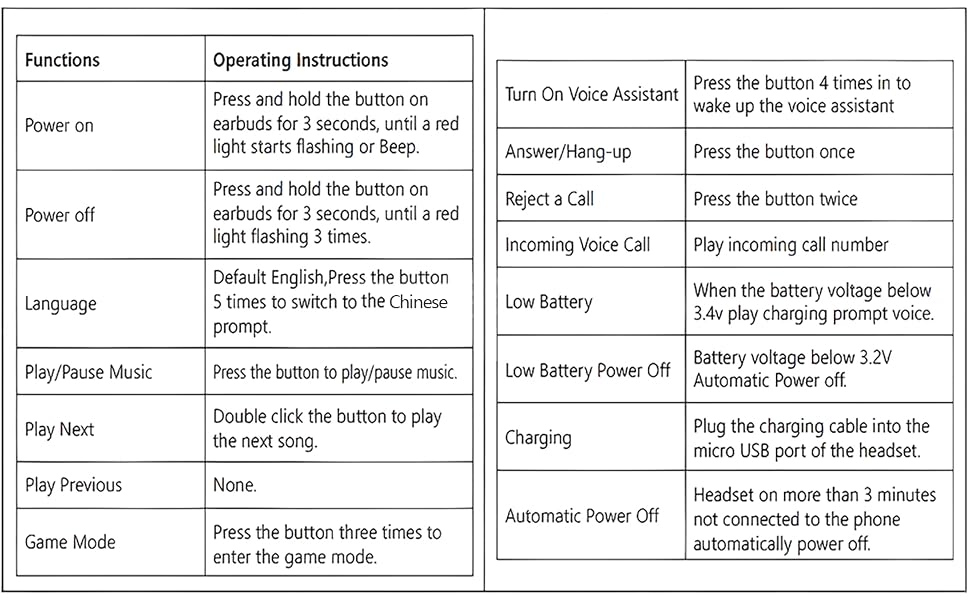
Disconnect the Bluetooth of the mobile phone, power on the earbud, then click the botton on the earbud five times quickly,
and the language will be changed.
Q: My earbud keeps connecting to the wrong device and no sound! How do I stop it?
This happens when you have multiple devices (e.g., your phone and your laptop) that have been previously paired with the earbud.
The Solution: On the device you DO NOT want it to connect to, go into its Bluetooth settings, find the earbud's name ("SYSFUN X7"), and choose "Forget this Device" or "Unpair". This will stop it from automatically connecting to that device in the future.
Operate Munual
Tired of earbuds that fall out? Get the perfect fit in 2 simple steps:
INSERT: Place the earbud into your ear canal.
ROTATE & SECURE: Gently rotate the earbud slightly forward until you feel it sit snugly. A secure fit prevents it from falling out and improves sound quality.
Note: This product may not be suitable for users with very small ear canals.
Charging for Optimal Battery Life
To ensure the longevity of your earbud, please charge it using a standard 5V/1A USB-A port (e.g., from a computer or a standard wall adapter).
Important: High-power PD fast chargers (over 15W) are not recommended, as they can cause overheating and may shorten the battery's overall lifespan.
Please Note: No charging case or wall adapter is included.
Designed for Your Comfort: Please Check the Dimensions
We want every customer to have the best possible wearing experience. Please carefully review this detailed dimension chart. It's designed to help you judge if this mini earbud is a good fit for you.
[NOTE] For users with narrow ear canals, prolonged wear may cause discomfort. This earbud may not be suitable for continuous all-day use in smaller ears.
For most users, the ergonomic design provides a secure and comfortable experience.
Q: How to operate to get STEREO SOUND through any two earbuds paired:
1. First turn off the Bluetooth of the mobile phone, disconnect the earbuds from the mobile phone
2. Then press the buttons on both two earbuds at the same time and hold on 5 seconds to turn on the power of the two earbuds at the same time(the light will be turn on also)
3. Then waiting for 3 seconds, after double-click the button of two earbuds at the same time, if you find only one earbud light flashing, the two earbuds are successfully paired,
4. And turn on bluetooth of the phone, find the Bluetooth name, connect the earbuds and enjoy it.
Q: How to change the language?
Disconnect the Bluetooth of the mobile phone, power on the earbud, then click the botton on the earbud five times quickly,
and the language will be changed.
Q: My earbud keeps connecting to the wrong device and no sound! How do I stop it?
This happens when you have multiple devices (e.g., your phone and your laptop) that have been previously paired with the earbud.
The Solution: On the device you DO NOT want it to connect to, go into its Bluetooth settings, find the earbud's name ("SYSFUN X7"), and choose "Forget this Device" or "Unpair". This will stop it from automatically connecting to that device in the future.
Operate Munual