Your Browsing History
- $2,299.00
- Free 30-day Returns
$1,149.00
Best Sellers
- $1,548.70
- + FREE SHIPPING
Meet Your Seller
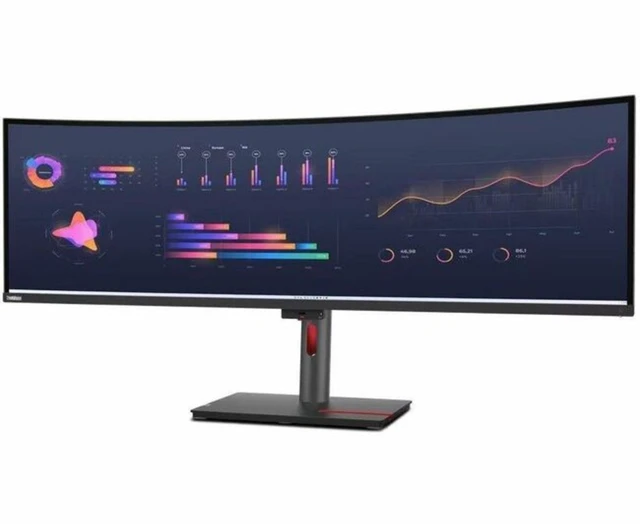
Lenovo ThinkVision 49 inch Ultra-Wide Monitor - P49w-30
- 49 5120x1440 dual QHD resolution
- 32:9 aspect
- 3800R curved display
- 98% DCI-P3
- 100% SRGB
- 100% REC.709 color gamut
- delta E <2
- IPS black panel 2000:1 contrast with TÜV IPS Black certified
- Thunderbolt4 monitor with up to 100W power delivery
+
+
Overview
Specs
Reviews
Any questions? Ask CelesteSM will help you find out quickly.
Try me now
The ThinkVison P49w-30 Monitor is a great companion for multitasking on tasks ranging from data crunching to chasing stock market numbers. Its In-Plane Switching Black panel technology delivers deep blacks and vivid, vibrant colors, while the wide viewing angles ensure that the screen is clearly visible from every angle. Enjoy a sharper view of your working world with its Dual QHD (5120 x 1440) resolution and 2000:1 contrast ratio. Get more done on a single screen with the 49-inch screen size and 32:9 screen aspect ratio. See crystal-clear views that appear consistent from every angle with the In-Plane Switching panel.
98% DCI-P3 color space coverage, along with an Avg. Delta E<2 lets you enjoy rich and vivid color representation. The ThinkVison P49w-30 Monitor sports a total of 13 ports, including two Thunderbolt 4 ports which facilitate extremely fast data transfer of up to 40Gbps. Availability of an ethernet port lets you access your machines Intel® vPro® capabilities over the internet. Lenovos patented True Split allows you to work on content from two PCs on a single screen through the PBP function with just one cable. Switch easily between two connected PCs with Lenovos eKVM/KVM switch without the need for additional drivers.
Enjoy loud and crystal-clear audio with the two built-in 5W speakers and benefit from the option to have a more convenient remote meeting experience with support for the MC60 Monitor Webcam1. Let the ThinkVison P49w-30 Monitor help you create a robust performance-driven ecosystem with ease.
98% DCI-P3 color space coverage, along with an Avg. Delta E<2 lets you enjoy rich and vivid color representation. The ThinkVison P49w-30 Monitor sports a total of 13 ports, including two Thunderbolt 4 ports which facilitate extremely fast data transfer of up to 40Gbps. Availability of an ethernet port lets you access your machines Intel® vPro® capabilities over the internet. Lenovos patented True Split allows you to work on content from two PCs on a single screen through the PBP function with just one cable. Switch easily between two connected PCs with Lenovos eKVM/KVM switch without the need for additional drivers.
Enjoy loud and crystal-clear audio with the two built-in 5W speakers and benefit from the option to have a more convenient remote meeting experience with support for the MC60 Monitor Webcam1. Let the ThinkVison P49w-30 Monitor help you create a robust performance-driven ecosystem with ease.
Warranty & Returns
Warranty, Returns, And Additional Information
Warranty
- Please contact the Seller directly for warranty information. Warranty information may also be found on the Manufacturer's website.
- Read full details
- CONTACT
Return Policies
- Return for refund within: 30 days
- Return for replacement within: 30 days
- This item is covered by Lenovo Return Policy
Manufacturer Contact Info
- For a directory of all our manufacturers, please click below.
- Manufacturers Directory
LOADING...
LOADING...
The Lenovo ThinkVision P49w-30 is a 49-inch curved ultrawide monitor with 5120×1440 Dual QHD resolution, suited to professionals who want room for multiple windows, documents, and dashboards on one screen.
Recommended For
- People who work across wide spreadsheets, financial charts, dashboards, or several application windows at once: the 32:9 screen gives you room for side-by-side work on one display.
- Laptop-and-desktop users who want to share a screen, keyboard, and mouse: Thunderbolt 4, up to 100W laptop charging, KVM, and picture-by-picture support suit a two-computer desk setup.
- Developers and project-based workers who keep code, documentation, and reference material visible together: the wide workspace can reduce the need to switch between windows or use separate monitors.
- Photo, video, and design creators who need a wide desktop and accurate SDR color for editing: the monitor has factory calibration and broad sRGB, Rec. 709, and DCI-P3 coverage.
Real-World Use Scenarios
- When working across spreadsheets, documents, and browser tabs, users can arrange several windows side by side instead of repeatedly switching between them; the wide desktop can take the place of a two-monitor setup for many office workflows.
- At a shared desk with a work laptop, users can connect the laptop to the monitor over Thunderbolt and use the monitor’s hub for compatible peripherals and wired networking; this can reduce desk cabling while delivering up to 100W of power to the laptop.
- When switching between a work computer and a personal computer, users can connect both to the monitor and use its KVM or split-screen features to view or control them from the same desk, reducing the need to swap cables and input devices.
- For photo or video work, users can keep an editing canvas or timeline open beside tool panels, previews, or reference material; the broad workspace and stated color coverage suit creative workflows, though the monitor’s 60 Hz refresh rate is not aimed at high-refresh gaming.
- For coding or technical work, users can place an editor beside documentation, terminals, or monitoring dashboards, keeping related information visible at once and spending less time toggling between windows.