




![Main image of KEHIPI for iPhone 17 MagSafe Car Mount Charger, [Safer & Faster] Vent Magnetic Wireless Car Charger, Car Vent Phone Mount Charger Fits iPhone 17 Pro Max Air 15 14 13, Samsung with MagSafe Case,Silver](https://c1.neweggimages.com/productimage/nb640/BJZJD2511110Z5E5X76.jpg)
![Alt view image 2 of 7 - KEHIPI for iPhone 17 MagSafe Car Mount Charger, [Safer & Faster] Vent Magnetic Wireless Car Charger, Car Vent Phone Mount Charger Fits iPhone 17 Pro Max Air 15 14 13, Samsung with MagSafe Case,Silver](https://c1.neweggimages.com/productimage/nb640/BJZJD2511110Z5E6TA7.jpg)
![Alt view image 3 of 7 - KEHIPI for iPhone 17 MagSafe Car Mount Charger, [Safer & Faster] Vent Magnetic Wireless Car Charger, Car Vent Phone Mount Charger Fits iPhone 17 Pro Max Air 15 14 13, Samsung with MagSafe Case,Silver](https://c1.neweggimages.com/productimage/nb640/BJZJD2511110Z5E9M66.jpg)
![Alt view image 4 of 7 - KEHIPI for iPhone 17 MagSafe Car Mount Charger, [Safer & Faster] Vent Magnetic Wireless Car Charger, Car Vent Phone Mount Charger Fits iPhone 17 Pro Max Air 15 14 13, Samsung with MagSafe Case,Silver](https://c1.neweggimages.com/productimage/nb640/BJZJD2511110Z5E9KCF.jpg)
![Alt view image 5 of 7 - KEHIPI for iPhone 17 MagSafe Car Mount Charger, [Safer & Faster] Vent Magnetic Wireless Car Charger, Car Vent Phone Mount Charger Fits iPhone 17 Pro Max Air 15 14 13, Samsung with MagSafe Case,Silver](https://c1.neweggimages.com/productimage/nb640/BJZJD2511110Z5EBB03.jpg)
![Alt view image 6 of 7 - KEHIPI for iPhone 17 MagSafe Car Mount Charger, [Safer & Faster] Vent Magnetic Wireless Car Charger, Car Vent Phone Mount Charger Fits iPhone 17 Pro Max Air 15 14 13, Samsung with MagSafe Case,Silver](https://c1.neweggimages.com/productimage/nb640/BJZJD2511110Z5EFTFE.jpg)
![Alt view image 7 of 7 - KEHIPI for iPhone 17 MagSafe Car Mount Charger, [Safer & Faster] Vent Magnetic Wireless Car Charger, Car Vent Phone Mount Charger Fits iPhone 17 Pro Max Air 15 14 13, Samsung with MagSafe Case,Silver](https://c1.neweggimages.com/productimage/nb640/BJZJD2511110Z5EJ87E.jpg)


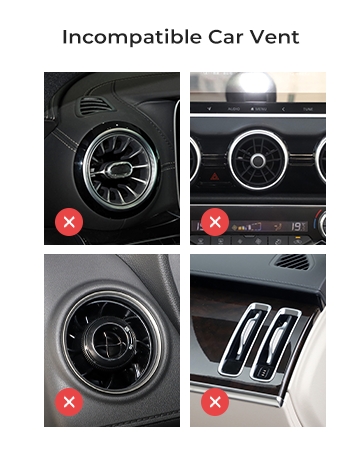
Check Your Vent Here
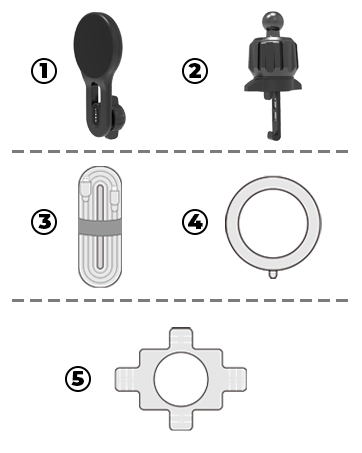
Step 1
knob-operated hook clamp, MagSafe charger, Product Specifications Guide, Lead Ring Accessory Kit and Charging Cable
Step 2
Locate a horizontal or vertical vent blade (ensure it is thick and sturdy)
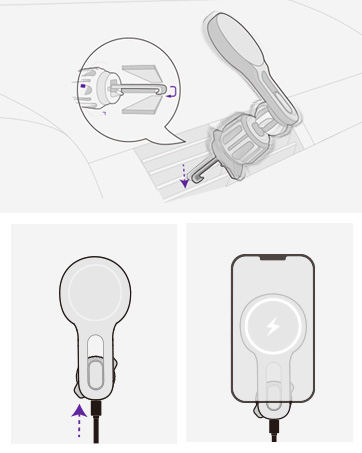
Step 3
Hold the MagSafe charger head and rotate it vertically/horizontally to your preferred angle
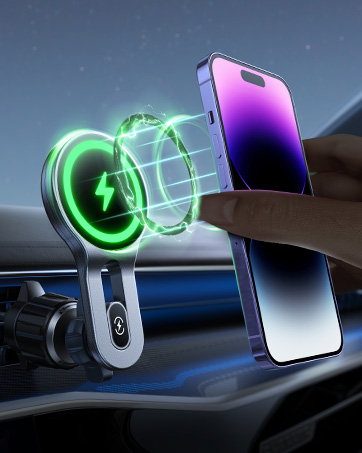
Step 4
Align your MagSafe-compatible iPhone (or MagSafe case) with the charger until it magnetically snaps on
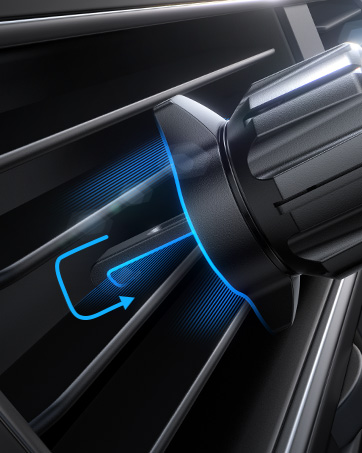
Step 5
Gently shake the mount to ensure the knob clamp stays firmly locked on the vent.
Plug the USB-C cable into your car’s power outlet

Double-check the knob’s tightness before driving.
Avoid blocking the driver’s sightline or airbag deployment areas.
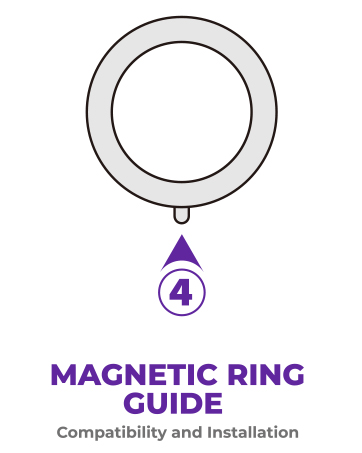

Step 1
Unbox the mount and check components: knob-operated hook clamp, MagSafe charger, Product Specifications Guide, Lead Ring Accessory Kit and Charging Cable
Step 2
Locate a horizontal or vertical vent blade (ensure it is thick and sturdy).
Open the hook clamp by rotating the knob counterclockwise until the clamp jaws widen.
Hook the clamp onto the vent blade, then rotate the knob clockwise to tighten and secure the grip.
Step 3
Hold the MagSafe charger head and rotate it vertically/horizontally to your preferred angle.
The built-in friction ball joint will hold the angle automatically
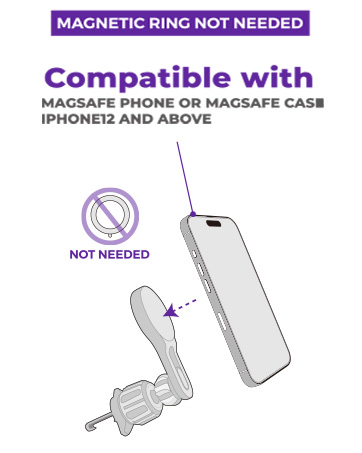
Step 4
Align your MagSafe-compatible iPhone (or MagSafe case) with the charger until it magnetically snaps on.
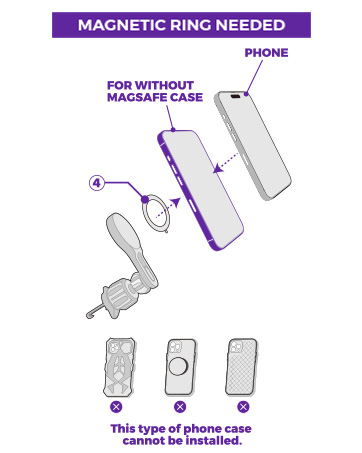
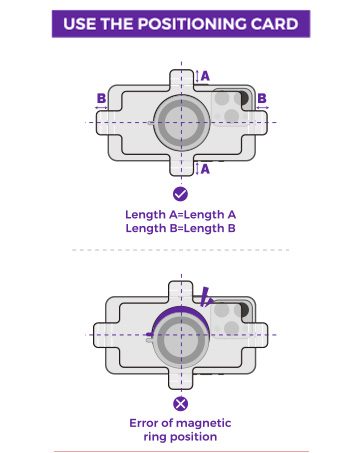
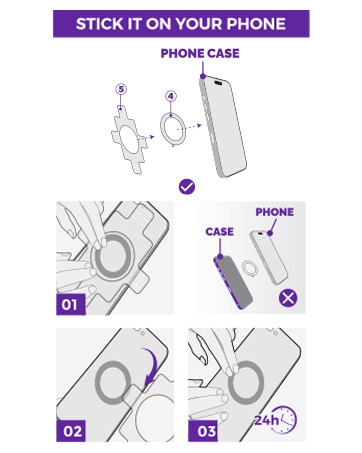
For non-MagSafe phones, use a MagSafe-compatible case or metal ring adapter
Step 5
Gently shake the mount to ensure the knob clamp stays firmly locked on the vent.
Plug the USB-C cable into your car’s power outlet
Safety Tips
Double-check the knob’s tightness before driving.
Avoid blocking the driver’s sightline or airbag deployment areas.
Remove the mount if the vent blade becomes loose over time

![LISEN for Qi2 15W MagSafe Car Mount Charger, [Safer & Faster] Magsafe Car Charger, Vent Magnetic ...](//c1.neweggimages.com/sellingpilot/modules/product/a-plus/0d0cb069848b061b8d64b00cbea8fcfec39cf9a3b487b8f6402c80be80c31bfa.jpg)
Qi2 Steady-state 15W Charging

![LISEN for Qi2 15W MagSafe Car Mount Charger, [Safer & Faster] Magsafe Car Charger, Vent Magnetic ...](http://c1.neweggimages.com/sellingpilot/modules/product/a-plus/0d0cb069848b061b8d64b00cbea8fcfec39cf9a3b487b8f6402c80be80c31bfa.jpg)
Check Your Vent Here
Step 1
knob-operated hook clamp, MagSafe charger, Product Specifications Guide, Lead Ring Accessory Kit and Charging Cable
Step 2
Locate a horizontal or vertical vent blade (ensure it is thick and sturdy)
Step 3
Hold the MagSafe charger head and rotate it vertically/horizontally to your preferred angle
Step 4
Align your MagSafe-compatible iPhone (or MagSafe case) with the charger until it magnetically snaps on
Step 5
Gently shake the mount to ensure the knob clamp stays firmly locked on the vent.
Plug the USB-C cable into your car’s power outlet
Double-check the knob’s tightness before driving.
Avoid blocking the driver’s sightline or airbag deployment areas.
Step 1
Unbox the mount and check components: knob-operated hook clamp, MagSafe charger, Product Specifications Guide, Lead Ring Accessory Kit and Charging Cable
Step 2
Locate a horizontal or vertical vent blade (ensure it is thick and sturdy).
Open the hook clamp by rotating the knob counterclockwise until the clamp jaws widen.
Hook the clamp onto the vent blade, then rotate the knob clockwise to tighten and secure the grip.
Step 3
Hold the MagSafe charger head and rotate it vertically/horizontally to your preferred angle.
The built-in friction ball joint will hold the angle automatically
Step 4
Align your MagSafe-compatible iPhone (or MagSafe case) with the charger until it magnetically snaps on.
For non-MagSafe phones, use a MagSafe-compatible case or metal ring adapter
Step 5
Gently shake the mount to ensure the knob clamp stays firmly locked on the vent.
Plug the USB-C cable into your car’s power outlet
Safety Tips
Double-check the knob’s tightness before driving.
Avoid blocking the driver’s sightline or airbag deployment areas.
Remove the mount if the vent blade becomes loose over time
Qi2 Steady-state 15W Charging