Five Bay 2.5 "/ 3.5" SATA SSD/HDD Hard Drive Offline Duplicator Docking Station
1. Offline cloning, no need to connect the computer, turn the switch of the hard disk copier to clone mode, insert the source disk into source a, and the target disk into target B / C / D; connect the power supply, long press the clone button, and wait until the 0-100% light is always on to indicate completion. (Target SSD capacity must be = Source SSD capacity.)
2. Read and write online, turn on the switch of the hard disk copier to PM mode, connect the computer, and check the hard disk drive in computer disk management (new hard disk needs to be formatted for the first time, old hard disk needs to be backed up before use)
Vertical Insert Design
This 5 Bay SATA dock/cloner has vertical insert desing, which is perfect for heat dissipation, good cooling performance for hard disks.
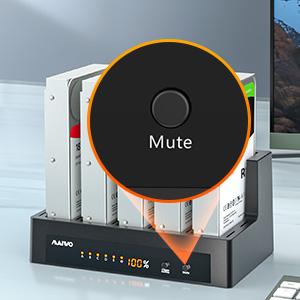
Mute Function
There is a Mute button on this sata docking station, whiich can keep reading&writing&cloning mute, no noise at working.
Double Modes
This 5 Bay Dock have two modes: read&write/offline clone.
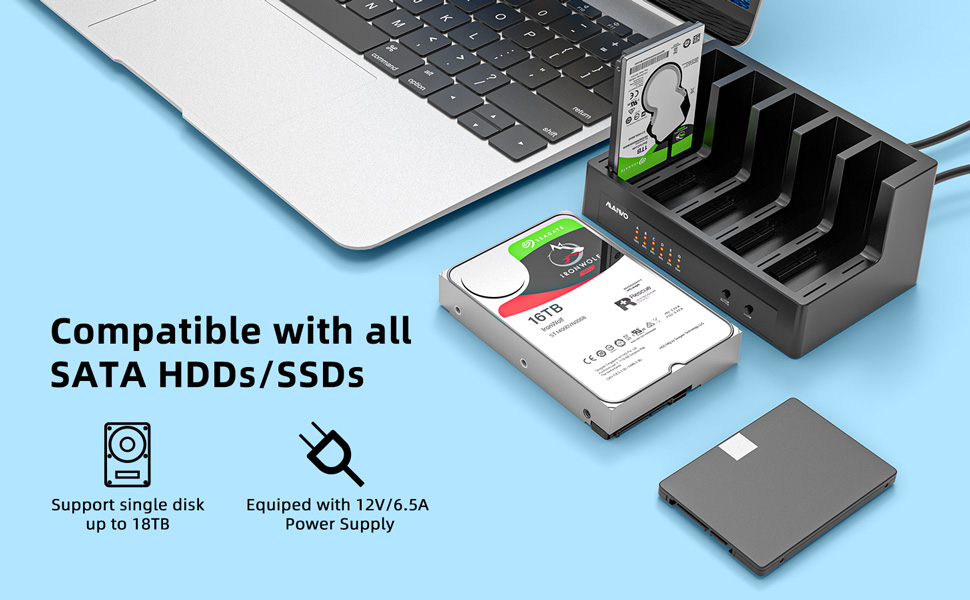
Compatible with all 2.5/3.5 inch SATA Hard Drive
2.5 "/ 3.5" SSD five Bay one drag three offline hard disk copier
SSD whole copy function without PC
1. Offline cloning, no need to connect the computer, turn the switch of the hard disk copier to clone mode, insert the source disk into source a, and the target disk into target B / C / D; connect the power supply, long press the clone button, and wait until the 0-100% light is always on to indicate completion. (Target SSD capacity must be = Source SSD capacity.)
2. Read and write online, turn on the switch of the hard disk copier to PM mode, connect the computer, and check the hard disk drive in computer disk management (new hard disk needs to be formatted for the first time, old hard disk needs to be backed up before use)
Product parameters
Transmission interface: USB B
Transmission speed: 5gbps
Support device: 2.5 "/ 3.5" SATA HDD SSD
Product weight: 1709G
Product size: 410x260x1855mm
Material: ABS + Aluminum alloy
What is in the box
1x MAIWO docking
1 x USB3.0 Cable
1 x 12V/6.5A Power Adapter
1 x User Manual
Notes
Target Disk must contain more space than Source Disk.
Please backup files in the target hard drive before cloning. Any files in target hard drive will be overwritten when offline cloning occurs.
To avoid data loss, do not remove or insert drives when one drive is working in the docking station. Please power off the docking station before removing.
please note:
1. Clone Do not connect to the computer during use.
2. SSD condition: If there is a bad sector in the SSD, copying may stop. Scan the SSD once before copying to make sure there are no bad sectors.
3. Make sure that the two SSD disks can be recognized on the computer when plug in our SATA enclosure.If not, it could not clone.








![Main image of MAIWO 5 Bay 1:4 2.5/3.5" SATA SSD Docking Station, USB3.0 to 2.5 Inch & 3.5 Inch SATA SSD Clone External Hard Drive HDD Enclosure for SATA, Support Offline Clone Duplicator [Support 90TB]](https://c1.neweggimages.com/productimage/nb640/AVF7S211026pguxw.jpg)
![Alt view image 2 of 7 - MAIWO 5 Bay 1:4 2.5/3.5" SATA SSD Docking Station, USB3.0 to 2.5 Inch & 3.5 Inch SATA SSD Clone External Hard Drive HDD Enclosure for SATA, Support Offline Clone Duplicator [Support 90TB]](https://c1.neweggimages.com/productimage/nb640/AVF7S2110268DD23.jpg)
![Alt view image 3 of 7 - MAIWO 5 Bay 1:4 2.5/3.5" SATA SSD Docking Station, USB3.0 to 2.5 Inch & 3.5 Inch SATA SSD Clone External Hard Drive HDD Enclosure for SATA, Support Offline Clone Duplicator [Support 90TB]](https://c1.neweggimages.com/productimage/nb640/AVF7S21102667658.jpg)
![Alt view image 4 of 7 - MAIWO 5 Bay 1:4 2.5/3.5" SATA SSD Docking Station, USB3.0 to 2.5 Inch & 3.5 Inch SATA SSD Clone External Hard Drive HDD Enclosure for SATA, Support Offline Clone Duplicator [Support 90TB]](https://c1.neweggimages.com/productimage/nb640/AVF7S21102606C79.jpg)
![Alt view image 5 of 7 - MAIWO 5 Bay 1:4 2.5/3.5" SATA SSD Docking Station, USB3.0 to 2.5 Inch & 3.5 Inch SATA SSD Clone External Hard Drive HDD Enclosure for SATA, Support Offline Clone Duplicator [Support 90TB]](https://c1.neweggimages.com/productimage/nb640/AVF7S211026C6F32.jpg)
![Alt view image 6 of 7 - MAIWO 5 Bay 1:4 2.5/3.5" SATA SSD Docking Station, USB3.0 to 2.5 Inch & 3.5 Inch SATA SSD Clone External Hard Drive HDD Enclosure for SATA, Support Offline Clone Duplicator [Support 90TB]](https://c1.neweggimages.com/productimage/nb640/AVF7S211026B8A01.jpg)
![Alt view image 7 of 7 - MAIWO 5 Bay 1:4 2.5/3.5" SATA SSD Docking Station, USB3.0 to 2.5 Inch & 3.5 Inch SATA SSD Clone External Hard Drive HDD Enclosure for SATA, Support Offline Clone Duplicator [Support 90TB]](https://c1.neweggimages.com/productimage/nb640/AVF7S211026261B9.jpg)