

Your Browsing History

Best Sellers
 Top Rated
- $1,851.47
- + FREE SHIPPING
Top Rated- $1,899.99
- + FREE SHIPPING
Top Rated- $1,904.45

More Resources
Sponsored Products

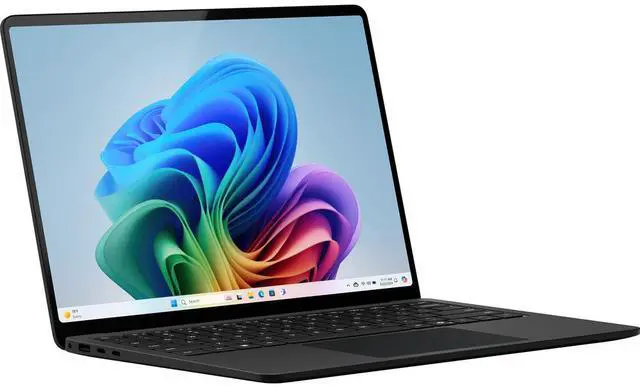
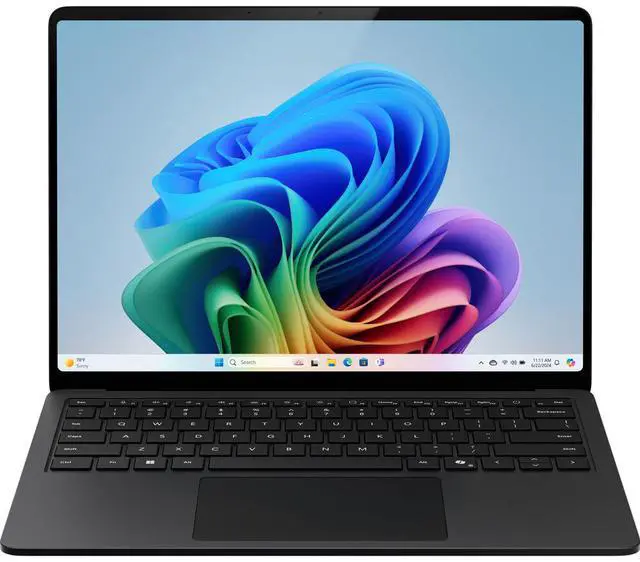
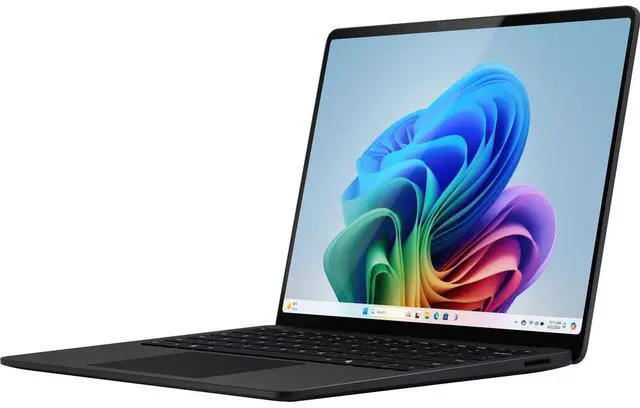
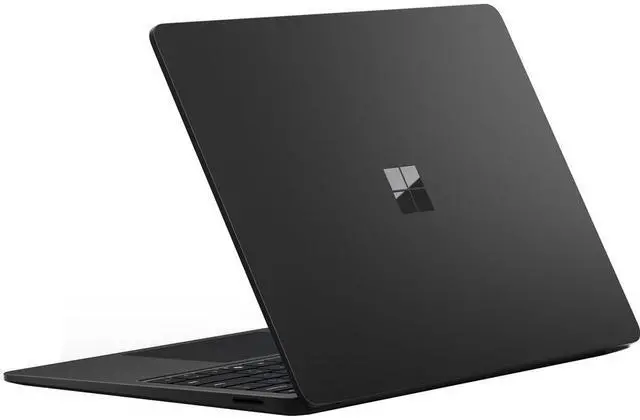


Microsoft Surface 13.8" Copilot+ Laptop 7th Edition - 13.8" PixelSense Flow Display - Intel Core Ultra 5 (Series 2) - 16GB Memory - 512GB SSD - Wi-Fi 7 - Windows 11 Pro - Black EP2-33228
- 16GB Memory 512 GB SSD
- Intel Arc Graphics
- 2304 x 1536
- Windows 11 Pro

+
+
Overview
Specs
Reviews
See all Q & A 
Any questions? Our AI mode will help you find out quickly.
Try me now
Surface Laptop for Business, 7th Edition, the first Copilot+ PC built exclusively for business with Intel Core Ultra processors (Series 2). Tackle demanding workloads with powerful performance, all-day battery life, and new, unique AI experiences only available on Copilot+ PCs that help make your device smarter, faster, and more creative.Exceptional performance and AI capabilitiesImpressive, reliable power
Built with the latest Intel Core Ultra processors (Series 2), enjoy powerful performance, reliable power, and AI capabilities.
All-day productivity
Power through tasks with up to 20 hours of battery, and recharge in a snap with Fast Charging, supported via Surface Connect or USB-C.
More powerful AI processing
The Intel AI Boost NPU features 40 TOPS, designed to accelerate AI experiences.
Immersive brilliance, expansive display
Experience stunning visuals on the Surface PixelSense Flow touchscreen, featuring razor-thin bezels, a 3:2 ratio.
Screen size
Sleek 13.8-inch screen for portability.True-to-life color
HDR and adaptive color improve color accuracy and contrast with up to 600 nits of peak brightness.Smoother scrollingEnjoy a smoother Dynamic Refresh Rate of 120 Hertz when quickly moving windows and scrolling websites.
Designed for eye comfortThe integrated anti-reflective display is tested to be flicker-free and reduce blue light exposure, which can help reduce eye strain.Seamless connectivity, smartly sleek design
Ultralight and Ultra durableEnjoy a sleek, lightweight laptop engineered from aluminum that's been tested for durability and reliability.Maximize typing comfortExperience effortless typing with optimal key travel, ensuring unparalleled comfort and swift, accurate input. A dedicated Copilot key seamlessly engages your AI assistant.
Dock and connect to accessoriesTwo USB-C Thunderbolt 4 ports support charging, data transfers, and multiple 4K monitors at 60 Hz with compatible docks. Connect to accessories with additional ports, including USB-A and Audio Jack.
Fast, reliable wireless connectionsEnhance productivity with lightning-fast speeds, ultra-low latency, and stable, secure connections with Wi-Fi 7 and Bluetooth Core 5.4.The most inclusive touchpad on the marketThe precision haptic touchpad allows you to customize the touchpad's settings to work for your diverse needs and use the touchpad with different parts of your limbs, such as your palm, foot, edges of the hand, and residual limbs.
Best in class security, built for trustProtect your business data
Surface Laptop for Business is a Secured-core PC, designed to elevate the benefits of Windows 11 Pro security, providing additional hardware and software protection.
Easy, secure, password less sign-inSign in instantly and securely without a password using Windows Hello with facial recognition. It can help prevent phishing and credential-based attacks.Protection from chip to cloudMicrosoft Pluton is a built-in security processor, making it harder to hack and easier to update.Quickly secure sensitive dataThe removable SSD makes it easy to quickly and securely erase sensitive data, ensuring that confidential information is not accessible to unauthorized individuals.Protect against evolving threatsWindows is secure by default, with layers of hardware-backed protection and a reported 62% drop in security incidents.
Keep your data protectedSign in to your work account to access Microsoft Copilot with commercial data protection. Chat data isn't saved, Microsoft has no eyes-on access, and your data isn't used to train the models.Uncover solutions quickly with Microsoft Copilot
Get answers to tough questionsCopilot can help you find the answers you need, summarize important points, and compare, analyze, and visualize your data
Built with the latest Intel Core Ultra processors (Series 2), enjoy powerful performance, reliable power, and AI capabilities.
All-day productivity
Power through tasks with up to 20 hours of battery, and recharge in a snap with Fast Charging, supported via Surface Connect or USB-C.
More powerful AI processing
The Intel AI Boost NPU features 40 TOPS, designed to accelerate AI experiences.
Immersive brilliance, expansive display
Experience stunning visuals on the Surface PixelSense Flow touchscreen, featuring razor-thin bezels, a 3:2 ratio.
Screen size
Sleek 13.8-inch screen for portability.True-to-life color
HDR and adaptive color improve color accuracy and contrast with up to 600 nits of peak brightness.Smoother scrollingEnjoy a smoother Dynamic Refresh Rate of 120 Hertz when quickly moving windows and scrolling websites.
Designed for eye comfortThe integrated anti-reflective display is tested to be flicker-free and reduce blue light exposure, which can help reduce eye strain.Seamless connectivity, smartly sleek design
Ultralight and Ultra durableEnjoy a sleek, lightweight laptop engineered from aluminum that's been tested for durability and reliability.Maximize typing comfortExperience effortless typing with optimal key travel, ensuring unparalleled comfort and swift, accurate input. A dedicated Copilot key seamlessly engages your AI assistant.
Dock and connect to accessoriesTwo USB-C Thunderbolt 4 ports support charging, data transfers, and multiple 4K monitors at 60 Hz with compatible docks. Connect to accessories with additional ports, including USB-A and Audio Jack.
Fast, reliable wireless connectionsEnhance productivity with lightning-fast speeds, ultra-low latency, and stable, secure connections with Wi-Fi 7 and Bluetooth Core 5.4.The most inclusive touchpad on the marketThe precision haptic touchpad allows you to customize the touchpad's settings to work for your diverse needs and use the touchpad with different parts of your limbs, such as your palm, foot, edges of the hand, and residual limbs.
Best in class security, built for trustProtect your business data
Surface Laptop for Business is a Secured-core PC, designed to elevate the benefits of Windows 11 Pro security, providing additional hardware and software protection.
Easy, secure, password less sign-inSign in instantly and securely without a password using Windows Hello with facial recognition. It can help prevent phishing and credential-based attacks.Protection from chip to cloudMicrosoft Pluton is a built-in security processor, making it harder to hack and easier to update.Quickly secure sensitive dataThe removable SSD makes it easy to quickly and securely erase sensitive data, ensuring that confidential information is not accessible to unauthorized individuals.Protect against evolving threatsWindows is secure by default, with layers of hardware-backed protection and a reported 62% drop in security incidents.
Keep your data protectedSign in to your work account to access Microsoft Copilot with commercial data protection. Chat data isn't saved, Microsoft has no eyes-on access, and your data isn't used to train the models.Uncover solutions quickly with Microsoft Copilot
Get answers to tough questionsCopilot can help you find the answers you need, summarize important points, and compare, analyze, and visualize your data
Warranty & Returns
Warranty, Returns, And Additional Information
Warranty
- Limited Warranty period (parts): 1 year
- Limited Warranty period (labor): 1 year
- Read full details
Return Policies
- Return for refund within: 15 days
- Return for replacement within: 15 days
- This item is covered by Newegg.com's 15-Day Return Policy.
- Read full return policy for details.
Manufacturer Contact Info
- Manufacturer Product Page
- Manufacturer Website
- Support Phone: 1-800-642-7676
- Support Website
- View other products from Microsoft
LOADING...
LOADING...
Learn about this product
The Microsoft Surface 13.8-inch Copilot+ Laptop 7th Edition is a premium Windows 11 Pro laptop with an Intel Core Ultra 5 236V, 16GB RAM, 512GB SSD, 2304 x 1536 PixelSense Flow display, and Wi-Fi 7, making it a strong fit for professionals, students, and hybrid workers who want a light, business-ready PC for productivity, video calls, and everyday AI-assisted tasks.
Recommended For
- Professionals who want a light Windows laptop for travel, meetings, browser-heavy work, Office apps, and video calls, and prefer Intel app compatibility over ARM-based Copilot+ models.
- Buyers who care about premium everyday ergonomics—high-quality keyboard, 120Hz touchscreen, strong speakers, and a polished clamshell design for long work or study sessions.
- Students, consultants, and hybrid workers who spend most of the day in docs, email, Slack/Teams, web apps, and light coding, and need battery life that can realistically cover a workday rather than gaming-class performance.
- Business users or IT-managed environments that specifically want Windows 11 Pro, modern connectivity, and a more serviceable Surface than older generations.
- Users who want a MacBook Air-style thin-and-light alternative but need Windows-native software support, touch input, and Microsoft’s Surface hardware experience.
Real-World Use Scenarios
- Mobile office work and web-based multitasking: handling email, Office apps, Slack/Teams, and many browser tabs on the go is a typical fit, with a light chassis and real-world battery often covering most or all of a workday under mixed productivity use.
- Hybrid meetings and remote collaboration: joining frequent video calls, using the webcam and mics, and working in shared documents should be smooth for standard business use, though long meeting-heavy days will drain battery faster than lighter browsing or document work.
- Travel and carry-everywhere use: commuting between classes, offices, or client sites is a common scenario, with the 13.8-inch size offering a balance of screen space and portability that works well for typing, presentations, and everyday setup in tight spaces.
- Light creative work and media consumption: photo editing, document layout, streaming, and general content viewing should feel comfortable on the high-resolution 3:2 touchscreen, but this is better suited to moderate creative tasks than sustained heavy video production workloads.
- Casual gaming or GPU-heavy tasks: older, lighter, or less demanding games may be workable at reduced settings, but community feedback and comparable Surface testing suggest this is not the right choice if gaming, 3D work, or sustained graphics-heavy apps are a main priority.
Spec Summary
| Attribute | Value |
|---|---|
| Best For | Mobile productivity and Copilot-enabled workflows on a compact 13.8-inch Windows laptop; suited for on-the-go office work, web use, and light creative or media tasks that benefit from integrated Intel Arc graphics and built-in Copilot+ features |
| Processor And Core Count | Intel Core Ultra 5 (Series 2) — Intel Core Ultra 5 236V; attribute data lists a 2.2 GHz processor speed and single processor count |
| GPU And VRAM | Intel Arc Graphics (integrated) |
| Display Spec | 13.8-inch PixelSense Flow touchscreen LCD, 2304 x 1536 resolution, 60 Hz refresh rate |
| Memory Configuration | 16 GB DDR4 installed (maximum 16 GB) |
| Storage And Expansion | 512 GB SSD internal storage |
| High Speed I O | 2 × USB-C ports supporting USB4 / Thunderbolt 4 |
| Battery And Power | Built-in lithium-ion battery with up to 20 hours local video playback and up to 12 hours active web usage; 39W power supply; attribute data lists 4 lithium-ion cells |
| Wired And Wireless Networking | Wi‑Fi 7 wireless and Bluetooth 5.4; attribute data lists compatibility with 802_11_AX (Wi‑Fi 6/ax) and 802_11_AC |
| Webcam And Privacy | Full HD front-facing Surface Studio Camera (1080p Full HD) |
| Keyboard And Control | Physical keyboard with a dedicated AI key, touchpad input, and PixelSense touch screen support |
| Audio Setup | Built-in speakers |
| Portability | 11.85 × 8.67 × 0.69 inches; 2.97 lbs (1.35 kg) |
| External Display And Docking Fit | USB4 / Thunderbolt 4 over USB‑C ports for external displays and docking solutions |
| Model Identifiers | Microsoft — Model EP2-33228 (Part Number EP2-33228), marketed as Surface Laptop, Model Year 2025 |
Reference Q&A
Q: Should I buy this Intel Core Ultra 5 Surface Laptop 7 or the Snapdragon Surface Laptop 7?
A: Choose this Intel Core Ultra 5 Surface Laptop 7 if you want the broadest Windows app, driver, and peripheral compatibility without relying on ARM emulation. Choose the Snapdragon Surface Laptop 7 if your workload is mostly mainstream productivity, browser, video calls, and Office apps, and you want the version Microsoft positions more aggressively for battery life. Across official Surface materials, reviews, and community discussions, the recurring trade-off is compatibility-first on Intel versus battery-efficiency-first on Snapdragon.
Q: Is this Surface Laptop 7 worth it over the previous Surface Laptop 6 for Business?
A: Yes, this model is the more current choice if you want the newer Surface design generation with Copilot+ positioning, Wi‑Fi 7, Thunderbolt 4/USB4, and longer claimed battery life than older Intel-based Surface Laptop business models. Surface Laptop 6 for Business is still the more straightforward pick only if you are specifically standardizing on that earlier platform or need exact fleet continuity. For most new buyers, the newer 7th Edition makes more sense as the forward-looking purchase.
Q: Should I get this Core Ultra 5 model or move up to a Core Ultra 7 Surface Laptop 7?
A: Get this Core Ultra 5 236V model if your main use is office work, web apps, video meetings, school, and general business productivity. Move up to Core Ultra 7 if you expect heavier multitasking or want extra headroom from the higher-tier Lunar Lake configuration. The practical trade-off is value and efficiency on Core Ultra 5 versus more performance margin on Core Ultra 7, not a change in the overall Surface experience.
Q: Is the 16GB/512GB version the right choice, or should I look for a lower-tier configuration?
A: The 16GB/512GB configuration is the safer long-term choice for a premium 13.8-inch laptop. It gives more room for multitasking, larger apps, local files, and longer useful life than entry storage options, while keeping the same portability and general user experience. A lower-tier version is reasonable only if your workload is light and you mainly use cloud storage or web apps.
Q: Is this Surface Laptop 7 a better fit for portability or should I choose a performance-first laptop instead?
A: This Surface Laptop 7 is the better fit if you want a premium, light 13.8-inch laptop for mobile work, meetings, travel, and everyday productivity. Its 2.97 lb weight, 3:2 high-resolution display, and business-focused configuration align with portability and day-long use. A performance-first laptop is the better fit only if your priority is sustained heavy workloads, gaming, or more powerful graphics rather than thin-and-light mobility.
Q: Is this a good travel and work laptop?
A: Yes for mobile office use. This model is light for a 13.8-inch laptop at 2.97 lbs, has a compact footprint, long rated battery life, Wi-Fi 7, and two USB-C/Thunderbolt 4 ports that support charging and external displays. The main trade-off is limited built-in port variety, so frequent HDMI, Ethernet, or USB-A users may want a dock or adapter.
Q: Is it good for meetings, note-taking, and everyday office work?
A: Yes. It is well suited to web work, documents, email, video meetings, and general business tasks. This configuration includes a 1080p front camera, Windows 11 Pro, 16GB RAM, and a 512GB SSD, which is a practical baseline for multitasking and work files. It is a better fit for productivity than for heavy gaming or specialized GPU workloads.
Q: Who is this Surface Laptop best for?
A: It is best for professionals, students, and frequent travelers who want a premium Windows laptop for office work, meetings, web apps, and light creative tasks. It makes the most sense for buyers who value portability, battery life, business features, and Copilot+ capabilities. It is less suitable for users who need upgradeable memory, lots of built-in ports, or stronger graphics for gaming and intensive 3D work.
Q: What are the trade-offs versus a MacBook Air or other thin premium laptops?
A: Its strengths are Windows 11 Pro, Copilot+ features, Thunderbolt 4 support, and business-oriented security. The trade-offs are typical for thin premium laptops: limited built-in ports and less appeal for gaming or heavy graphics work. Compared with ARM-based Copilot+ alternatives, this Intel version may be a safer choice for buyers who want broad Windows software compatibility while still getting modern AI features.
Q: Should I choose this model over a higher-end Surface configuration?
A: Choose this model if your workload is mostly productivity: documents, browser tabs, meetings, and standard business apps. The Core Ultra 5, 16GB RAM, and 512GB SSD are enough for many users. Move up only if you need more local storage, heavier multitasking headroom, or stronger performance for demanding creative or technical work.
Q: Is this Intel Surface Laptop 7 a better choice than the Snapdragon version if I need full Windows app compatibility?
A: Yes, this Intel model is the safer choice if you rely on standard x86 Windows software, older utilities, or work apps that may not behave well on ARM. Reddit discussions repeatedly frame the Intel Surface Laptop 7 as the lower-risk option for compatibility, while still keeping the same premium Surface design. The trade-off is that Intel models may run warmer and usually do not match Snapdragon models on battery efficiency.
Q: Is this Surface Laptop 7 a good fit for work, travel, and everyday productivity?
A: Yes, it is well suited for office work, web use, meetings, and travel. Its 13.8-inch size, 2.97 lb weight, 16GB RAM, 512GB SSD, 1080p webcam, and two USB4/Thunderbolt 4 ports fit common mobile-work needs. Community discussion also repeatedly highlights the Surface Laptop 7 as portable, premium-feeling, and responsive for general use. The main limits are the reflective display and a port selection that is minimal compared with some business laptops.
Q: What are the main trade-offs of buying this model?
A: The main trade-offs are display reflectivity, limited built-in ports, and value relative to price. Reddit posts about the 13.8-inch Surface Laptop 7 repeatedly mention reflections and only modest brightness as downsides. This configuration also has just two USB-C/USB4 ports and no USB-A or HDMI, so some buyers will need adapters. It is best for users who prioritize build quality, portability, and Windows compatibility over maximum connectivity or price efficiency.
Q: Is this model worth buying over cheaper Windows laptops?
A: It is worth considering if you want a compact premium Windows laptop with strong everyday performance, a high-resolution 13.8-inch display, 16GB memory, and business-friendly Windows 11 Pro. It is less compelling if your priority is lowest cost per spec, because Reddit discussions repeatedly question whether the Intel Surface Laptop premium is justified versus other high-end Windows laptops. In short: buy it for the Surface form factor and balanced work-focused experience, not for value alone.