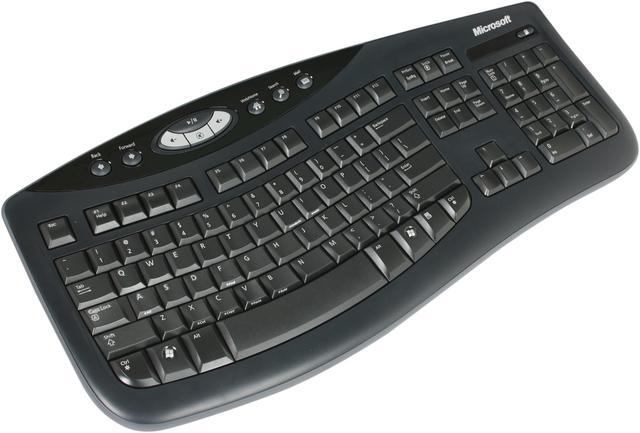
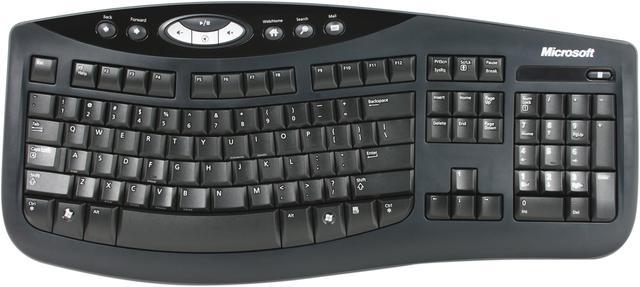
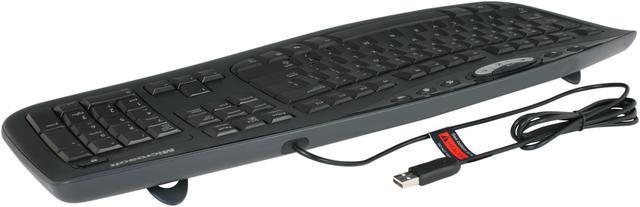
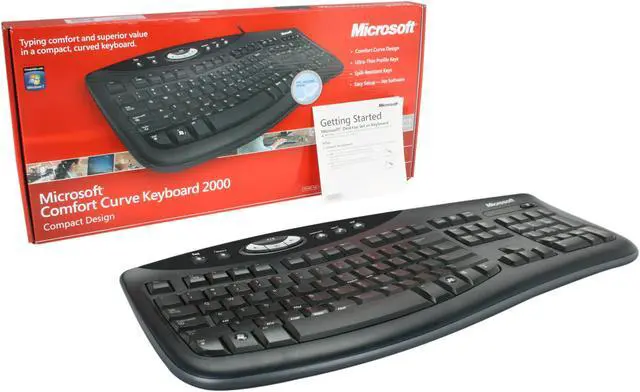
The USB interface easily connects to most PCs and notebooks, without having to install specific drivers. The Microsoft Comfort Curve 2000 B2L-0002 shows cutting-edge design, smooth, quiet function, and is well-suited for any desktop system.
Learn more about the Microsoft B2L-00002
Model
Brand
Microsoft
Model
B2L-00002
Keyboard
Keyboard Interface
USB
Design Style
Ergonomic
Normal Keys
105
Keyboard Color
Black
Type
Wired
Mouse
Mouse Included
No
OS / System Requirement
Operating System Supported
Windows XP Home Edition, Windows XP Professional, Windows XP Tablet PC Edition, or Windows XP Media Center Edition
Features
Windows Vista
Certified for Windows Vista
Features
Spill-resistant design Don’t worry about liquids near your desktop—this keyboard is designed to withstand accidental spills. Ultra-thin profile keys The sleek, notebook-like keys feel comfortable and look great. Comfort Curve keyboard design If you prefer a flat keyboard, let this ergonomic design help your hands rest in a more natural position. Cutting-edge design Improve your performance as you keep current with the very latest technology Microsoft has to offer.
Package Contents
Package Contents
Microsoft Comfort Curve Keyboard 2000 Getting Start Guide
KNOWN FATAL FLAW. You have been warned.5/30/2012 8:44:14 AM
Pros: + Comfortable
+ Insert/Delete/Home/End/PgUp/PgDown key are in standard layout
+ Spills don't kill it
Cons: Search for "microsoft comfort curve static buildup"
This keyboard has a major known flaw that Microsoft refuses to fix: Keys will randomly swap or stop working. This is due to the keyboard's poor use of membranes rather than scissor switches (there are good membrane keyboards, just not this one).
This only happens to be about every three months, but it can really screw things up (it happened to my wife trying to type in her password -- we kept going through all her old passwords until we realized the keyboard was bad).
Overall Review: This keyboard is like an otherwise perfect car whose reverse and 4th gear occasionally switch places. The car is great, but the flaw is fatal.
Caveat emptor.
If you are unfortunate enough to have one of these, bashing it against a table seems to temporarily fix the problem.
Pros: This is the second of this keyboard I have bought and only reason I replaced the original one is that many of the letters have worn off the keys now I use it for my work station it works great is resonable noise level depending on how you type of course the faster you are the noisier it gets of course or if you bang the keys but if you are delicate touch then it almost silent. And yes with a gentle touch it still registers key strokes.
Cons: The printed letters are not recess so they last longer but then would cost a lot more I am sure
Overall Review: eggcelent price to product ratio used original about 2 years and I am on my computer an average of 16 hours a day much of that typing
Pros: The curvey shape, and the fact that it's wired means I KNOW it won't miss keystrokes.
Since I learned to type the B key with my right index finger (not left) "split" keyboards won't work for me. But I like the curved shape.
Also, I'm an old timer, so I dislike how more modern keyboards have rearranged PgUp/Dn, Home, Del, and Insert.
Also, this doesn't have the "F lock" key, which is good. A function key should be a function key. (grumble grumble)
Cons: If you hate wires, that's a con. But I've had too many bad experiences with wireless keyboards missing keystrokes, no matter how close I put the receiver.
Overall Review: I am "upgrading" from the much more expensive "Microsoft Wireless Comfort Keyboard". It misses keystrokes no matter what I do, in addition to the F lock and huge delete key issues which I can't get used to.
49 out of 50 people found this review helpful. Did you?
Cons: Keys won't work after a while, poor quality.
Overall Review: You get what you pay for I guess. Not even a year and this keyboard already has more than a few keys that do not work. It's of poor quality that's for sure. The good thing is that it's easy to type on.
4 out of 4 people found this review helpful. Did you?
Anonymous
Ownership: more than 1 year
Verified Owner
Best Keyboard Ever!9/7/2012 5:37:25 PM
Pros: Gentle Curve, No Bump or Divide, Adjustable Height, Not Straight.
Easy to re-adjust back and forth between straight keyboards and Curve 2000.
Cons: Large Desk Profile due to adequate spacing between number and function keys and media buttons above function keys.
Overall Review: I own two of these, home and work. I code for hours at work. At home I code, surf, and play video games for hours on end. All comfortably. Just bought one as replacement of 3 yr old one with no longer functioning home and number six row keys but otherwise fully functional. The home key just got to aggravating with coding and #6 is the knife in BF3.
This is not a mac lovers pretty keyboard, this is for a person who wants comfort after hours of continuous use.
2 out of 2 people found this review helpful. Did you?
Pros: I have been using this keyboard for over a year and it still manages to blow me away. Let's face it normal keyboards are not made for human hands, and the full erogomic keyboards are to far angled. The comfort curve manages the perfect medium with keys that are fall somewhere between raised conventional keys and laptop keys.
Cons: I have never even had a key stick.
Overall Review: This is the best keyboard under a hundred dollars. I have even purchased another for my girlfriend just recently.
2 out of 2 people found this review helpful. Did you?
Cons: the usb cable is only like 2-3 ft long, so if your PC is far away from your keyboard placement, it might require a usb extension cable. After a month of usage, the "u" key stopped functioning, also a few weeks later my "9" key on the num lock side stopped functioning.
Overall Review: i had to copy and paste the "u" from other text so i was able to properly type out this review
2 out of 2 people found this review helpful. Did you?
Anonymous
Ownership: 1 day to 1 week
Verified Owner
love the feel of the keyse10/3/2007 9:58:02 PM
Pros: the keys are very nice for the price of the keyboard. i like the 'laptop-like' feel of the keys as others have said, and its low profile.
Cons: no palm/wrist rest means I had to go and get a separate one.
Overall Review: the curve takes some getting used to, but i'm sure it helps out in the long run.
2 out of 2 people found this review helpful. Did you?
Pros: + Comfortable + Insert/Delete/Home/End/PgUp/PgDown key are in standard layout + Spills don't kill it
Cons: Search for "microsoft comfort curve static buildup" This keyboard has a major known flaw that Microsoft refuses to fix: Keys will randomly swap or stop working. This is due to the keyboard's poor use of membranes rather than scissor switches (there are good membrane keyboards, just not this one). This only happens to be about every three months, but it can really screw things up (it happened to my wife trying to type in her password -- we kept going through all her old passwords until we realized the keyboard was bad).
Overall Review: This keyboard is like an otherwise perfect car whose reverse and 4th gear occasionally switch places. The car is great, but the flaw is fatal. Caveat emptor. If you are unfortunate enough to have one of these, bashing it against a table seems to temporarily fix the problem.