




 here!
I’m your shopping assistant for PC builds, upgrades, and everything tech.
Got questions? Ask away!
Start a conversation
here!
I’m your shopping assistant for PC builds, upgrades, and everything tech.
Got questions? Ask away!
Start a conversation
Make informed decisions with expert advice. Learn More







Any questions? Ask CelesteSM will help you find out quickly.


We want to ensure your holiday shopping this year is hassle-free. That’s why we’re automatically extending our return policies on almost every product! For purchases placed between November 1st, 2026 and December 31, 2026 you will have until January 31, 2027 to return your product.
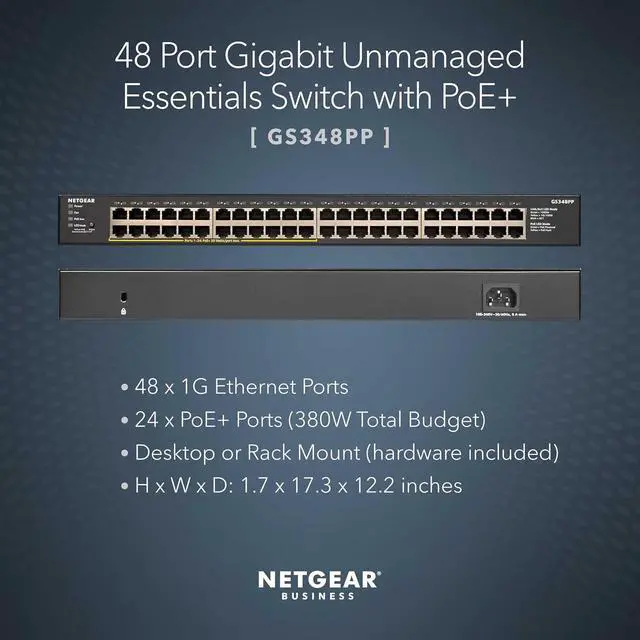
The NETGEAR GS348PP is a 48-port unmanaged Gigabit Ethernet switch with 24 PoE+ ports and a 380W power budget, suited to small businesses or home networks that need simple wired expansion and power for devices such as access points, IP cameras, or VoIP phones.
| Attribute | Value |
|---|---|
| Best For | Business or home wired networks needing 48 Gigabit Ethernet ports, including up to 24 PoE+ devices, with unmanaged Layer 2 operation and desktop or rack placement |
| Ports And Networking | 48 RJ45 ports support 10/100/1000Base-T Gigabit Ethernet over twisted-pair media |
| PoE Power | 24 PoE+ ports share a 380W PoE budget, with power allocation that adjusts to connected device needs |
| Switching And Management | Unmanaged Layer 2 switch |
| Power And Cooling | Internal AC input: 110–240V, 50/60Hz, 8A max; maximum and standby consumption: 410W and 10W; heat dissipation: 1402.2 BTU/hr and 34.2 BTU/hr; two fans |
| Physical Design | Metal, black enclosure for desktop or rack-mount placement; 440 × 310 × 43 mm (17.3 × 12.2 × 1.7 in.); 4.56 kg (10.05 lb) |
| Compliance And Operating Environment | NDAA compliant; meets ErP, RoHS, WEEE, and REACH requirements; 10%–90% relative humidity, noncondensing |
| Included Items | Switch, localized power cord, rack-mount kit, installation guide, and rubber feet |
| Model Identifiers | NETGEAR GS348PP-100NAS |


