





/20-821-422/clogo.png)
/20-821-422/ch1b.jpg)
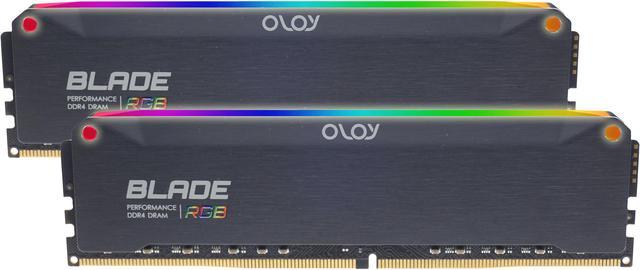
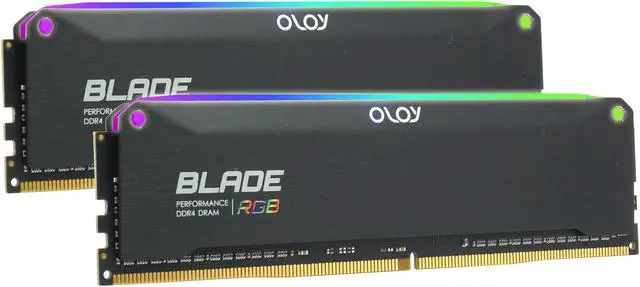
OLOy Blade DDR4 Memory
Fast and reliable, the OLOy DDR4 Blade series high-frequency desktop memory supercharges everything that’s thrown your way, like gaming, multitasking, content editing and more. It works at low voltage, produces minimum heat, and gives gorgeous RGB lighting that can be customized and synced using motherboard software.
Available with or without RGB.
/20-821-422/1.jpg)
The OLOY DDR4 blade series is impressive with e-Sports style and incredible features. It strikes the perfect balance between product quality, performance and cost.
/20-821-422/2.jpg)
Aluminum Heat Spreader
- Geometric Stamped Aluminum Facets.
- Various surface treatment processes to show your unique personal style.
- Efficiently dissipates heat from memory chips to ensure performance and stability at high clock speed.
- Color options to enhance your build.
- Low-profile design fits easily in most small-form-factor builds.
- Translucent Light Guide by Sputter Deposition (RGB).
/20-821-422/3.jpg)
- Internal thermal sensor to monitor the temperature.
- Low-profile design with vacuum evaporation coating light bar.
- Built-in unique Blade Flash RGB lighting effects.
- Support Asus Aura Sync
- Support MSI Mystic Light Sync
- Support Gigabyte Fusion
- Support ASRock PolyChrome
Fully control and customize the 8-zone RGB lighting through Asus, MSI, Gigabyte, or ASRock sync software.
/20-821-422/4.jpg)
- Various speed options from 3200MHz to 4800MHz for your next adventure.
- Hand-sorted memory chips, high-quality IC with stable performance.
- High-performance PCB to ensure stability at high frequency.
- XMP 2.0 Automatic O.C. Technology.
- Compatible with Intel & AMD.
- 100% Burn-ln Test and Multi-Platform Compatibility Test.
The DDR4 form factor is optimized for the latest DDR4 systems and offers higher frequencies, greater bandwidth, and lower power consumption than DDR3 modules. OLOy DDR4 modules are compatibility-tested across DDR4 systems for reliability and performance. There's XMP 2.0 support for trouble-free automatic overclocking.
/20-821-422/5.jpg)
Energy saving, ultra-low working voltage with minimum 1.2V
Eco-Friendly Digital Printing
The external heat dissipation module is made of high-quality aluminum, stamped and formed in one piece, plus synchronized RGB and a unique light guide original design, which exudes a unique texture and style.
Concise and neat, low-key and introverted, revealing a sharp edge.
Blade makes you invincible.