• $106.90
  • Free 30-day Returns
  • Sold by Direct from manufacturerOWC
    4.7 (29 seller ratings)

    Shipped by Direct from manufacturerOWC

    Price alert
    Newegg PC Builder
    Shop it at NeweggBusiness.

    Meet Your Seller

    OWC 16GB (2x8GB) DDR4 3200MHz PC4-25600 CL22 1RX8 Non-ECC UDIMM 1.2V 288-pin Desktop Memory RAM Upgrade for PC

    • 8GB
    • 16GB
    • 16GB (2 x 8GB)
    • 32GB
    • 32GB (4 x 8GB)
    • 64GB (2 x 32GB)
    • 64GB (4 x 16GB)
    • 64GB (8 x 8GB)
    • 128GB (4 x 32GB)
    • 128GB (8 x 16GB)
    • 256GB (8 x 32GB)
    • OWC 16GB UPGRADE: Consists of 2pcs of 8GB DDR4 3200MHz PC4-25600 CL22 2RX8 Non ECC Unbuffered UDIMM 1.2V 288-pin Memory Modules
    • 100% COMPLIANT: With JEDEC Standard Specifications, ROHS Compliant, Warranty Safe Upgrade. Designed and Tested to Meet or Exceed all Manufacturer OEM Specs
    • INCREASED PERFORMANCE: Memory Upgrades are the Most Effective and Easy Way to Boost your PC's Performance
    • INDUSTRY LEADING: Consumer Friendly Advanced Replacement Program and Limited Lifetime Warranty, which Includes Free Tech Support by Other World Computing
    • EASY INSTALLATION: In Most Cases Installing Memory is an Easy DIY project. Watch our OWC Basic Installation Video for help
    🔥Don't forget your OS, we have Windows 11 OEM, Download and USB versions available
    +
    +
    Overview
    Specs
    Reviews (2)

    Any questions? Ask CelesteSM will help you find out quickly.

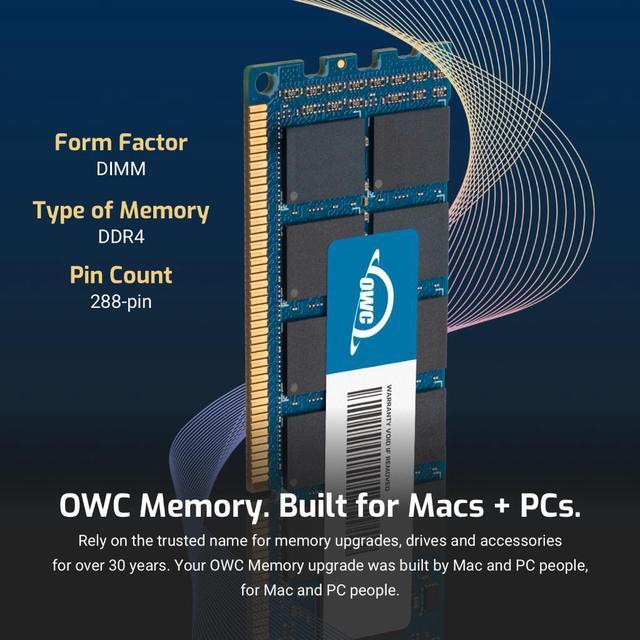
    OWC DDR4 memory is Fully compliant with JEDEC specifications, ROHS compliant, providing a warranty safe upgrade. OWC Memory is the most cost effective and simple DIY upgrade you can install to unleash your Mac or PC's full potential and speed up overall responsiveness. Become a multitasking maven when you upgrade your Mac or PC with OWC Memory. Open more apps. Open larger files. Plus, work with multiple files all at the same time. We test every OWC memory module at our in house lab so you can upgrade with the confidence that your memory is built to last.

    We built your OWC Memory upgrade to meet or exceed the toughest industry specs to provide years of worry-free service. OWC recommends that all DIMMs be the same capacity, speed, and manufacturer to ensure optimal memory performance.

    Warranty & Returns

    Warranty, Returns, And Additional Information

    Warranty

    • Please contact the Seller directly for warranty information. Warranty information may also be found on the Manufacturer's website.
    • Read full details
    • CONTACT

    Return Policies

    • Return for refund within: 30 days
    • Return for replacement within: 60 days
    • This item is covered by OWC Return Policy

    Manufacturer Contact Info

    LOADING...

    The OWC 16GB DDR4 3200 desktop memory kit includes two 8GB unbuffered, non-ECC UDIMMs for compatible desktops, making it a straightforward dual-channel upgrade for everyday computing and multitasking.

    Recommended For

    • Desktop owners with a compatible DDR4 motherboard who want to replace or upgrade memory with a matched 2×8GB kit for a 16GB dual-channel setup.
    • People using a desktop mainly for everyday work—such as documents, email, video calls, and a modest number of browser tabs—who want a straightforward memory upgrade rather than capacity for demanding workloads.
    • Budget-conscious owners of an older DDR4 desktop who play less demanding games or game without many other apps open, and need a matched two-module kit rather than a single stick.
    • DIY upgraders who prefer standard, unbuffered desktop memory and want a kit marketed for manufacturer-spec-compatible upgrades; confirm the motherboard and processor support DDR4-3200 before buying.

    Real-World Use Scenarios

    • On a compatible desktop that currently has 8GB of RAM, moving to 16GB can give everyday work—such as having a browser, email, and office apps open together—more memory headroom and reduce slowdowns when switching between them.
    • For casual gaming alongside chat or a few browser tabs, 16GB can provide room for the game and background apps on a desktop that had less memory; it is not a guarantee of higher frame rates, and demanding games or heavier multitasking may still need more.
    • When a desktop with 8GB struggles with many open browser tabs while other apps are running, upgrading to 16GB can leave more memory available for those apps and make switching between them less disruptive.
    • For light photo editing while keeping everyday apps open, 16GB can offer more breathing room than an 8GB setup; large projects or several demanding creative apps may still exceed that capacity.