




 here!
I’m your shopping assistant for PC builds, upgrades, and everything tech.
Got questions? Ask away!
Start a conversation
here!
I’m your shopping assistant for PC builds, upgrades, and everything tech.
Got questions? Ask away!
Start a conversation Top Rated Top Rated
 Hot Seller





Any questions? Ask CelesteSM will help you find out quickly.
We want to ensure your holiday shopping this year is hassle-free. That’s why we’re automatically extending our return policies on almost every product! For purchases placed between November 1st, 2026 and December 31, 2026 you will have until January 31, 2027 to return your product.
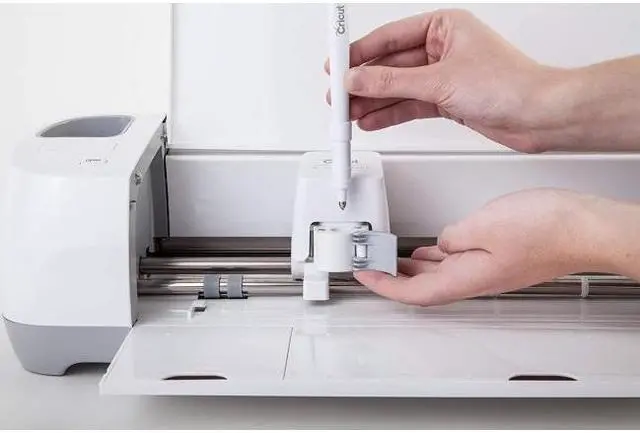
The Cricut Scoring Stylus is a scoring tool for Cricut Explore and Maker machines that creates fold lines on paper, cardstock, and similar materials, making it a practical choice for crafters who make cards, boxes, invitations, and other folded paper projects.
| Attribute | Value |
|---|---|
| Best For | Scoring fold lines on paper, cardstock and similar materials using Cricut Explore and Maker cutting machines |
| Model Identifiers | Model 2006699; Brand Cricut; Manufacturer CRICUT INC |
| Physical Dimensions & Weight | Compact L-shaped stylus; item weight 0.05 Pounds; package weight 0.04 Kilograms; item package dimensions 1.2 L x 7.493 W x 26 H centimeters; item length (longer edge) 10.24 Inches; item width (shorter edge) 2.95 Inches |
| Color & Material | Multicolour appearance; material type listed as Paper; style Classic |
| Packaging & Quantity | Set listed as 2-Pack |
| Battery & Power | No batteries required and no batteries included |
| Safety & Compliance | Safety attestation present (true) |
Q: Should I get the Cricut Scoring Stylus or the Cricut Single Scoring Wheel?
A: Choose the Cricut Scoring Stylus if you use a Cricut Explore machine or want a simple scoring tool for paper and cardstock projects. Choose the Single Scoring Wheel if you use a Cricut Maker and want deeper score lines on a wider range of materials. Cricut positions the Scoring Wheel as the higher-pressure option, with up to 10x more pressure than the Scoring Stylus, which is why Maker users often choose it for cleaner folds on thicker materials.
Q: Is the Cricut Scoring Stylus better for Cricut Explore than a Scoring Wheel?
A: Yes, for Cricut Explore machines the Scoring Stylus is the practical choice because it is the scoring tool Cricut lists for Explore compatibility, while Scoring Wheel tools are designed for Cricut Maker machines only. If you have an Explore and mainly make cards, boxes, and folded paper projects, the Scoring Stylus is the direct fit.
Q: Should I upgrade from the Cricut Scoring Stylus to the Double Scoring Wheel?
A: Upgrade to the Double Scoring Wheel if you use a Cricut Maker and often score thicker materials that benefit from two parallel score lines, such as heavy cardstock or structured 3D projects. Keep the Scoring Stylus if your projects are mostly standard paper crafts and you want a lower-complexity tool. The trade-off is simple: the Stylus covers basic scoring, while the Double Scoring Wheel is meant for more demanding folds on Maker machines.
Q: For card making, is the Cricut Scoring Stylus enough or should I move to a Scoring Wheel?
A: The Cricut Scoring Stylus is usually enough for standard card making, especially on Cricut Explore machines and for regular cardstock. Move to a Scoring Wheel if you use a Cricut Maker and want stronger, more defined score lines for thicker stock or more intricate folded designs. The buying decision mainly depends on machine compatibility first, then how heavy your materials are.
Q: Is the Cricut Scoring Stylus a better fit for simple paper projects than higher-end Cricut scoring tools?
A: Yes, the Cricut Scoring Stylus is the better fit when your priority is straightforward paper scoring on compatible Explore or Maker machines and you do not need the extra pressure of Cricut's scoring wheel system. Higher-end scoring tools make more sense for Maker users who regularly work with thicker or specialty materials. In short: choose the Stylus for basic folded-paper work, and choose Scoring Wheels for broader material capability and deeper scoring.
Q: Will this work with my Cricut machine?
A: This stylus is a fit for Cricut Explore and Cricut Maker machines. It is not the right choice for Cricut Joy models, and if you have an Explore One, you may need the accessory adapter to use a scoring stylus. Buy it if you already use an Explore or Maker and want basic scoring without moving to a different tool system.
Q: What is this best for: cards, boxes, and light paper projects, or heavier materials?
A: The Scoring Stylus is best for fold lines on paper, cardstock, envelopes, tags, and other light 3D craft projects. It is a practical choice for everyday cardmaking and box folds. If you mainly work with thicker or more demanding materials and want stronger creases, a Scoring Wheel is usually the better upgrade.
Q: Is the Scoring Stylus better than the Scoring Wheel?
A: The Scoring Stylus is the simpler, lower-cost option for standard paper and cardstock folds. The Scoring Wheel is generally the better option if you use a Maker machine and want deeper, more defined score lines or work on more advanced projects. The trade-off is compatibility and cost: the stylus works with Explore and Maker, while the Scoring Wheel is for Maker machines only.
Q: Does it save time during crafting, or is it just another accessory?
A: It can save time if you make folded projects regularly. A key benefit is that compatible Cricut machines can hold the Scoring Stylus and cutting blade so cut-and-score jobs can be done in one step without changing mats. That makes it more useful for repeat card, envelope, and box projects than for occasional one-off crafts.
Q: Who should buy this instead of skipping it?
A: Buy this if you already own a Cricut Explore or Maker and often make folded paper projects such as greeting cards, invitations, envelopes, gift boxes, or simple 3D paper builds. Skip it if you rarely score fold lines, use a Cricut Joy, or want the deepest possible scoring performance for heavier-duty projects, where a Maker-only Scoring Wheel is a stronger fit.
Q: Do I need the Cricut Scoring Stylus for card making and folded paper projects?
A: If you make cards, boxes, or other folded paper projects on a Cricut Explore or Maker, the Scoring Stylus is a practical add-on because it creates fold lines directly in the machine workflow. It is most useful for paper and standard cardstock projects where you want scoring and cutting in one setup.
Q: Is the Cricut Scoring Stylus worth buying instead of a Scoring Wheel?
A: It is usually the better value if you mainly score paper or regular cardstock and want the lower-cost option. The main trade-off is performance on thicker materials: community discussions repeatedly compare it as cheaper and often good enough for common paper crafts, while the Scoring Wheel is more often preferred for heavier stock or deeper score lines.
Q: Who is the Cricut Scoring Stylus best for?
A: It is best for Cricut Explore owners, and also suits Maker owners who mostly work with paper and want a simpler, lower-cost scoring tool. It is less ideal for users who frequently score thick cardstock or specialty materials and want the deepest or most pronounced fold lines.
Q: What are the main trade-offs of choosing the Scoring Stylus?
A: The main advantages are compatibility with Cricut Explore and a lower entry cost. The trade-offs are that some users report weaker results on heavy cardstock, and Maker users may need to manually choose the stylus in Design Space when the software prefers a scoring wheel for certain projects.


