




Our Mission and Vision
Dedicated to helping people with diabetes.
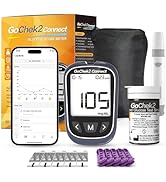
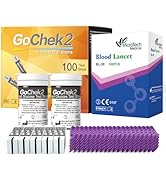
Glucose Meter & Test Strip
Our Company
Since 2011, MicroTech Medical has been dedicated to advancing diabetes care with our commitment to innovation, sustainability, and affordability. Our comprehensive diabetes management solution includes the Patch Insulin Pump, as well as the Continuous Glucose Monitoring System (CGMS), Blood Glucose Monitoring Systems (BGMS), and POCT products for diagnostics.
Our Customer
Our solutions assist diabetics' daily lives, relieve burdens and bring them peace. Glucose data helps healthcare workers make better decisions for collaborative care. Providing a better life.

Products are globally accessible and are gaining recognition in Europe, Asia-Pacific, the Middle East, Africa, Latin America and China.
Diverse Product,Frontier Tech.


Your Reliable and Precise Choice in Blood Sugar Monitoring
Since 2011, MicroTech Medical has been dedicated to advancing diabetes care with our commitment to innovation, sustainability, and affordability.
We are always dedicated to helping people with diabetes, and lead better lives.
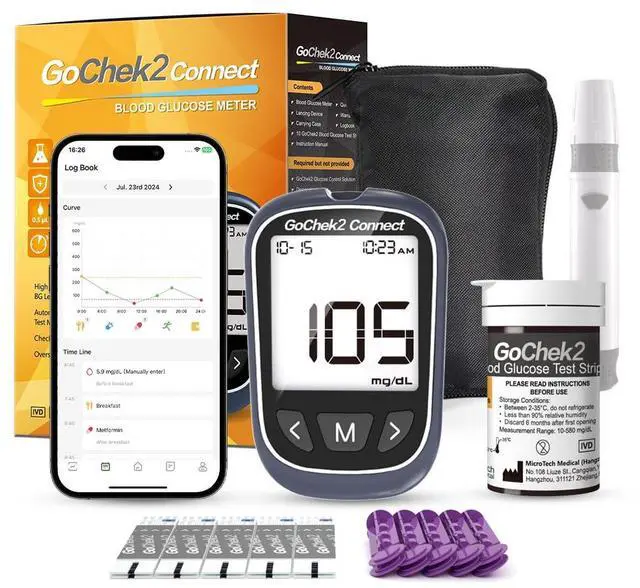
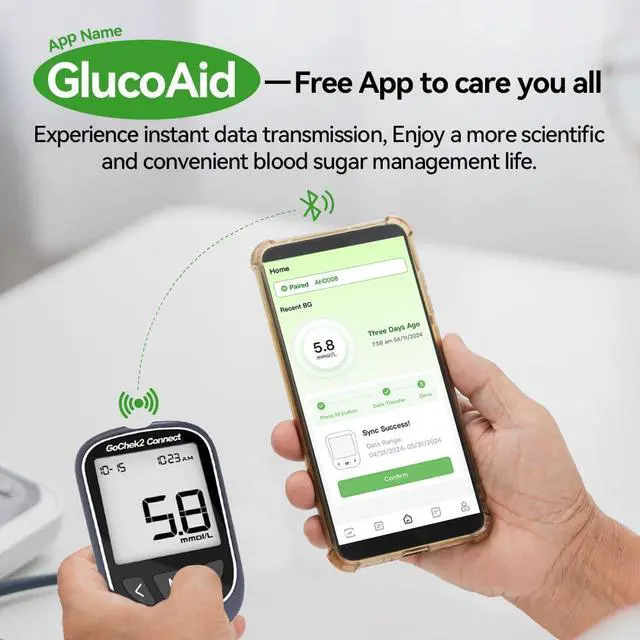
How to use Bluetooth, What‘s the APP?
Download the "GlucoAid" app from the App Store.
How do I pair the meter with the APP?
Open the app and click to enter the Blood Glucose Meter Serial Number (SN) in the "HOME" section to initiate the Bluetooth connection. The SN, which consists of six characters, can be found at the bottom right of the sticker on the back of meter.
How do you upload and sync data from your Meter to the GlucoAid App?
Long-press “M” button,the meter will enter Memory Mode and the Bluetooth icon will appear. Follow the instruction on the Main Menu,till the Memory data upload is finished.


Your Reliable and Precise Choice in Blood Sugar Monitoring
Since 2011, MicroTech Medical has been dedicated to advancing diabetes care with our commitment to innovation, sustainability, and affordability.
We are always dedicated to helping people with diabetes, and lead better lives.
How to use Bluetooth, What‘s the APP?
Download the "GlucoAid" app from the App Store.
How do I pair the meter with the APP?
Open the app and click to enter the Blood Glucose Meter Serial Number (SN) in the "HOME" section to initiate the Bluetooth connection. The SN, which consists of six characters, can be found at the bottom right of the sticker on the back of meter.
How do you upload and sync data from your Meter to the GlucoAid App?
Long-press “M” button,the meter will enter Memory Mode and the Bluetooth icon will appear. Follow the instruction on the Main Menu,till the Memory data upload is finished.


Our Mission and Vision
Dedicated to helping people with diabetes.
Glucose Meter & Test Strip
Our Company
Since 2011, MicroTech Medical has been dedicated to advancing diabetes care with our commitment to innovation, sustainability, and affordability. Our comprehensive diabetes management solution includes the Patch Insulin Pump, as well as the Continuous Glucose Monitoring System (CGMS), Blood Glucose Monitoring Systems (BGMS), and POCT products for diagnostics.
Our Customer
Our solutions assist diabetics' daily lives, relieve burdens and bring them peace. Glucose data helps healthcare workers make better decisions for collaborative care. Providing a better life.
Products are globally accessible and are gaining recognition in Europe, Asia-Pacific, the Middle East, Africa, Latin America and China.
Diverse Product,Frontier Tech.