• $119.99
  • Free 30-day Returns
  • Ships from China.

    Shipped by Cloudless Clear

    Price alert
    Shop it at NeweggBusiness.

    Meet Your Seller

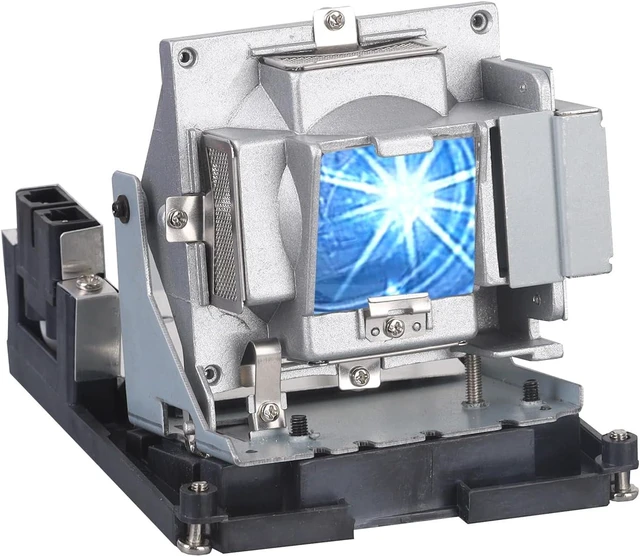
    5811116701-SVV Replacement Projector Lamp for VIVITEK D963HD EH2060 D965 DH1015 DH1016 EX779P EX784 EX799P Bulb with Housing

    • Compatible Models: for VIVITEK D963HD EH2060 D965 DH1015 DH1016 EX779P EX784 EX799P.
    • Lifespan:Engineered with precision manufacturing and rigorous durability testing, delivers 5,000 hours of reliable performance20% longer lifespan than standard bulbs, minimizing replacements and long-term costs.
    • Performance: Precision-engineered optical-grade ceramic reflector achieves over 90% light efficiency. Uniform focus eliminates edge shadows and speckle distortion, delivering sharp, theater-quality visuals.
    • 1-Minute Installation:Tool-free clip-on design with foolproof connectors. Includes color-illustrated manual for secure replacement in 60 seconds flat.
    • Full-Cycle Support:Our technical team stand ready for 200 days post-order,12-hour customized responses with persistent follow-through until resolution.
    +
    +
    Overview
    Reviews

    Any questions? Ask CelesteSM will help you find out quickly.

    " Projector Lamp & Projector Bulb:
    for 5811116701-SVV

    Lamp compatible Models:
    Compatible with VIVITEK D963HD EH2060 D965 DH1015 DH1016 EX779P EX784 EX799P.

    If you are not sure whether your projector is suitable for this model of lamp, please ask us.

    How to change the lamp on your projector:
    Step 1. Unplug the power cord from your projector and let the lamp cool down.
    Step 2. Locate the lamp access panel on your projector and remove the screws and access panel.
    Step 3. Remove any screws holding the lamp housing into the projector.
    Step 4. Reach in and firmly pull the lamp housing out of the projector.
    Step 5. Place the new lamp housing into the projector in the same orientation as you removed the old lamp.
    Step 6. Wiggle the lamp into place and make sure full contact is made inside of the projector.
    Step 7. Replace the lamp mounting screws to secure the lamp into the projector.
    Step 8. Replace the lamp access panel and secure the screws.
    Step 9. Plug in your projector and power it on.
    Step 10. Reset the lamp counter. Some lamps will reset the lamp counter automatically when a new lamp is placed in.
    If your projector needs the lamp counter manually reset, look through the projector menus for an option to reset the 'Lamp Counter' back to 0 hours."

    Warranty & Returns

    Warranty, Returns, And Additional Information

    Warranty

    • Please contact the Seller directly for warranty information. Warranty information may also be found on the Manufacturer's website.
    • CONTACT

    Return Policies

    Manufacturer Contact Info

    LOADING...