

Your Browsing History
- $150.99
- Free 30-day Returns

Meet Your Seller

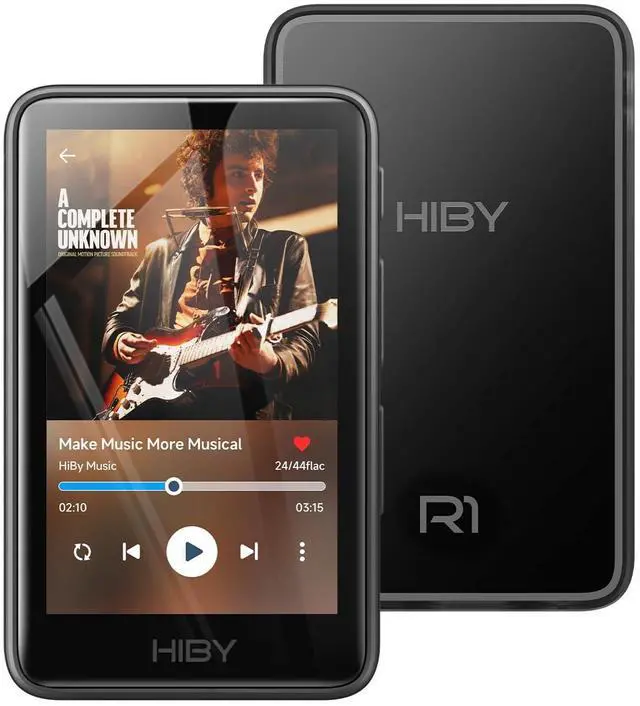

R1 HiFi MP3 Player with Bluetooth 5.1 Tidal Qobuz DSD 256 Native Lossless Music Player with Touchscreen/Hi Res Audio Certified/MSEB Tuning/2TB Expanded Memory
Limited time offer, ends 09/14 By Fornierwoly
- This is a genuine hi-fi music player featuring an integrated CS43131 chip, supporting playback of high-resolution lossless audio formats, up to DSD 256 native and PCM 384kHz. Compatible with various music files such as MP3, WAV, APE, FLAC, DSF, DFF, ISO, CUE, WMA, OGG, AAC, Opus, AIFF, and more. Smooth and powerful, this HiFi MP3 player is powered by the X1600E CPU and runs on a dedicated operating system, delivering a seamless experience with improved Bluetooth stability. It supports Tidal and Qobuz streaming (online only) and internet radio playback, while the built-in MSEB mixer enables personalized sound tuning. Ideal for audiophiles, it combines professional performance with user-friendly features for an outstanding listening experience. This MP3 player features Bluetooth 5.1 (Output-Only) and supports high-resolution codecs including LDAC, aptX, AAC, and SBC for smooth pairing with wireless headphones and speakers. It boasts both Hi-Res AUDIO and Hi-Res AUDIO WIRELESS dual certifications for superior sound performance. Note: It connects exclusively to audio-receiving devices; it does not pair with PCs, phones, or other players via Bluetooth. This MP3 player requires a Micro SD card and supports up to 2TB of expandable storagesufficient for around 50,000 high-quality songs and an extensive music library. Two packages are offered: Standard (R1 MP3 Player + Mesh Pouch) and Value Set (R1 MP3 Player, 32GB Micro SD Card, Yves Earphones, BA06 R1 Magnetic Organizer). This musi
+
+
Overview
Specs
Reviews

Any questions? Our AI mode will help you find out quickly.
Try me now
This is a genuine hi-fi music player featuring an integrated CS43131 chip, supporting playback of high-resolution lossless audio formats, up to DSD 256 native and PCM 384kHz. Compatible with various music files such as MP3, WAV, APE, FLAC, DSF, DFF, ISO, CUE, WMA, OGG, AAC, Opus, AIFF, and more. Smooth and powerful, this HiFi MP3 player is powered by the X1600E CPU and runs on a dedicated operating system, delivering a seamless experience with improved Bluetooth stability. It supports Tidal and Qobuz streaming (online only) and internet radio playback, while the built-in MSEB mixer enables personalized sound tuning. Ideal for audiophiles, it combines professional performance with user-friendly features for an outstanding listening experience. This MP3 player features Bluetooth 5.1 (Output-Only) and supports high-resolution codecs including LDAC, aptX, AAC, and SBC for smooth pairing with wireless headphones and speakers. It boasts both Hi-Res AUDIO and Hi-Res AUDIO WIRELESS dual certifications for superior sound performance. Note: It connects exclusively to audio-receiving devices; it does not pair with PCs, phones, or other players via Bluetooth. This MP3 player requires a Micro SD card and supports up to 2TB of expandable storagesufficient for around 50,000 high-quality songs and an extensive music library. Two packages are offered: Standard (R1 MP3 Player + Mesh Pouch) and Value Set (R1 MP3 Player, 32GB Micro SD Card, Yves Earphones, BA06 R1 Magnetic Organizer). This music player is equipped with a 1150mAh battery, providing up to 15 hours of playback and over 400 hours of standby time. It features a USB-C port with OTG support and a 3.5mm jack (CTIA standard inline control, not supporting microphone input). To protect your hearing, this audio player comes with a volume limiter. To unlock the volume limit, follow these steps: Tap the system serial number below the logo 5 times, exit the "About Player" page, then go to "System" > "Developer Options" > "Volume Lock" > "Disable" to enter Developer Mode. When you begin using the player, please ensure the firmware is updated to the most recent version promptly. The latest firmware updates contain important fixes and enhancements to improve performance and address any known issues. This will help you get the best performance from the device
Warranty & Returns
Warranty, Returns, And Additional Information
Warranty
- Please contact the Seller directly for warranty information. Warranty information may also be found on the Manufacturer's website.
- CONTACT
Return Policies
- Return for refund within: 30 days
- Return for replacement within: 30 days
- This item is covered by Fornierwoly Return Policy
Manufacturer Contact Info
- For a directory of all our manufacturers, please click below.
- Manufacturers Directory
LOADING...