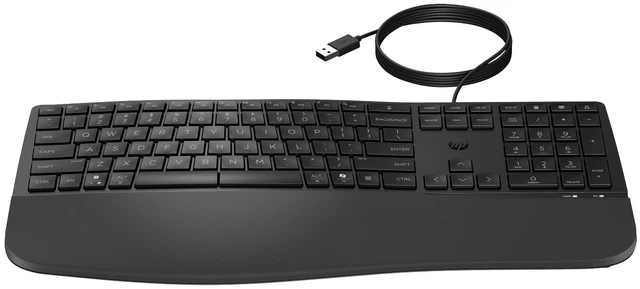
The HP 485 Comfort Wired Keyboard is a business keyboard designed for comfortable everyday typing, with a wave-like shape, cushioned wrist rest, and quiet keys that suit office workers and frequent typists.
Recommended For
- Desk-based workers who type for long stretches—such as writers, administrators, and programmers—who want a wave-shaped layout, cushioned wrist rest, and adjustable keyboard angle.
- Office workers in shared spaces who prefer a wired keyboard with quiet keycaps for everyday typing, email, and document work.
- Users with repetitive computer tasks who want programmable keys to assign shortcuts and reduce repeated key combinations.
- People setting up a fixed workstation across supported operating systems who want a direct USB-A connection rather than wireless pairing.
Real-World Use Scenarios
- For a workday of email, documents, and other routine typing, the keyboard’s wave-like shape, cushioned wrist rest, and three angle options are designed to make it easier to find a comfortable setup.
- When entering text for long stretches—such as writing or coding—users can try the keyboard’s flat, inclined, or negative-tilt position to find a typing angle that suits their desk setup.
- At a shared desk or in a quieter office, the quiet keycaps are intended to keep routine typing less noticeable to nearby coworkers.
- For repetitive office tasks, users can program supported keys for frequently used actions, helping make recurring shortcuts easier to access; setup requires HP Accessory Center software.
- When setting up a desk with a compatible Windows, macOS, or ChromeOS computer, the USB-A connection provides a wired keyboard option without relying on a wireless connection.




 here!