• $50.48
  • Free 30-day Returns
  • Ships from Hong Kong.
    Price alert

    Best Sellers

    Hot Seller
    4.1 (2,367 total ratings)
    • $34.99
    • + FREE SHIPPING
    Top Rated
    4.4 (8,591 total ratings)
    • $43.14
    Top Rated
    4 (3,724 total ratings)
    • $44.46
    • + FREE SHIPPING
    Shop it at NeweggBusiness.

    Meet Your Seller

    SLIM TYPE WRLS KEYBOARD

    • Office Products
    • KENSINGTON COMPUTER
    +
    +
    Overview
    Specs
    Reviews
    See all Q & A

    Any questions? Ask CelesteSM will help you find out quickly.

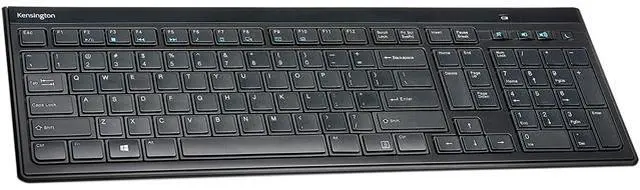
    The Kensington Slim Type Wireless Keyboard is a quiet, full-size keyboard with a slim 0.66 inch (16.7 mm) profile and a matte black finish. Low-profile keys give precise, quiet typing for shared offices and home offices, and six rows of keys with a full numeric keypad give touch typists a familiar layout. Integrated 30 degree tilt stands let you set a comfortable typing angle.

    A plug-and-play 2.4 GHz nano receiver connects with no software or pairing. It gives a stable connection up to 33 feet (10 m) and uses 128-bit AES encryption. One-touch multimedia keys control volume, mute, sleep, email and your default browser, and smart battery management gives up to 15 months of battery life from the 2 included AAA batteries, with a low-power LED reminder. Newer Macs with only USB-C ports need a USB-C to USB-A adapter for the receiver.

    Specifications:

    • Thickness: 0.66 inch (16.7 mm)
    • Layout: full size with numeric keypad, 6 rows of keys
    • Connectivity: 2.4 GHz wireless, USB nano receiver
    • Range: up to 33 feet (10 m)
    • Encryption: 128-bit AES
    • Batteries: 2 AAA, included
    • Battery life: up to 15 months
    • Tilt stands: 30 degrees
    • Compatibility: Windows 7 or above, macOS 10.14 or above, Chrome OS
    • Warranty: limited 3-year
    Application Instructions

    1. Open the battery cover on the bottom of the keyboard and install the 2 included AAA batteries.
    2. Plug the nano receiver into a USB-A port on your computer. On newer Macs with only USB-C ports, use a USB-C to USB-A adapter.
    3. Start typing. The keyboard connects automatically with no software or pairing needed.
    4. Flip out the tilt stands on the bottom of the keyboard if you want a steeper typing angle.
    5. Replace the batteries when the low-power LED indicator lights.

    Warranty & Returns

    Warranty, Returns, And Additional Information

    Warranty

    • Please contact the Seller directly for warranty information. Warranty information may also be found on the Manufacturer's website.
    • Read full details
    • CONTACT

    Return Policies

    Manufacturer Contact Info

    LOADING...
    LOADING...